
[CVPR 2025] PSDesigner: Bridging the Gap Between AI Generation and Professional Graphic Design
PSDesigner: Automated Graphic Design with a Human-Like Creative Workflow
PSDesigner is an automated graphic design system that emulates a human-like creative workflow to generate production-quality, editable PSD files from user instructions. It integrates specialized components including an AssetCollector and a GraphicPlanner (built on Qwen2.5-VL), achieving SOTA performance in aesthetic quality and layout coherence compared to previous text-to-image and MLLM-based methods.
TL;DR
PSDesigner is a revolutionary framework that transforms simple user prompts into professional, multi-layered Adobe Photoshop (PSD) files. Unlike previous models that simply "paint" an image, PSDesigner "designs" it—mimicking the human expert workflow of collecting assets, planning layouts, and iteratively refining elements. By introducing the CreativePSD dataset and a dual-mode GraphicPlanner, it achieves a level of editability and aesthetic harmony that current text-to-image models (like FLUX or DALL-E) cannot match.
Problem & Motivation: Why Current AI Fails Designers
While Generative AI has mastered "artistic" imagery, it remains a "black box" for "functional" graphic design. Professional designers face two major hurdles with current SOTA models:
- The "Flattened" Problem: Most models (e.g., Stable Diffusion) output a flat raster image. If a logo is 5 pixels to the left, you can't move it; you have to regenerate the whole image.
- Lack of Intuition: Existing MLLMs try to predict every design element at once. Real designers work in groups—thinking about a "Header" or a "Product Panel" as a single visual concept—and they refine as they go.
Methodology: Thinking in Layers and Groups
The core innovation of PSDesigner lies in its Human-Like Creative Workflow. It doesn't just output a list of layers; it follows a bottom-up traversal of a nested hierarchy.
1. The Design Hierarchy
PSDesigner organizes elements into Visual Concepts. A "Left Panel" might contain a background, a stylized text, and a shadow. The system treats these as a group, ensuring internal harmony before moving to the next group.
2. GraphicPlanner: Xgen & Xedt
The "Brain" of the system is a Vision-Language Model (VLM) trained in two modes:
- Xgen (Asset Integration): Harmoniously places a new asset into the current canvas.
- Xedt (Layer Refinement): Identifies "inferior" elements (e.g., a text that is hard to read) and applies "retouching" tool calls (adjusting opacity, adding a drop shadow).
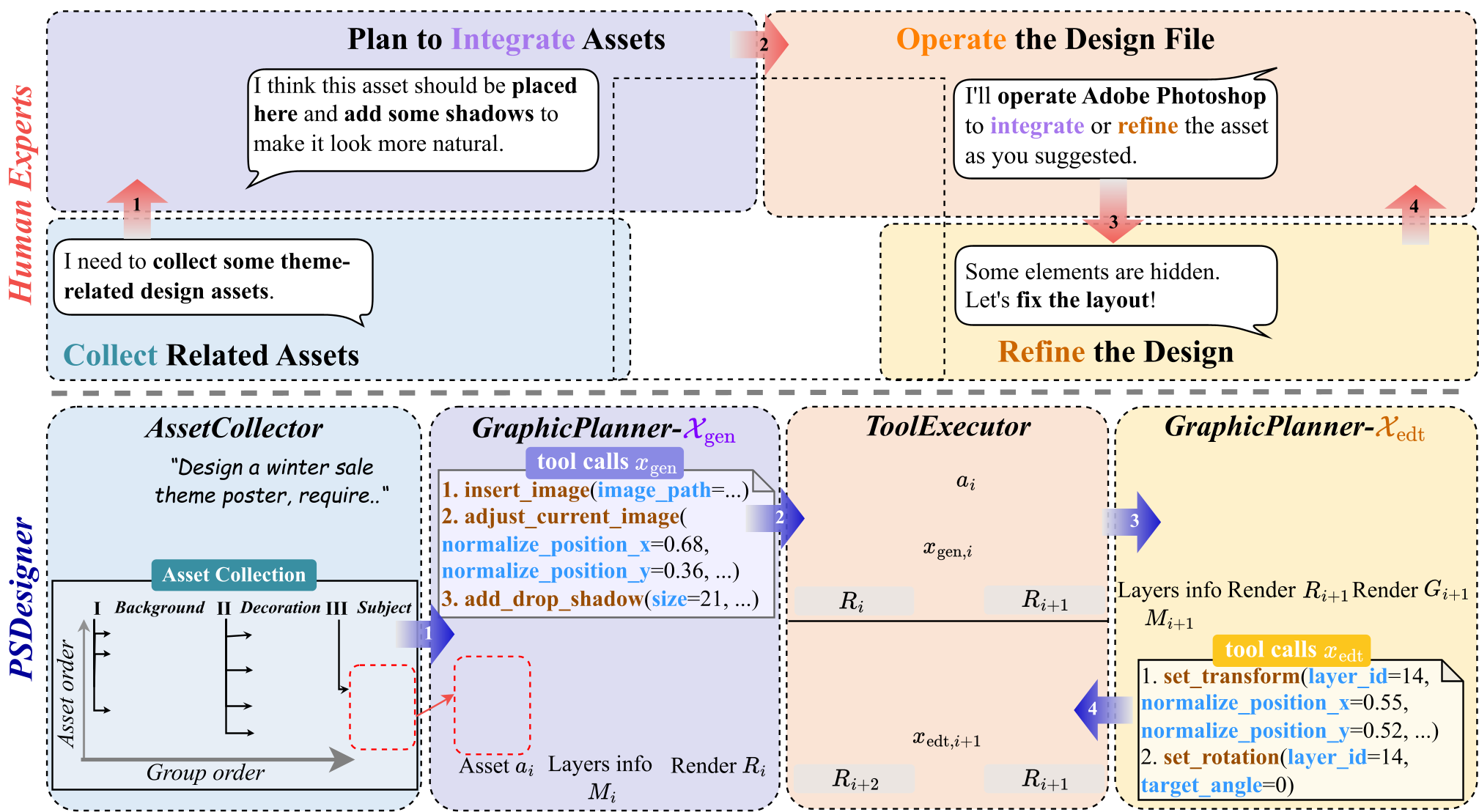 Figure 1: Comparison between Human Expert (top) and PSDesigner (bottom) workflows.
3. CreativePSD Dataset
To teach the model how to use Photoshop, the authors built CreativePSD. This isn't just a collection of images; it’s 10,000+ professional PSD files with operation traces.
- Complexity: Avg. 48 layers (vs. ~5 in previous datasets).
- Depth: Includes over 60 attribute types including blending modes, clipping masks, and layer effects.
Experiments: Superior Professionalism
In head-to-head comparisons for translating user intentions into designs, PSDesigner shines in Layout and Editability.
- Text Accuracy: While T2I models like FLUX often hallucinate text (missing letters), PSDesigner treats text as a distinct layer, ensuring 100% accuracy and the ability to change fonts later.
- Aesthetic Refinement: Through its reinforcement learning stage (using GRPO), the model learns that adding a "Drop Shadow" or "Inner Glow" makes a composition look "premium" rather than "flat."
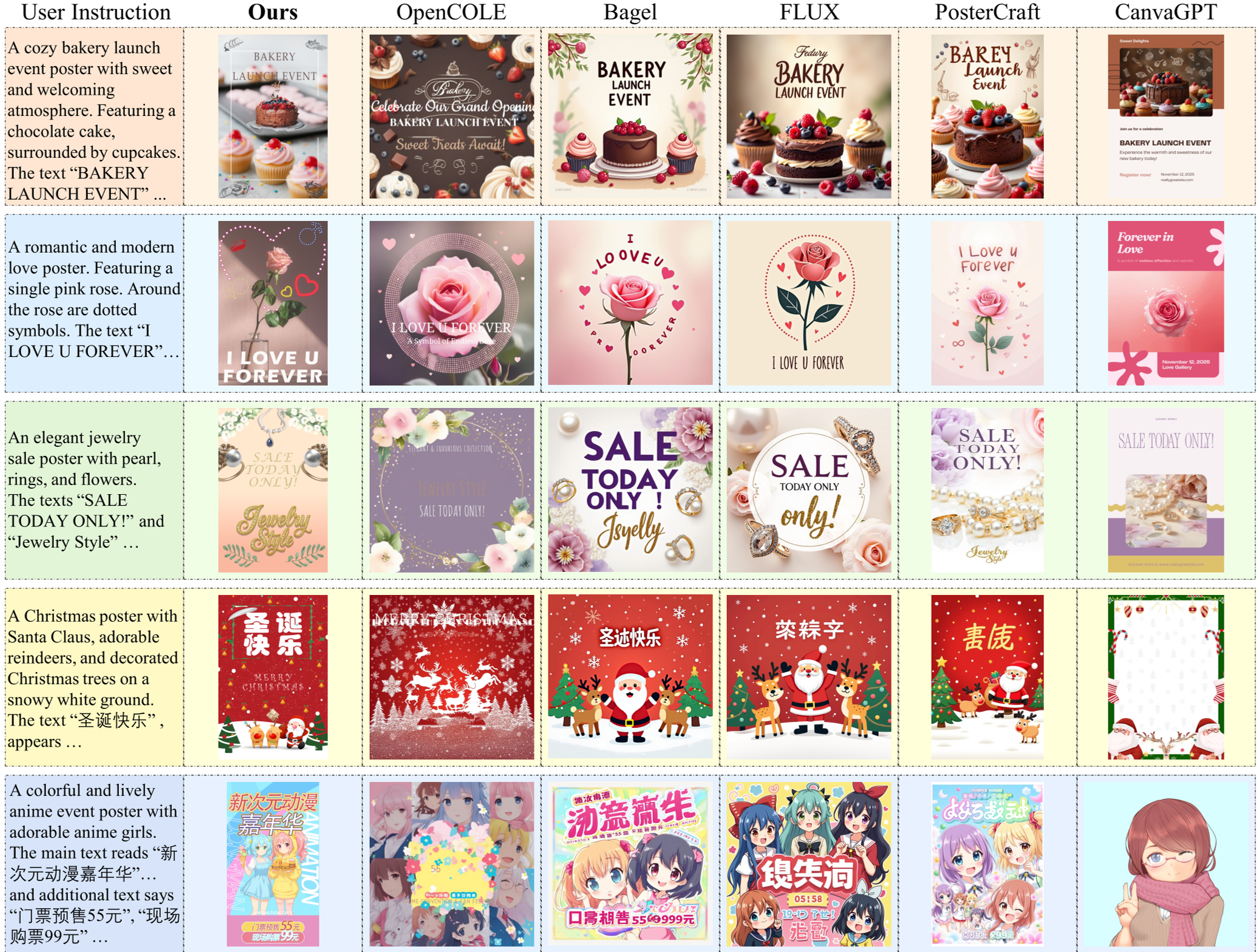 Figure 2: Performance on translating user intentions. Notice the superior handling of complex Chinese characters and layered structures.
Critical Analysis & Future Outlook
Takeaway
PSDesigner proves that the future of AI in creative industries isn't "End-to-End Generation," but "Agentic Tool-Use." By outputting PSD files, it allows a seamless hand-off between the AI (which does the heavy lifting of layout) and the Human (who does the final creative polish).
Limitations & Future Work
While 70+ tools are supported, Photoshop has thousands. Future iterations will likely need to incorporate more complex "Smart Objects" and vector-based path manipulation. Additionally, integrating real-time feedback where a user can say "make the logo more 'pop'" and have the model execute a specific tool call in Xedt mode is the next frontier for interactive design.
Senior Editor's Note: This paper is a masterclass in "Domain-Specific Agent Design." It avoids the trap of generic multimodal generation and instead focuses on the specific data structures (PSD hierarchies) that define professional excellence in the field.