
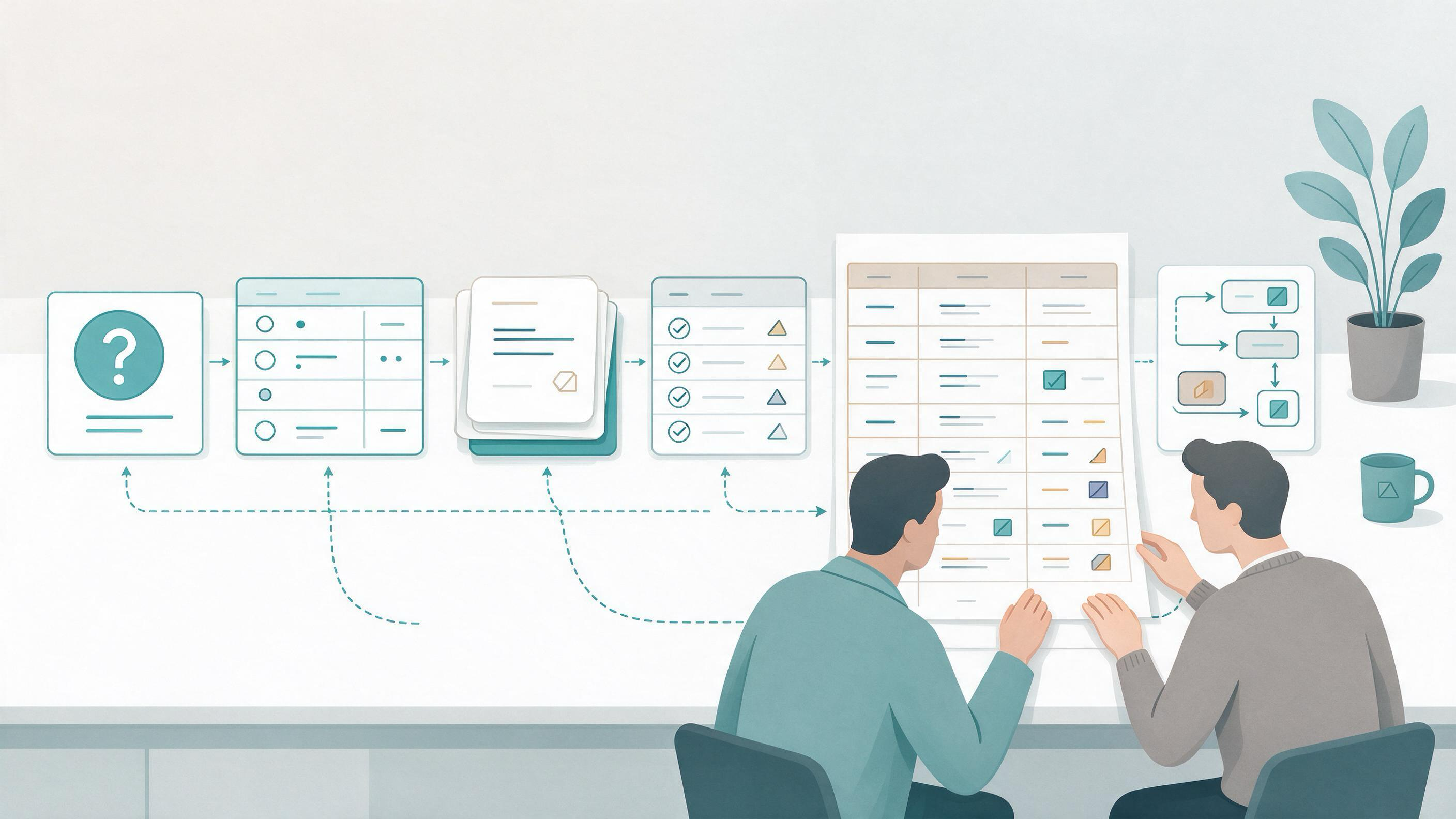
A literature review search strategy is a documented plan that turns a research question into a reproducible set of records, screening decisions, and synthesis-ready evidence. It is not a single database query. The workflow starts with eligibility criteria, moves through source selection and search construction, then into deduplication, staged screening, full-text assessment, and synthesis. Each stage produces an artifact you can inspect, share, and rerun.
This guide is written for clinicians and medical researchers preparing a focused evidence brief, a research update, or a team discussion. It uses one running example: adults with a common chronic condition and a patient-important outcome such as symptom burden or function. The example is deliberately generic so you can substitute your own population and outcome without changing the workflow.
What state is your review actually in?
Before choosing tools or databases, diagnose where you are. Most stalled reviews are not stalled because the searcher lacks a database. They are stalled because the question, the eligibility criteria, or the screening record is underspecified.
| Starting state | Typical symptom | First artifact to produce |
|---|---|---|
| Idea only | You can describe a topic but not a comparison | A one-sentence question with population, exposure or intervention, comparator if relevant, and outcome |
| Question but no criteria | You keep finding papers that are "maybe relevant" | Written inclusion and exclusion criteria |
| Criteria but no search | Your queries return either too much or too little | A search concept table with free-text terms and subject headings |
| Search but no record | You cannot say how many records you retrieved or removed | A search log with dates, sources, and deduplication counts |
| Records but no decisions | Screening lives in your head or in scattered notes | A screening log with include, exclude, and reason |
| Included studies but no synthesis | You have PDFs but no evidence table | An extraction table with study design, population, outcome, and limitations |
Cochrane's guidance on searching for and selecting studies begins with eligibility criteria and treats the search as a planned, documented process rather than an improvised query. That is the right diagnostic lens: if you cannot write the criteria, you are not ready to search.
Which decisions must be made before the first query?
Four decisions shape everything downstream. Make them explicit and write them down.
Decision 1: What is the question? State the population, the exposure or intervention, the comparator if one is required, and the outcome. For the running example, the question might concern adults with a chronic condition and a functional outcome. A question that names only a disease and a drug is not yet a searchable question.
Decision 2: What counts as eligible? Eligibility criteria are the bridge between the question and the search. They should specify study designs, publication types, date limits if any, language handling, and the minimum outcome reporting you will accept. Cochrane recommends planning searches from these criteria, which means the criteria come first and the terms follow.
Decision 3: Which sources? Cochrane recommends using multiple sources rather than relying on a single database. The practical implication is that your search log should have more than one row. PubMed and Google Scholar behave differently, and a review that uses only one of them should say so.
Decision 4: How will you document? Decide now where the search strings, dates, record counts, and screening decisions will live. PRISMA 2020 provides reporting templates, including flow-diagram templates, that make the documentation burden visible early. If you cannot populate a flow diagram at the end, the record was not kept during the process.
How do you build a search that matches your eligibility criteria?
A search is a translation of eligibility criteria into terms and logic. Build it in layers.
Step 1: Build a concept table
List the core concepts from your question. For each concept, collect free-text terms, synonyms, spelling variants, and subject headings where the source supports them. Cochrane recommends combining free-text terms with subject headings; PubMed supports field tags, phrase searching, and filters, and its search details show how terms were translated and combined. That translation view is useful for catching a phrase that was split or a term that mapped unexpectedly.
Step 2: Choose the source for the job
| Source | Useful for | What to record |
|---|---|---|
| PubMed | Field tags, filters, Advanced Search, saved searches, Similar Articles, citation lookup | The final query, filters applied, date run, and result count |
| Google Scholar | Author and title searching, date sorting and limits, Cited by, Related articles, alerts | The query, date limit, and how you handled multiple versions |
| WisPaper search | Finding academic papers through a scholarly search interface | The query and which records you moved into your library |
Google Scholar documents author and title searching, date sorting and limits, Cited by and Related articles, citation export, library access links, email alerts, and ways to locate alternative versions of a work. Those features support citation chasing and version reconciliation, but they do not replace a structured database query. Use them for what they do well.
Step 3: Run, inspect, and revise
Run the search, then inspect the result set before screening. PubMed's search details reveal how terms were translated and combined, which is the fastest way to see whether a phrase search behaved as intended. If the result set is implausibly large, tighten the population or add a design filter. If it is implausibly small, check for a term that is too narrow or a heading that does not exist in that source.
When you need to find academic papers through a scholarly search interface, WisPaper search is a natural place to run exploratory queries before you commit to a final string. For a public explanation or entry point to finding academic papers, the WisPaper Scholar Search page describes that starting point.
Step 4: Save and rerun
PubMed supports saved searches, and Google Scholar supports email alerts. Cochrane recommends rerunning searches before publication. Put a rerun date in your plan so the final search date is a decision, not an afterthought.
How should you deduplicate and screen without losing the audit trail?
Cochrane describes deduplicating records and screening in stages. The stages matter because they let you exclude cheaply before you invest in full-text assessment.
Deduplication. Remove duplicate records and record how many were removed. Multiple reports of one study should be linked rather than counted as separate studies. This is a synthesis decision as much as a housekeeping one.
Title and abstract screening. Apply the eligibility criteria to titles and abstracts. Record include, exclude, and the reason for exclusion. A reason code such as wrong population, wrong outcome, or wrong design keeps the log usable.
Full-text screening. Retrieve full texts and apply the same criteria. Record the reason for each exclusion at this stage. PRISMA 2020's flow-diagram templates are built around exactly these counts, so a screening log that records them makes reporting straightforward.
Linking reports. When several reports describe one study, link them before extraction. Otherwise your evidence table will double-count the same participants.
If you are organizing the records you keep, My Library is the place to save or upload papers and organize them. That is a record-keeping step, not a screening decision; the include and exclude calls still belong in your screening log.
Where do evidence level, applicability, indirectness, and limitations fit?
These four judgments are often collapsed into a single "quality" column. Keep them separate, because they answer different questions.
| Judgment | Question it answers | Where it belongs in the workflow |
|---|---|---|
| Evidence level | How strong is the design and certainty for this question? | After extraction, when you compare studies |
| Applicability | Does the population, setting, and outcome match your question? | During full-text assessment and synthesis |
| Indirectness | Is the evidence about a different comparison, population, or outcome than the one you asked about? | When a study is included but does not directly answer the question |
| Limitations | What are the study's own weaknesses? | In the extraction table and the synthesis narrative |
A study can be high-level evidence and still be indirect for your question. A trial in a different care setting may be applicable to your discussion but not to your primary conclusion. Keeping these columns separate prevents a common error: labeling a study "low quality" when the real issue is that it studied a different population.
This is also where a focused example helps. If your question concerns adults with a chronic condition and a functional outcome, a study in a different age band is an applicability question, not necessarily a limitations question. Say which one it is.
How do you turn included studies into a synthesis-ready evidence table?
Extraction is the step where the review becomes useful to a team. Build one row per linked study, not one row per report.
Include the citation, design, population, exposure or intervention, comparator, outcome definition, follow-up, result, evidence level, applicability, indirectness, and limitations. Add a column for the reason the study was included. That column is what lets a colleague audit your judgment without rereading every paper.
When you need to ask questions based on papers you have uploaded to My Library or added from search results, Library QA supports that question-and-answer step against your own collected papers. Use it to interrogate the evidence table's source papers, then record the answer in the table with the citation.
For longer research tasks that fit a literature review, inspiration, or reproduction use case, Scholar Agent is the area for that kind of work. Keep the agent's output tied to the records in your log rather than treating it as a separate source.
How do you know the search is ready to report?
The review is ready when the artifacts are complete enough that someone else could rerun the search and reach the same screening decisions.
Use this readiness check:
- The question and eligibility criteria are written and dated.
- The search log lists each source, the final query, filters, and the date run.
- Deduplication counts and screening counts are recorded at each stage.
- Multiple reports of one study are linked.
- The evidence table separates evidence level, applicability, indirectness, and limitations.
- A rerun date is set, and the final search date is recorded.
- The flow diagram can be populated from the log without reconstruction.
PRISMA 2020 provides a reporting checklist, expanded explanations, an abstract checklist, and flow-diagram templates for original and updated systematic reviews, including transparent reporting of search, selection, and synthesis methods. If your log cannot support those items, the gap is in the workflow, not in the writing.
Which route fits your entry point?
Readers arrive at different stages. Pick the route that matches your current artifact.
| If you are starting with... | Go to | Then produce |
|---|---|---|
| A topic and no question | The diagnostic table, then the four pre-search decisions | A one-sentence question and criteria |
| A question and no search | The concept table and source selection | A search log with at least two sources |
| A search and no record | Deduplication and staged screening | A screening log with reason codes |
| Included studies and no table | The evidence table section | One row per linked study |
| A draft and no audit trail | The readiness check | A populated flow diagram |
If you are coordinating this work across a team, Research Projects is the WisPaper area for creating a project and keeping the work together. For a general introduction to WisPaper as an AI research assistant for finding, screening, organizing, and working with academic papers, start at the WisPaper homepage.
How do citation checks and reference lists fit into the workflow?
Two steps are easy to skip and expensive to skip.
Citation chasing. Google Scholar's Cited by and Related articles features support forward and sideways citation chasing. Record which seed papers you used and what you found. This is a documented search source, not an informal detour.
Reference screening. Check the reference lists of included studies and relevant reviews. Record the yield. If reference screening produces no new included studies, that is a finding worth noting in the log.
Citation verification. If your brief includes a BibTeX file or a reference list assembled from multiple tools, TrueCite checks BibTeX against real academic databases to flag hallucinated references. Run it before the reference list is finalized, and resolve each flag against the source record.
FAQs
Keep Reading
Literature Review Update Workflow for New Evidence
A literature review update is not a fresh search pasted onto an old draft. It is a controlled revision: you re-enter the review at the point where new evidence could change your selection, your synthesis, or your reporte

Living Review vs. One-Time Literature Review: Choosing the Right Evidence Workflow
A one-time literature review answers a question once. A living review keeps answering it as new evidence arrives. The choice is not about effort or prestige; it is about how long your answer needs to stay true, and who w

Manual Deduplication vs. Reference Manager Deduplication: Choosing an Auditable Method
You have a folder of exported records, a manuscript deadline, and a nagging sense that the same paper appears three times under slightly different metadata. The real question is not which method is "better" in the abstra