
Empowering the Next Generation of AI Teachers: Insight from Children’s Interaction with Machine Learning
6067_Exploring Machine Teaching with Children.
This paper investigates "Machine Teaching" (MT) as a pedagogical tool for AI literacy in children aged 7-13. Using Google Teachable Machines, the researchers conducted co-design sessions where children trained image classifiers and tested them for robustness, achieving insights into how young learners conceptualize ML concepts like confidence and generalization.
TL;DR
As AI becomes ubiquitous, teaching children "how to think" about these models is more critical than programming them. This study explores Machine Teaching, where children aged 7-13 train image classifiers without writing a single line of code. By analyzing co-design sessions, the researchers discovered that making "hidden" metrics like confidence scores visible transforms how children understand model robustness, noise, and generalization.
Background: Beyond the Black Box
While most AI curricula introduce machine learning through block-based coding (like Scratch), this paper argues for an earlier, more intuitive entry point. The authors position their work in the "Machine Teaching" thread—a paradigm where the human focus shifts from the algorithm to the quality and diversity of the training data. By removing the coding hurdle, the study reveals the raw "Inductive Bias" and reasoning children apply to AI.
Problem & Motivation: Why Current AI Tools Fail Young Learners
Existing tools often hide the "why" behind an AI’s decision. If a child shows a robot a picture of a cat and it says "Dog," the child is left guessing. The researchers identified three major gaps in typical AI education:
- Metric Opacity: Hiding confidence scores prevents children from seeing if a model is "unsure."
- Static Learning: Individual activities lack the "adversarial" or collaborative feedback needed to test if a model works for someone else.
- Data Complexity: Gestures and audio are harder to "inspect" visually than images, making it difficult to spot background noise.
Methodology: The Co-Design Framework
The team used Google Teachable Machine (GTeach) as a testbed. GTeach uses transfer learning (via SqueezeNet) to allow users to train a model in seconds.
The Workflow
- Circle Time: Discussing human teaching to build a bridge to machine teaching.
- Train & Test: Children used origami shapes to build three-class classifiers.
- Model Swapping: This is the "secret sauce." Children exchanged laptops to see if their partner's model could recognize their own face or a different version of the origami.
 Figure 1: The session structure includes (a) circle time, (b) design activities, and (c) reflection presentations.
Key Insights: How Children "Think" Like Data Scientists
1. Confidence Scores as a "Confusion Meter"
In a significant departure from prior work, children were shown real-time probability bars. They didn't just look for the correct label; they looked for stability. If a bar flickered, they interpreted it as the machine being "confused."
- Finding: Children aimed for "100% confidence" and would iteratively prune their background or adjust their distance from the camera to stabilize the prediction.
2. The Power of the "Reset"
In professional ML, we often add more data to fix errors (appending). Children, however, preferred the Reset Strategy.
- Behavior: When a model failed, children would "clear all" and start over with a fresh perspective (e.g., using a different background or removing their face from the frame). All children in the study reset their data at least twice.
3. Identifying "Noise"
Children displayed a surprisingly sophisticated ability to spot Feature Noise. One participant, Kevin, realized the machine was confusing his blue ghost origami with his blue coat—an "aha!" moment regarding color bias in computer vision.
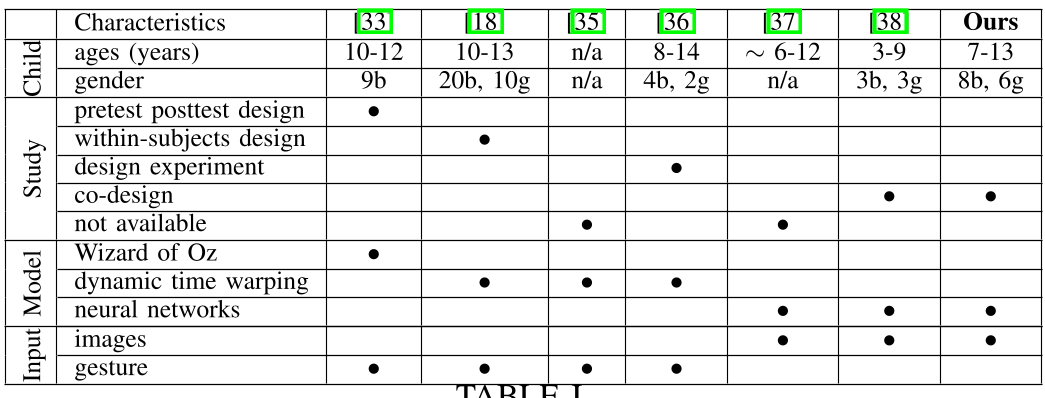 Table 1: Comparing this study's methodology (neural networks, image input, and visible metrics) against prior efforts.
Critical Analysis & Conclusion
Takeaways for Designers
- Show the Math (Visually): Don't hide the softmax output. Confidence scores are an excellent scaffolding tool for reasoning.
- Design for Generalization: Swapping models is the most effective way to teach that "my model only knows what I showed it," highlighting the risk of skewed data.
- Iterative Design: AI education shouldn't be a one-shot training task; it should be a "spiral" of trial, error, and reflection.
Limitations
The study's cohort had prior experience in "design thinking," which may not reflect the average child's intuition. Furthermore, image-based teaching assumes high visual acuity; making these tools accessible for children with visual impairments remains an open research challenge.
Final Thought
This paper proves that children can grasp complex ML concepts like training-validation splits, data noise, and model confidence—provided we give them the right "windows" into the black box.