
Beyond One-Size-Fits-All: Real-Time Adaptive Interfaces for the Aging Population
A Conceptual framework for Adaptive User Interfaces for older adults
The paper proposes a conceptual framework for Adaptive User Interfaces (AUI) specifically tailored for older adults, addressing cognitive decline and vision loss. It introduces a real-time system that utilizes an Eye-tracker to monitor pupil dilation and screen-to-face distance, enabling automatic UI adjustments like text simplification and font resizing to improve accessibility and technology adoption.
TL;DR
As the global population ages, the digital divide widens for older adults facing cognitive decline and vision loss. This paper introduces a modular AUI framework that uses eye-tracking technology to sense frustration and visual strain in real-time, automatically simplifying websites and adjusting layouts to match the user's immediate capabilities.
Background: The Accessibility Gap
The core irony of modern ICT is that while it offers the most potential value to older adults (social connection, health monitoring), its design complexity often acts as an insurmountable barrier. Conventional interfaces rely on a "design for all" philosophy. However, for an older user, a cluttered medical portal isn't just "poorly designed"—it is functionally inaccessible.
The authors identify two critical pain points:
- Cognitive Overload: The mental effort (Intrinsic/Extraneous load) required to navigate complex menus.
- Vision Loss: The physical barrier of perceiving small or low-contrast elements.
Methodology: The "Invisible" Sensor Loop
The breakthrough of this framework lies in its Real-Time Adaptation Loop. Instead of asking users to click a "high contrast" button (which requires digital literacy), the system watches the user.
1. Data Gathering & Physical Intuition
The system utilizes an Eye-tracker to collect two primary metrics:
- Pupil Dilation (TEPR): Based on Cognitive Load Theory, when a user struggles to process information, their pupils dilate slightly (0.3mm–0.5mm). By correlating this peak with a "Gaze Direction," the system knows exactly which paragraph or button caused the confusion.
- Screen-to-Face Distance: If a user leans in closer, the system infers visual difficulty and triggers a "magnifier" effect or font-size increase.
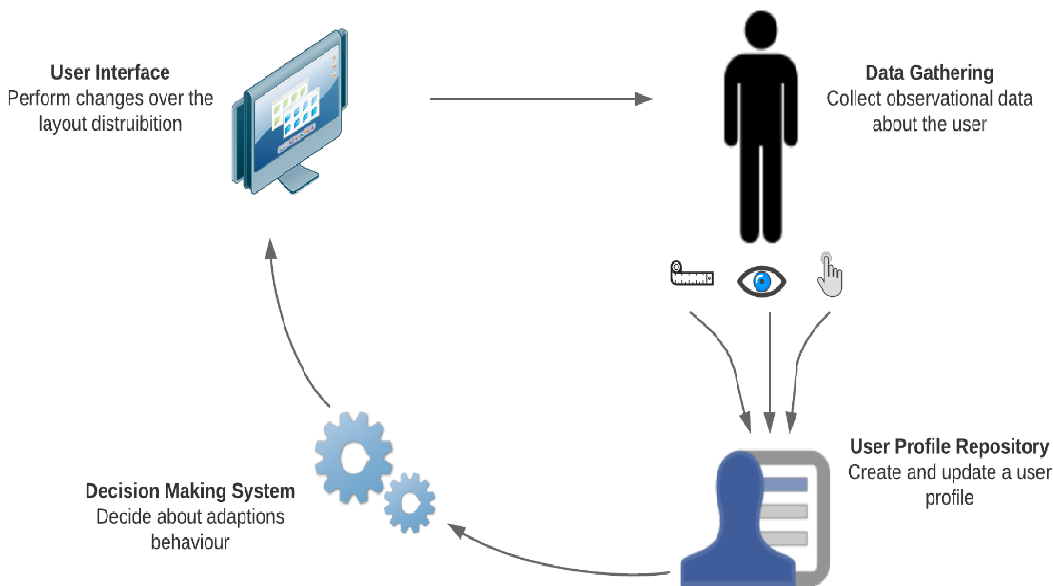 Fig 1: The modular architecture showing the flow from raw sensor data to UI mutation.
2. The Decision Engine
The framework uses a rule-based engine paired with an Ontology-driven User Profile. If the "Short-term Memory" class in the ontology is flagged as "Low" due to pupil spikes, the Decision Module instructs the Interface Module to:
- Simplify natural language.
- Remove distracting animations.
- Highlight the critical path (e.g., "Confirm" buttons).
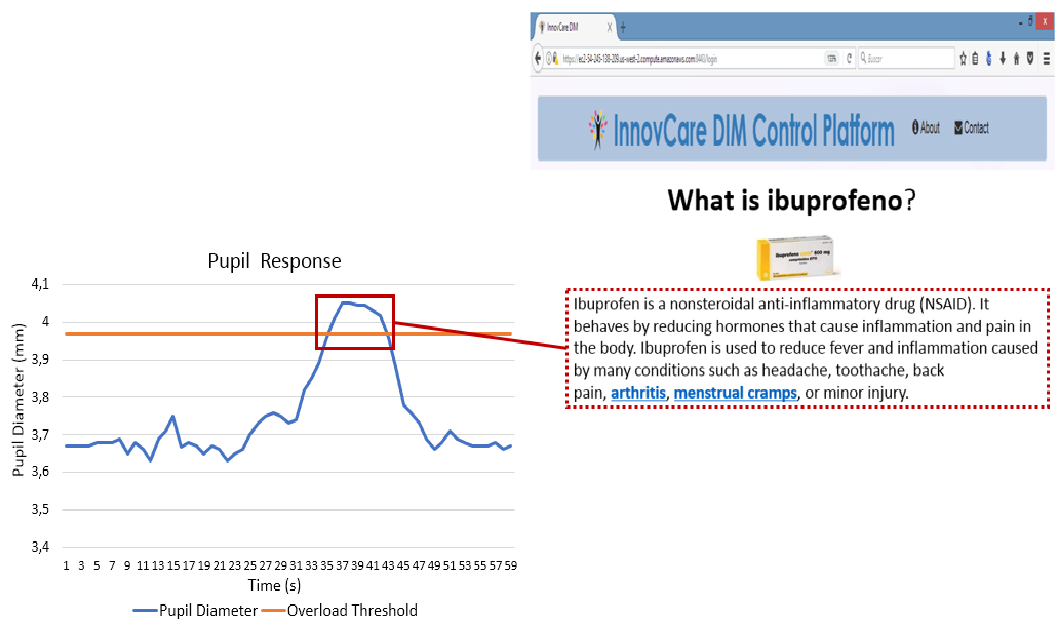 Fig 2: Mapping a physiological pupil spike to a specific UI element (Medicine Information).
Experiments and Insights
The research focuses on the INNOVCARE Platform, a health management site for seniors. By embedding the AUI solution as a browser plugin, the authors demonstrate that the UI can "mutate" its DOM (Document Object Model) structure.
For example, when the system detects a user struggling with a detailed text block about medication:
- Before: A dense, jargon-heavy paragraph.
- After: A simplified version with bullet points and highlighted dosage instructions.
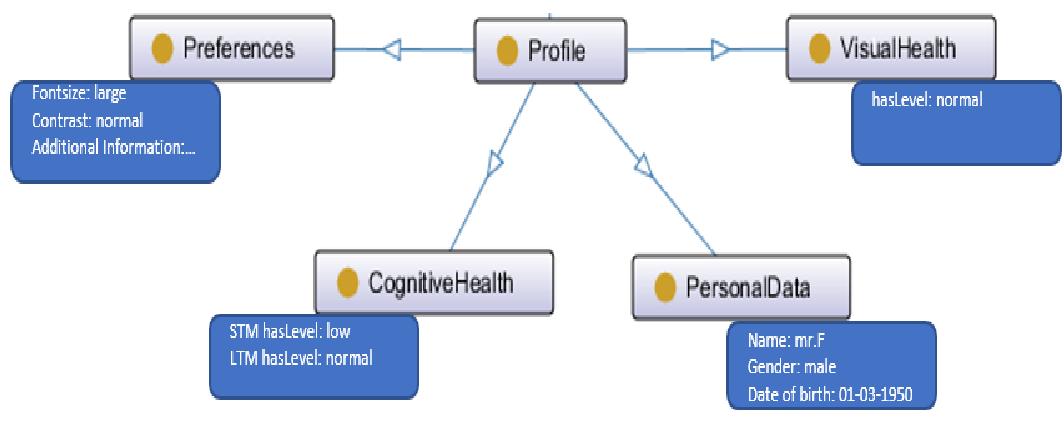 Fig 3: The Semantic Web (Ontology) approach used to represent user state and capabilities.
Critical Analysis & Conclusion
Takeaway
The shift from Static Adaptability (user-driven) to Dynamic Adaptation (system-driven) is essential for elderly users who may not even realize they are struggling or how to fix it. Utilizing physiological markers like pupil dilation provides an objective, "zero-effort" feedback loop.
Limitations & Future Work
While the conceptual framework is robust, real-world lighting conditions can significantly "noise" pupil dilation data. Furthermore, the cost of Eye-tracking hardware remains a barrier to widespread home adoption. The authors envision moving toward more generic web-based solutions and exploring secondary metrics (such as mouse movement jitter) to further refine the assessment of cognitive health.
In summary, this work moves us closer to a Self-Healing UI—one that senses a user's vulnerability and adjusts its own complexity to meet them halfway.