
Chatterbox: Breaking the Web Barrier in Crowdsourcing via Conversational AI
Chatterbox: Conversational Interfaces for Microtask Crowdsourcing
This paper introduces Chatterbox, a text-based conversational interface (chatbot) designed for microtask crowdsourcing. By comparing it with traditional Web interfaces across five task types (Information Finding, Human OCR, Speech Transcription, Sentiment Analysis, and Image Annotation), the study demonstrates that chatbots can maintain high work quality and execution efficiency while significantly improving worker satisfaction.
TL;DR
Is the era of clunky Web-based crowdsourcing forms coming to an end? The paper "Chatterbox" investigates whether the familiarity of messaging apps like Telegram can replace traditional Web interfaces for microtasks. Through a rigorous study, the researchers prove that chatbots can handle everything from Sentiment Analysis to Image Annotation with comparable quality and speed to Web platforms, while making the work significantly more enjoyable for the crowd.
Background & Motivation: Beyond the Browser
Microtask crowdsourcing (e.g., Amazon Mechanical Turk) is the engine behind modern AI, yet its interface hasn't evolved much in a decade. Most tasks require a desktop browser and a specific "learning curve" for each new interface design.
The authors argue that Conversational Interfaces (CIs) offer a unique opportunity:
- Ubiquity: Almost everyone knows how to use WhatsApp or Telegram.
- Low Barrier: CIs can bypass the literacy and technical hurdles of complex Web forms.
- Engagement: Chatting feels inherently more "human" and interactive than filling out a spreadsheet-like form.
Methodology: The Anatomy of a Crowdsourcing Bot
The researchers didn't just build a simple chat bot; they created a structured system to map Web UI elements to chat-native components.
1. Mapping UI Elements
The study focused on three primary interaction types:
- Free Text: For transcription and search.
- Single Selection: Using "Custom Keyboards" (buttons) for classification.
- Multiple Selection: For multi-label tagging (e.g., "What food is in this photo?").
2. The Interaction Logic
The system follows a 5-step lifecycle:
- Instruction: Bot prompts the worker with what to do.
- Question: Bot sends the content (image/audio/text).
- Validation: Real-time checking of the input format.
- Review: Giving the worker a chance to see their work.
- Edit: Allowing corrections before final submission.
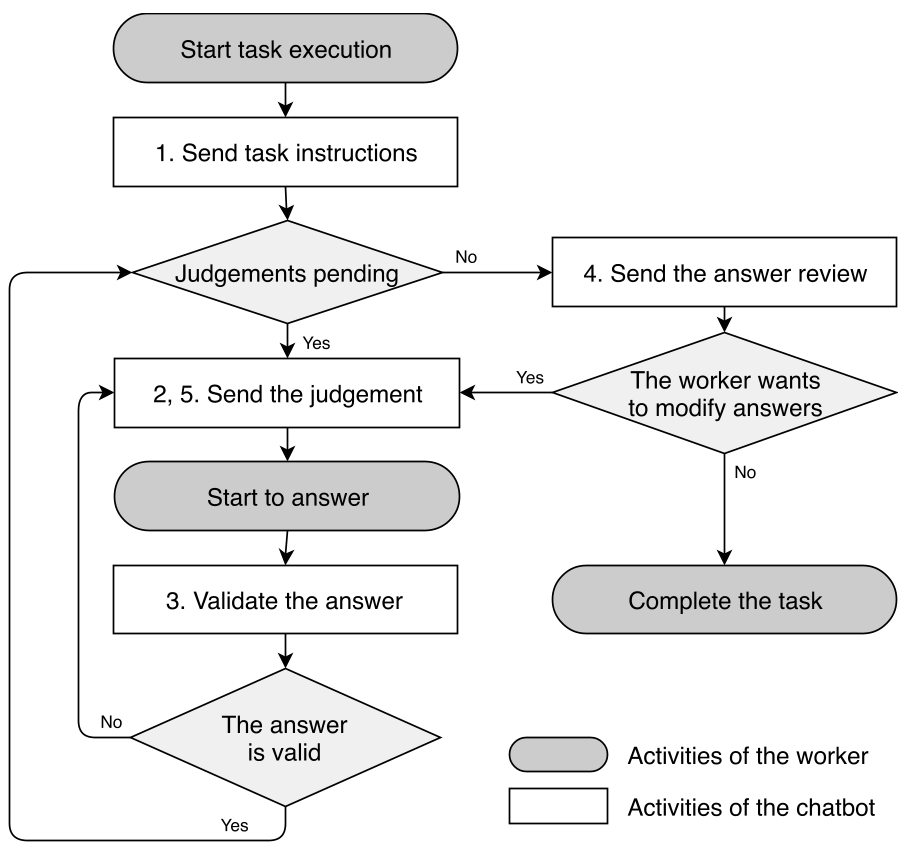 Figure 1: The conversation management logic ensures workers follow a structured path similar to a Web form but within a chat bubble.
Comparing Chat vs. Web: The Showdown
The authors compared the two interfaces across five diverse tasks.
Execution Time & Efficiency
Initial results showed that Chatbot tasks sometimes took longer, but there's a catch: Instructions. In a chat, you read instructions line-by-line, whereas on the Web, you skip them. When the authors tested a "minimal instruction" version of the bot, the execution time was virtually identical to the Web.
Quality and Satisfaction
The quality of work produced via Telegram was remarkably high. In tasks like Human OCR, the chatbot workers actually performed slightly better, possibly due to the focused, one-task-at-a-time nature of the message flow.
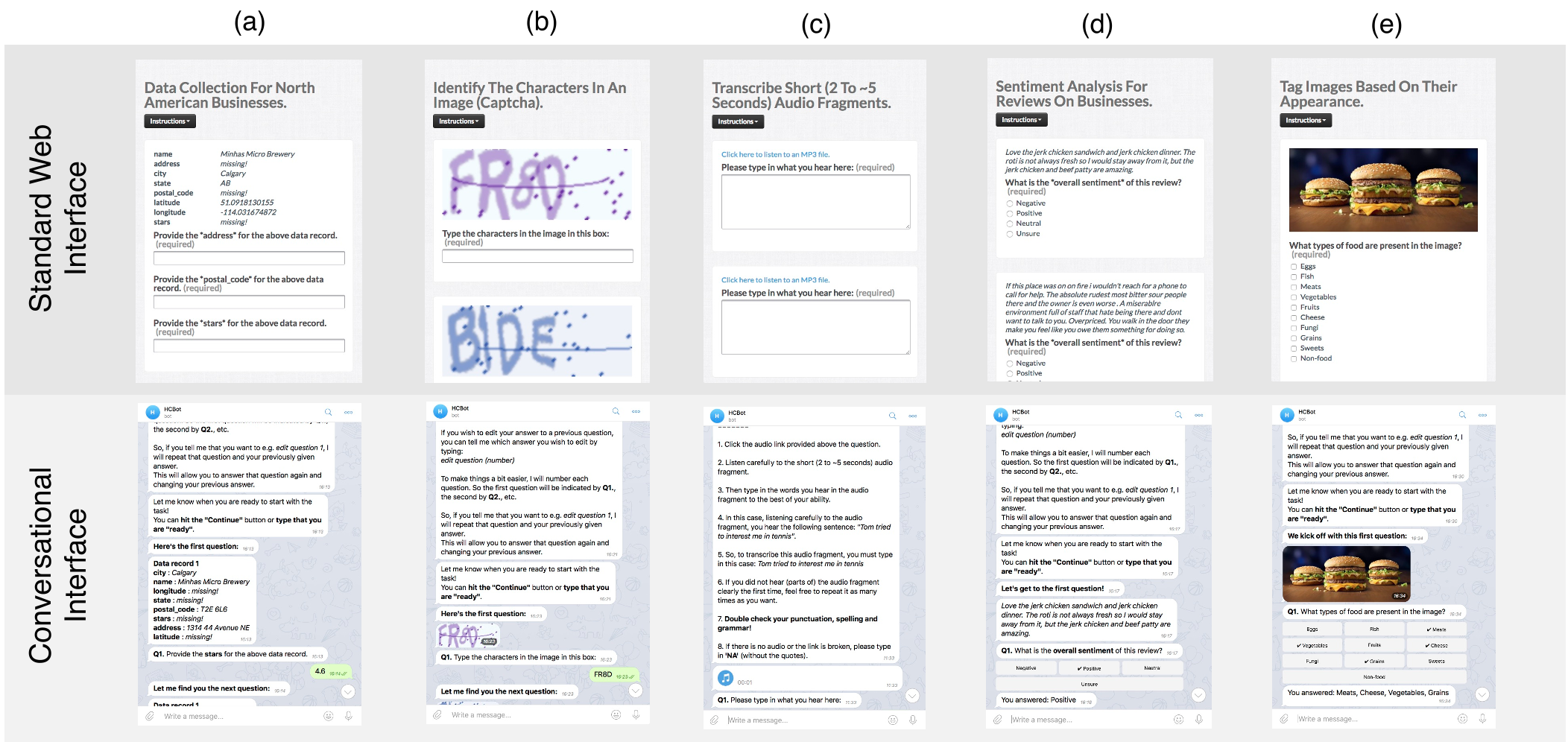 Figure 2: A side-by-side comparison of Sentiment Analysis and Image Annotation on Web vs. Telegram.
Key Insight: The "Keyboard" Matters
One of the most interesting findings from RQ2 was how much the type of button affected speed. The authors tested:
- Mixed Keyboards: Allowing workers to either click a button, type a word, or type a single-letter code.
- Result: The "Mixed" approach was the fastest for complex tasks like Image Annotation, suggesting that giving workers flexibility in how they "input" data is key to scaling conversational work.
Critical Analysis & Future Outlook
Chatterbox proves that conversational crowdsourcing isn't just a gimmick—it's a high-performance alternative. However, the study identifies a few hurdles:
- Setup Friction: Some workers found registering for Telegram "complicated" compared to staying within their known platform.
- Latency: Chatbots must be responsive; any "lag" in the bot's reply kills the worker's rhythm.
Future Directions
The researchers suggest that the next frontier is Push-based Crowdsourcing. Imagine a bot that pings you when you are at a specific location to verify a store's opening hours. This "situational" work is only possible through the conversational, mobile-first paradigm Chatterbox has pioneered.
Conclusion
By moving microtasks from the browser to the chat bubble, Chatterbox has opened the door for a more diverse, global workforce to participate in the AI data pipeline. It turns "work" into a "conversation," and for the crowd, that makes all the difference.