
CrowdSheet: Democratizing Complex Crowdsourcing via the Spreadsheet Paradigm
CrowdSheet: Instant Implementation and Out-of-Hand Execution of Complex Crowdsourcing
This paper introduces CrowdSheet, a spreadsheet-based interface designed to implement complex crowdsourcing workflows using only two new function types. It allows non-IT experts to manage multi-stage data flows and task dependencies directly within Excel, achieving a high success rate (over 60%) among non-technical users in preliminary evaluations.
Executive Summary
TL;DR: CrowdSheet is a "one-stop" tool that transforms a standard spreadsheet into a powerful IDE for managing complex crowdsourcing workflows. By introducing just two new cell functions, it enables non-programmers to orchestrate multi-step tasks, handle conditional logic, and maintain data quality without writing a single line of backend code.
Academic Positioning: This work bridges the gap between high-level declarative crowdsourcing (like CrowdDB or Deco) and end-user programming. It moves beyond simple "microtask submission" to "workflow execution," positioning itself as a practical middleware that validates the spreadsheet as a viable interface for complex human computation.
The "Programming Gap" in Crowdsourcing
While platforms like Amazon Mechanical Turk (AMT) make it easy to hire workers, complex crowdsourcing—where the output of one task (e.g., "Take a photo of a room") serves as the input for another (e.g., "Estimate occupants in this photo")—remains a nightmare for non-developers.
The current workflow for a regular user involves:
- Manually uploading Task A.
- Waiting days for results.
- Downloading CSVs and filtering data.
- Manually uploading Task B based on those results.
CrowdSheet identifies that the spreadsheet is the natural habitat for data manipulation for non-IT experts. The challenge, however, is extending it without breaking the "intuitive feel" of the grid-based interface.
Methodology: Two Functions to Rule the Workflow
The brilliance of CrowdSheet lies in its minimalism. Rather than creating a complex GUI builder, it introduces:
- Task Invocation (TI) Functions:
entryTask()orudTask()(User-Defined Task). These are treated like standard Excel functions (e.g.,SUM). When a cell contains a TI function, the system automatically generates a task on the backend. - The Control (C) Function:
evaluateIf(). This is the conditional logic anchor. Unlike a standardIFstatement that executes immediately,evaluateIfuses lazy evaluation. It triggers a task only if the condition is met, preventing the requester from paying for unnecessary tasks.
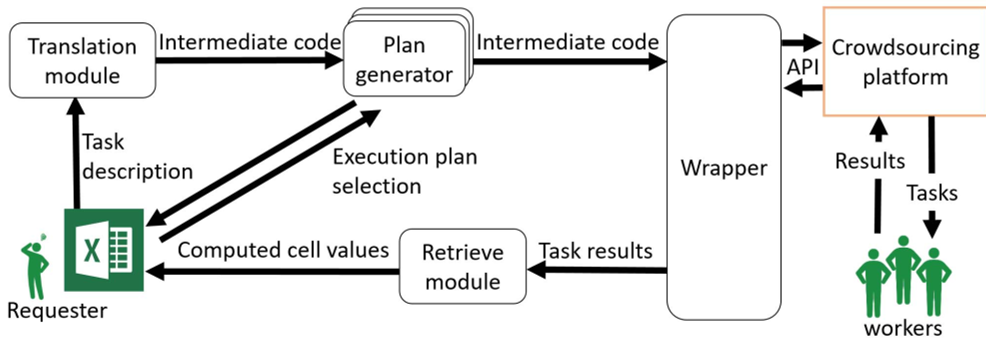 Fig 1: The CrowdSheet Architecture – bridging the gap between Excel and Crowdsourcing APIs.
Separation of Concerns: Logic vs. Quality
One of the biggest headaches in crowdsourcing is Data Quality. Usually, ensuring quality requires adding redundancy (e.g., having 3 workers do the same task and taking the majority vote), which triples the complexity of the code.
CrowdSheet uses a Declarative Architecture. The user writes the "Happy Path" logic in the spreadsheet. Upon clicking "Submit," a Plan Generator reviews the logic and suggests improved execution plans—such as automatically adding verification steps or qualification tasks—without the user needing to change their formulas.
 Fig 2: A running example of a complex flow: estimating attendees based on room capacity and session photos.
Experiments and Expressive Power
The authors didn't just build a tool; they proved its limits. By mapping CrowdSheet to CyLog (a logic-based crowdsourcing language), they proved it can handle any workflow where the number of tasks is finite and results are singular values.
Key Results:
- Usability: In a study of 50 spreadsheet users, over 60% successfully implemented complex workflows.
- Versatility: It can implement voting systems, creative writing tasks, and information extraction, though it struggles with "infinite" tasks like games or open-ended information sharing.
 Fig 3: How a complex workflow looks in practice – simple cell references and function calls.
Critical Insight & Future Outlook
Takeaway: CrowdSheet succeeds because it doesn't try to change how people work; it augments the tool they already use. By treating "human workers" as another API call within a spreadsheet, it turns a data-entry tool into a socio-technical orchestration engine.
Limitations: The current iteration is heavily dependent on the capabilities of the underlying platform (like Crowd4U). Furthermore, while it handles data flow well, it does not yet account for "human factors" like worker fatigue or task design aesthetics, which are critical for high-quality results.
The Future: As Generative AI (LLMs) becomes more integrated into spreadsheets, we can imagine a version of CrowdSheet where the TI functions are split between humans and AI agents, with the spreadsheet acting as the centralized "brain" for hybrid computation.