
Designing Beyond Intuition: Bayesian Optimization for Rapid UI Refinement
Crowdsourcing Interface Feature Design with Bayesian Optimization
The paper introduces a framework combining crowdsourcing with Bayesian Optimization (BO) to objectively refine User Interface (UI) design parameters. Applied to 2D maps, Mobile VR, and Mobile AR contexts, the system treats user performance (task completion time) as a noisy objective function to achieve rapid, data-driven interface optimization.
TL;DR
How do you decide the exact "hover timeout" or "button opacity" for a complex interface? Most designers guess. This paper replaces guessing with Bayesian Optimization (BO). By treating the UI as a mathematical function and the crowd as expensive "sensors," the researchers reduced user task times by up to 33% in just a few iterations, spanning 2D maps, VR, and AR.
The Problem: The "Noisy" Human Factor
Interface design is a "black box" problem. We know that changing a parameter affects performance, but we don't have a clean formula for it. Traditional A/B testing is slow and only compares two points. High-dimensional design spaces (where you have 5+ variables interacting) are impossible to navigate manually. Furthermore, human data is noisy—one user might be slow because they are distracted, not because the UI is bad.
Methodology: Bayesian Optimization as a Design Partner
The authors propose an online refinement system that bridges the gap between machine learning and HCI (Human-Computer Interaction).
1. The Gaussian Process (GP)
The core of the approach is the Gaussian Process. Instead of just looking at data points, the GP creates a "probabilistic map" of the entire design space. It predicts not just the likely task time for a set of parameters, but also the uncertainty (variance) of that prediction.
2. The Acquisition Function
To decide which UI version to test next, the system uses Expected Improvement (EI). It balances two goals:
- Exploitation: Testing designs in regions we already think are good.
- Exploration: Testing designs in regions we haven't checked yet but might be better.
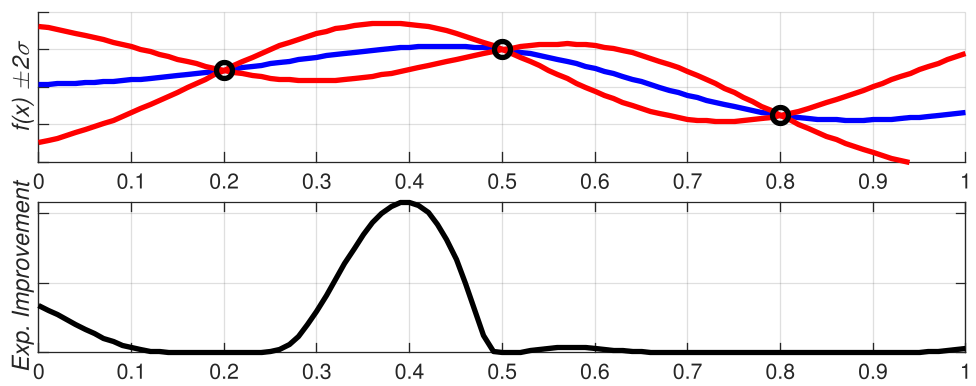 In the figure above, the system avoids redundant testing where it is certain and pushes toward the "Expected Improvement" peaks.
Putting the Crowd to Work
The researchers conducted three experiments:
- 2D Map Search: Finding hotels on a map.
- Mobile VR: Searching for icons in a 360-degree environment.
- Mobile AR: Finding virtual tools in a physical room.
In each case, they parameterized the UI into 5 dimensions (size, opacity, delay, etc.). Participants from Amazon Mechanical Turk performed tasks, and their completion times were fed back into the model in batches.
Key Result: Rapid Convergence
The results were striking. By the third batch (only 60 participants), the system had already identified high-performing regions.
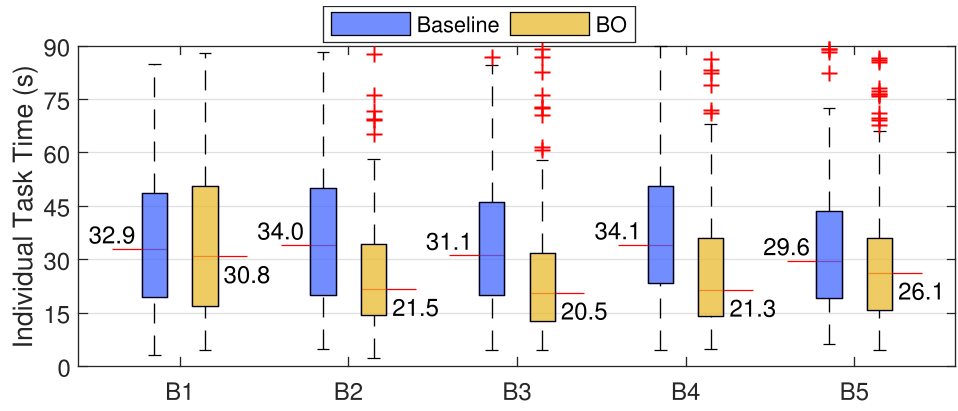 The boxplots show a clear downward trend in task completion time for the BO condition, while the baseline (randomly chosen reasonable parameters) remains stagnant.
Deep Insights: The "Sensitivity" Map
One of the most valuable "by-products" of this method is the ability to query the model after the experiment. By shifting one parameter at a time while holding others constant, designers can see which features actually matter.
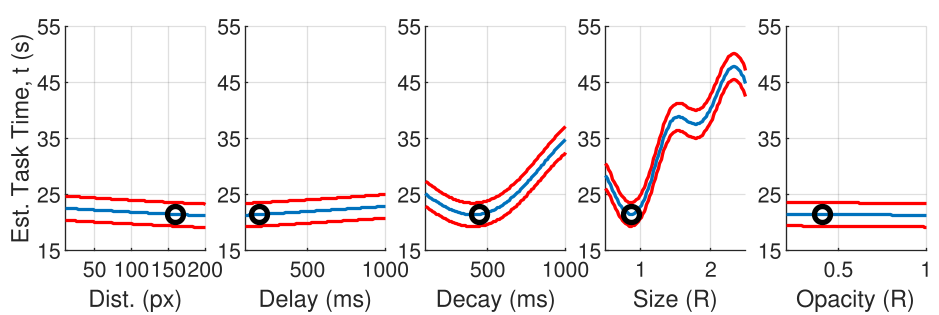 In Experiment 1, the model revealed that 'Decay' (how long a tooltip stays visible) and 'Size' had the most dominant impact on performance, whereas 'Opacity' was less critical.
Critical Analysis & Conclusion
The Power of "Pruning"
Is the system finding a "global optimum" or just "deleting the garbage"? The authors admit it's hard to tell. However, for a designer, pruning the bad designs is often 80% of the battle. By automatically eliminating parameter combinations that frustrate users, BO allows designers to focus on creative tasks.
Limitations
- The "Exploration" Tax: In late stages (Batch 5), the system sometimes "wastes" a batch by exploring a high-uncertainty (but likely poor) area, causing a temporary spike in task time.
- Metric Choice: This study focused on speed. Future work needs to integrate aesthetic preference—sometimes the fastest UI is also the ugliest.
Future Outlook
This work paves the way for "Self-Optimizing Interfaces." Imagine a website that subtly adjust its own layout and timing parameters over its first 1,000 visitors until it finds the configuration that maximizes efficiency for its specific audience. This is not just A/B testing; it's an autonomous evolution of design.