
Designing Minds: Leveraging Gestalt Principles for Dynamic Cognitive Interfaces
The Development of Dynamic Cognitive Interfaces for Multisubject Information Systems (on the Example of Geosocial Service)
This paper introduces a methodological framework for synthesizing "Cognitive User Interfaces" within multisubject information systems, exemplified by a geosocial tourism network. It leverages Gestalt psychology and mental model theory to automate parts of the user's cognitive selection process, moving toward a dynamic interface that adapts to the user's mentality.
TL;DR
The paper addresses the challenge of information overload in "multisubject" systems (systems used by diverse groups). It proposes Cognitive User Interfaces (CUI) that don't just display data but actively assist in the cognitive process. By integrating a user mentality model and applying Gestalt psychology—such as intelligent marker clustering and semantic icon usage—the system reduces cognitive load and speeds up information synthesis.
Background Positioning
In the landscape of Human-Computer Interaction (HCI), this work shifts the focus from purely functional UI design to Cognitive Engineering. It bridges the gap between psychological theory (Gestalt, Broadbent’s selection model) and modern web development (VueJS, Laravel) to solve the "relevance" problem in geosocial services.
Problem & Motivation: The Cognitive Bottleneck
Modern systems can store more data than humans can process. This "multisubjectivity" means a single interface must serve a fisherman, a mountain climber, and a history buff simultaneously.
- The Flaw of Static UI: Traditional interfaces are "dumb"—they present the same signals to everyone, forcing the human brain's "Semantic Analyzer" to do all the heavy lifting of filtering and connecting dots.
- The Insight: If the interface understands the user's mental stereotypes, it can pre-filter information. The goal is to move the "Selection" phase from the human brain to the software.
Methodology: The Core of the Cognitive Interface
The authors define the Cognitive UI as an entity that implements parts of human cognitive functions. It consists of two main components:
- The Semantic Part: Matches information in the system with the user's existing knowledge/concepts.
- The Perceptual Part: Uses visual laws to make information "pop" and organize itself naturally in the user's mind.
The Human-Interface Cognitive Model
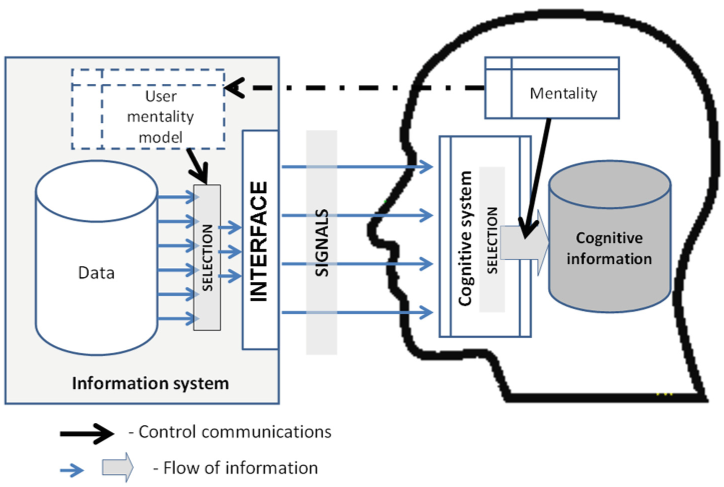
As shown in the architecture, the interface acts as a selective filter. By utilizing a Model of Mental Stereotypes, the system generates signals that "match" the user's mentality, allowing for "Proper and Sufficiently Rapid formation of concepts."
Implementation: Geosocial Service for Arctic Tourism
To test these theories, the researchers built a geosocial network for the Murmansk region. This is a perfect "multisubject" testbed because tourism is entirely dependent on descriptions and mental images.
1. Gestalt in Practice: Clustering and Proximity
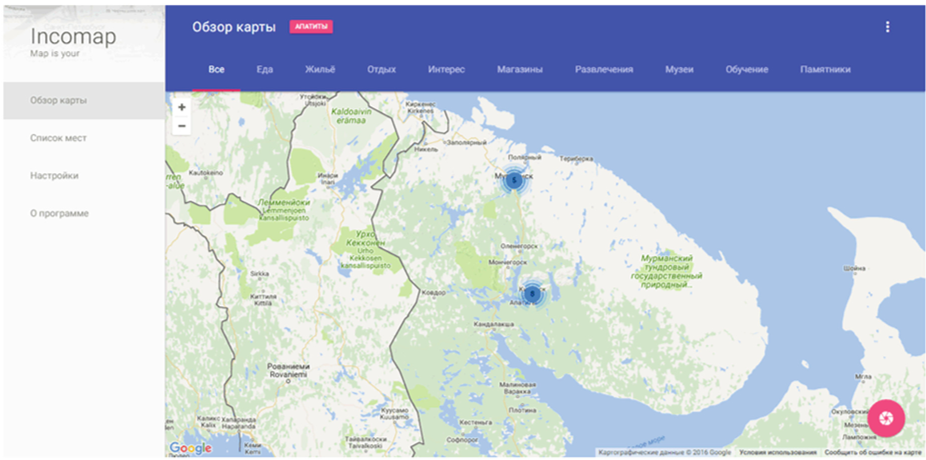
To avoid "visual noise," the system uses Clustering. When markers are too close, they are grouped.
- The "Magical Number Seven" Implementation: Clusters change colors (Green, Yellow, Red) based on the volume of information they contain (e.g., <5, 5-9, >9). This alerts the user to the "density" of information before they even click.
2. Semantic Stereotypes
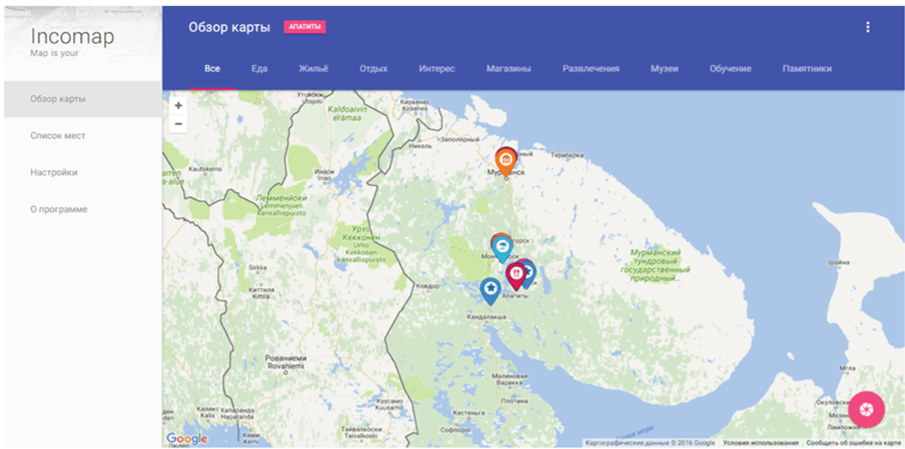
Instead of generic pins, the system uses "Perceptual Stereotypes"—icons like coffee cups for cafes or beds for hotels. This leverages existing cultural schemas, allowing the user to navigate the map with zero learning curve.
Experiments & Results
The prototype architecture utilizes a decoupled Client-Server model (VueJS/Laravel), ensuring that the dynamic UI can evolve without breaking the core data logic.
- Efficiency Gains: By applying the principle of proximity, users spend significantly less "mental energy" distinguishing between unrelated elements.
- SOTA Comparison: Unlike standard Google Maps implementations that often clutter the screen at high zoom levels, this dynamic approach regulates data withdrawal based on the "operational memory" capacity of the human mind (averaging 7 ± 2 elements).
Critical Analysis & Conclusion
Takeaway
The system effectively proves that UI design is not just about aesthetics—it's about Cognitive Offloading. By building an interface that "thinks" like the user, the time-to-concept is drastically reduced.
Limitations
- User Modeling: The creation of a truly accurate "User Mentality Model" remains computationally and psychologically difficult. How do we capture cultural nuances automatically?
- Semantic Heterogeneity: Managing data that changes rapidly over time while maintaining a consistent semantic model is a major hurdle.
Future Work
The researchers aim to refine the identification methods for dynamic models, potentially integrating real-time prediction of user needs based on their movement patterns within the geosocial service.