
Designing for the Human Dimension: HCI Strategies for Special Education
Planning effective HCI to enhance access to educational applications
The paper presents a framework for planning effective Human-Computer Interaction (HCI) to improve accessibility in educational applications, specifically focusing on two ICT projects: EASY and eWRAP. It introduces the "Meta-Knowledge Processing Model" to synchronize instructional strategies with individual cognitive styles, achieving a balanced delivery for learners with special needs.
TL;DR
This research challenges the assumption that digital courseware is inherently accessible. By introducing the Meta-Knowledge Processing Model, the paper demonstrates how tailoring Human-Computer Interaction (HCI) to individual cognitive styles (Wholist vs. Analytic) can significantly enhance educational outcomes for "sensitive" learner groups, such as those recovering from mental illness or facing long-term unemployment.
The Hidden Barrier: Cognitive Style Mismatch
Most online learning platforms operate on a dangerous assumption: if the content is clear and the graphics are sharp, the learner will succeed. However, Dr. Elspeth McKay argues that "accessibility" is not just about physical access, but cognitive access.
Prior works often ignored that learners possess "preferred and habitual approaches" to organizing information. When there is a mismatch between a person's cognitive style (e.g., an "Imager" who thinks in pictures) and the instructional material (e.g., a text-heavy manual), learning performance drops sharply. For individuals already facing high stress—such as those in vocational rehabilitation—this mismatch becomes an insurmountable wall.
Methodology: The Meta-Knowledge Processing Model
The core of this work is a shift toward Adaptive HCI. The author proposes a framework that doesn't just present data, but reacts to how the user thinks.
1. Mapping Cognitive Dimensions
The research utilizes Riding’s dimensions to categorize learners:
- Wholist-Analytic: Can you see the big picture, or do you focus on the constituent parts?
- Verbal-Imagery: Do you represent information in words or mental pictures?
2. The Design Framework
The paper introduces a design tool that identifies interactive relationships between cognitive style and instructional format.
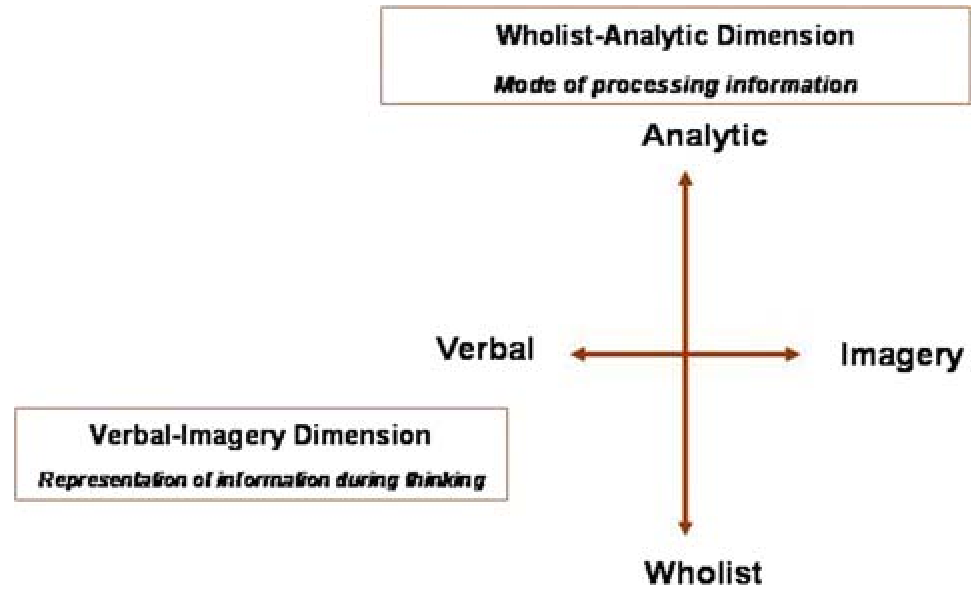 Figure 1: The Meta-Knowledge Processing Model (Image Placeholder - Represents the integration of user preference and task difficulty).
Prototypes in Action: EASY & eWRAP
The research tested these theories through two distinct institutional projects:
- Project-1 (EASY - Educational/Academic Skills Evaluation): Targeted young people with learning difficulties. It used a touch-screen interface to remove the "mouse and keyboard" anxiety, focusing on magnitude, safety, and communication through visual tasks.
- Project-2 (eWRAP - Work Readiness): Targeted the long-term unemployed. This system used video vignettes—short film clips showing "good" and "bad" examples of job interviews—to foster self-confidence and behavioral modeling.
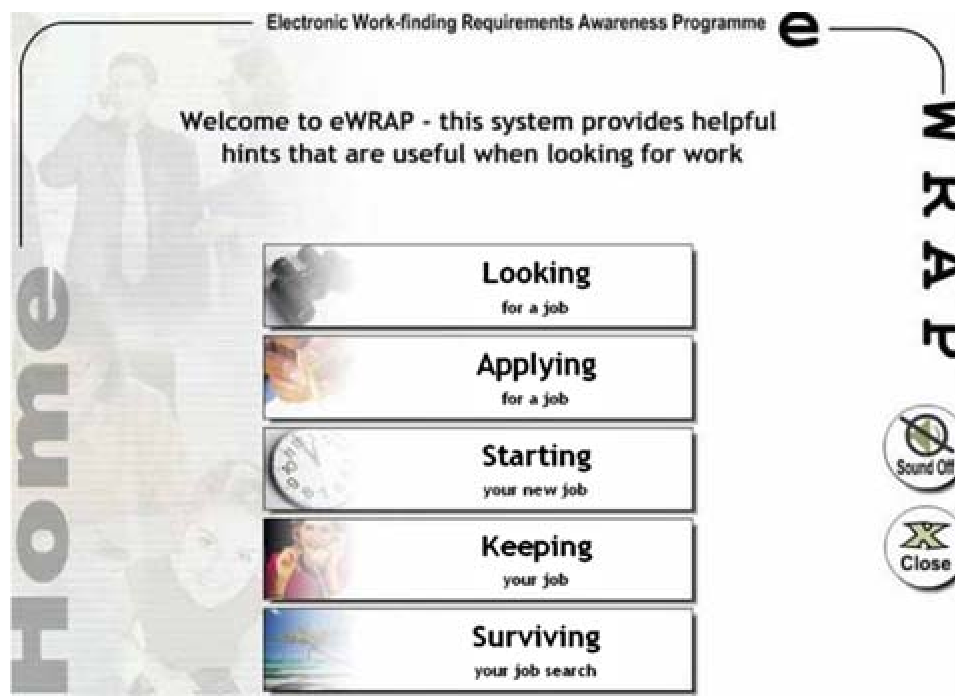 Figure 2: Prototype Login Screen - Utilizing simple navigation and audio-visual toggles to reduce cognitive load.
Key Insights and Results
The evaluation used the QUEST Interactive Test Analysis System (based on the Rasch measurement model) to precisely calibrate test difficulty against learner performance.
- Visual vs. Textual Divergence: The data confirmed that some participants performed exceptionally well on visual perception tasks (e.g., identifying magnitude) but struggled with recipes or numeric costs.
- Reduction of Technology Phobia: The use of touch technology and simplified navigation ("Forward," "Back," "Exit") proved essential. By removing traditional input devices, the researchers lowered the "perceived threat" of the computer tool.
- Modeling Effectiveness: Participants in Project-2 specifically noted that seeing "non-examples" (how not to act in an interview) was as instructive as seeing the correct behavior, validating Merrill’s principles of Demonstration and Activation.
Critical Analysis & Conclusion
This paper serves as a vital reminder that Human-Computer Interaction is an interdisciplinary field. To build effective educational tools, we must combine instructional science, cognitive psychology, and UX design.
Limitations: While the research proves the need for adaptive systems, the prototypes themselves were standalone and didn't yet feature a fully automated real-time adaptation engine; much of the data capture remained paper-based or hard-coded.
Future Outlook: As we move toward AI-driven education, the "Meta-Knowledge Processing Model" provides a blueprint. Future systems should use AI to detect a user's cognitive style in real-time—adjusting the ratio of text to imagery on the fly—truly fulfilling the promise of personalized, accessible education.