
FLOW: Reimagining Social Connection for the Digital Silver Generation
FLOW: A Software Application Designed to Help Older Adults Build Distance Interaction
This paper introduces "FLOW," a story-based social communication application prototype specifically designed for older adults on touch-based tablets. It utilizes a mixed-method research approach to evaluate how intuitive visual cues and simplified hierarchical structures can bridge the digital divide and reduce social isolation among the elderly.
TL;DR
As the world ages, the "digital divide" is no longer just about access to hardware, but about the cognitive and physical accessibility of software. FLOW is a research-driven tablet application designed to help older adults share stories and maintain distance interactions. By stripping away the complexity of traditional "newsfeeds" and focusing on intuitive, voice-enabled storytelling, FLOW aims to reduce the social isolation that often accompanies aging.
Problem & Motivation: The "Heavy Finger" and the Privacy Wall
While 78% of young adults are active on social media, less than half of seniors over 65 participate. The researchers identified two primary barriers:
- Cognitive & Physical Friction: Standard UI designs assume a high level of technical literacy. Older adults often struggle with "heavy fingers" (prolonged pressure on touch screens) and abstract iconography.
- The Facebook Paradox: Many seniors find current platforms too "open-ended" and "superficial." They worry about privacy and prefer meaningful, categorized interactions over a chaotic stream of consciousness.
The motivation behind FLOW was to create a "secured environment" where the interface itself acts as an assistant rather than a barrier.
Methodology: Designing for Aging Cognition
The researchers moved away from deep, nested menus in favor of a Parallel Menu Structure. The logic is simple: if a user has to go more than two levels deep, they are likely to get lost.
Key Architectural Principles:
- Three-Row Grid: Utilized to provide a clear hierarchy and efficient use of tablet real estate.
- Color-Coded Context: Green for Login, Orange for "My Story," and Blue for "Community Chats." This provides an instant visual anchor.
- Functional Literalism: Replacing abstract commands like "Cancel" with the self-explanatory "Back" and adding text labels to every icon.
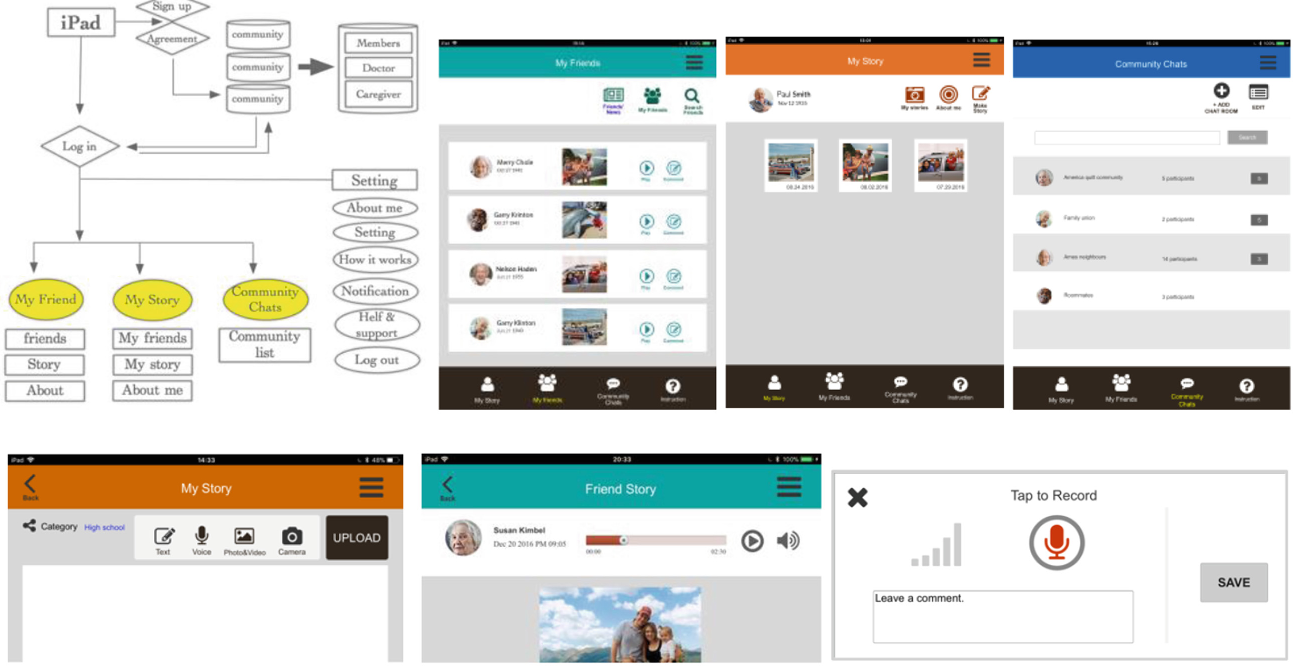 Figure 1: The redesigned shortcut and navigation structure based on user feedback.
Experiments & Results: Expectations vs. Reality
The study involved 11 participants (ages 60-85). The results provided a fascinating look into the "stigma of technology."
The Voice Recording Controversy
Surprisingly, 73% of participants initially preferred typing. Why? They associated voice-recording with physical impairment (e.g., "I can still write, I'm not that old yet"). However, after using the FLOW prototype, many changed their minds, realizing that voice capture more effectively conveyed emotion to their grandchildren.
The "Red" Danger Signal
A critical finding was the interpretation of color. While designers use red for "Record" (standard in AV gear), older users interpreted red as "Danger" or "Stop." This forced a shift toward using green or neutral tones accompanied by clear text.
 Figure 2: Observation of older adult interaction with the tablet interface.
Quantitative Success
Despite navigation errors, the emotional response was overwhelmingly positive. Participants scored the app high (Mean: 4.18) on its potential to "enhance memory" through social interaction.
Critical Analysis & Conclusion
The Takeaway: The most significant insight from the FLOW project is that Older adults are willing to learn, but they have zero tolerance for "mystery meat navigation" (icons without labels).
Limitations: The study's participants were highly educated (many with Ph.D.s), which may not represent the broader elderly population. Furthermore, the prototype used in the study lacked a fully functional back-end for real-time storage, which limited the "flow" of actual social exchange.
Future Work: The next iteration of FLOW will focus on "Data-Driven Gerontology"—using app usage patterns to monitor for early signs of cognitive decline or social withdrawal. In the future, your social media app might not just keep you connected; it might act as a frontline tool for geriatric health monitoring.