
Unlocking the Palm: Investigating Handheld Interaction for Older Adults with Visual Impairments
An exploratory investigation of handheld computer interaction for older adults with visual impairments
This study investigates the Human-Computer Interaction (HCI) factors for older adults with Age-related Macular Degeneration (AMD) using handheld computers. Researchers assessed task performance—searching, selecting, and dragging playing card icons—under various interface conditions, finding that contrast sensitivity and AMD severity are the strongest predictors of interaction efficiency.
TL;DR
This seminal 2005 study explores how older adults with Age-related Macular Degeneration (AMD) interact with handheld computers. By analyzing task efficiency through linear regression, the researchers discovered that contrast sensitivity and disease severity are the primary predictors of performance. Crucially, the study demonstrates that low-cost interventions like auditory feedback can bridge the accessibility gap on small displays.
Background & Positioning
While desktop HCI for the visually impaired is well-documented, this paper is an early exploratory pivot into the realm of Mobile Computing. Published in the mid-2000s, it anticipated the "Silver Tsunami"—the aging baby boomer population—and their impending need for accessible, portable technology. It moves beyond "What" users do to "Why" their specific ocular physiology dictates their interaction speed and accuracy.
Problem: The Desktop Bias and Small Display Barriers
Prior work largely focused on desktop setups where screen real estate was abundant. However, handhelds introduce "suboptimal interfaces":
- Tiny Targets: Icons are small (7x7 mm), demanding high visual acuity.
- Crowded Layouts: Limited space forces targets closer together, complicating visual search.
- Input Precision: Using a stylus requires motor dexterity that may decline with age.
The authors argue that accessibility solutions for the totally blind (like screen readers) are often mismatched for the millions of users with residual vision (useful remaining eyesight).
Methodology: The "Playing Card" Strategy
The researchers conducted a controlled experiment with 13 participants (10 with AMD, 3 controls).
1. Familiarity over Complexity
Instead of abstract software icons, the study used playing cards.
- Why? Older adults are often highly familiar with cards, reducing the "learning curve" and isolating the physical interaction challenges.
- The Task: Search for a specific card, select it with a stylus, and drag it to a matching suit pile.
2. Experimental Variables
- Set Size (SS): 4, 8, or 12 icons.
- Inter-Icon Spacing (ISp): 1/4, 1/2, or 1 full icon width.
- Auditory Feedback (AF): A "sucking" sound cue when the icon was correctly positioned for dropping.
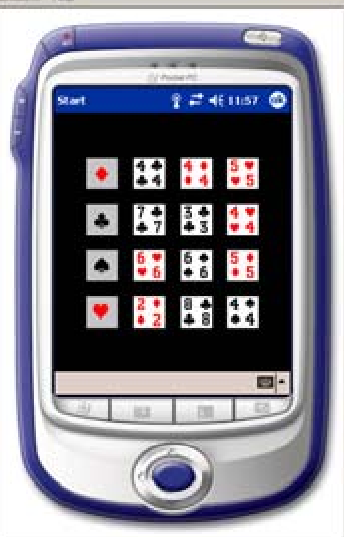 Figure 1: The experimental setup showing the tilted handheld device and the card-sorting interface.
Results: The Power of Contrast and Cues
The results provide a mathematical roadmap for accessible UI design:
1. Contrast Sensitivity is King
The stepwise regression showed that Contrast Sensitivity (CS) was a more consistent predictor of efficiency than standard Visual Acuity (20/20 scores). If a user can't distinguish an object from its background, icon size doesn't matter.
2. The Multi-modal Advantage
Auditory feedback (AF) didn't just help—it specificially targeted the "Movement Time" (MT) and "Drag Distance" (DD) for users with the most severe AMD.
- Insight: In the absence of sound, users with AMD often "chased" the target pile, moving the icon erratically. The sound provided a "hit" confirmation that their eyes couldn't reliably see.
3. Interaction Models
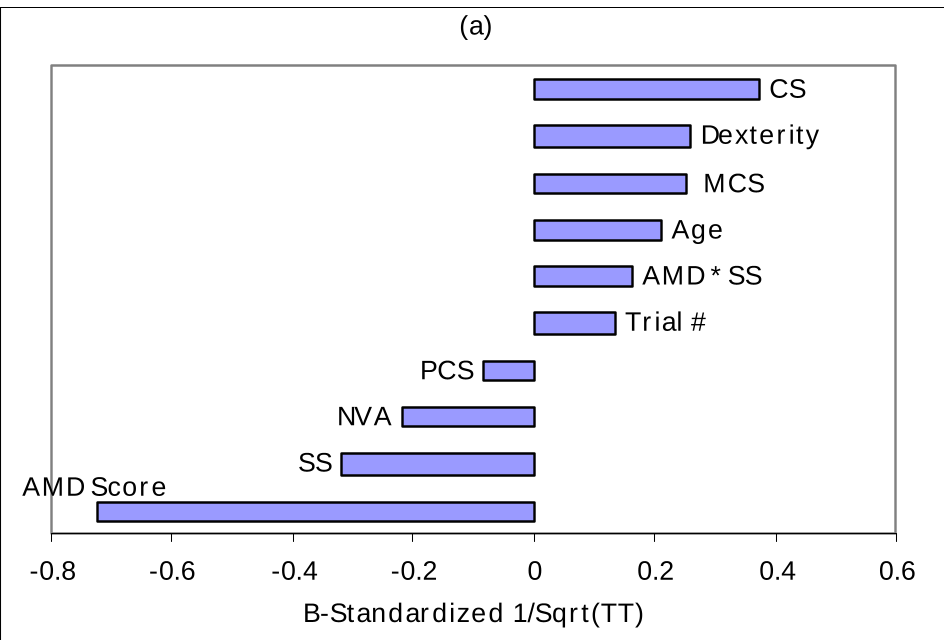 Figure 2: Statistical modeling showing how AMD severity (extending to the left) negatively impacts Trial Time and Visual Search Time.
Deep Insight & Future Outlook
The most striking takeaway is Outcome #10: Design theories for desktops should not be automatically applied to handhelds. For instance, while tight icon spacing ruins search on a desktop, its impact was less pronounced on the small screen, likely because the entire display fit within the user's remaining visual field.
Limitations
- Sample Size: With only 13 participants, the study is "exploratory."
- Context: The device was stationary on a stand; real-world mobile use (walking, glare) would likely exacerbate visual difficulties.
Final Thought
This research proved 20 years ago that mobile devices are not "off-limits" for the visually impaired. It shifted the focus from magnification to interaction quality, highlighting that a simple "beep" can be as powerful as a 200% zoom.