
Engineering Inclusion: How HCI Factors Redefine m-Learning Accessibility
How Can HCI Factors Improve Accessibility of m-Learning for Persons with Special Needs?
This paper explores the integration of Human-Computer Interaction (HCI) factors to enhance the accessibility of mobile learning (m-learning) for persons with special needs. It introduces a remote engineering application called "m-house," a micro-controlled system for smart home automation, evaluated through qualitative usability testing on users with visual and hearing impairments.
TL;DR
Mobile learning (m-learning) is often touted as the "next step" in education, yet for users with special needs, the transition from desktop to mobile can introduce new barriers. This paper investigates how rigorous Human-Computer Interaction (HCI) factors can bridge this gap. By developing and testing "m-house"—a remote-controlled engineering model—the researchers demonstrate how tailored interface design can make complex technical education accessible to those with significant visual and hearing impairments.
Problem & Motivation: The Small Screen Barrier
Traditional e-learning materials are frequently designed with a "one-size-fits-all" mentality that actually fits very few. When moved to mobile devices, these problems are magnified:
- Screen Real Estate: Small displays make navigation difficult for those with motor or visual impairments.
- Cognitive Overload: Complex menu structures can be overwhelming for users with memory or concentration challenges.
- Hardware Constraints: Limited memory and processing power on older mobile devices (like the PDAs used in this study) mean that accessibility overlays can't be too resource-heavy.
The authors argue that accessibility isn't just about "fixing" content; it's about a fundamental shift in how we approach the interface between the human and the machine.
Methodology: The "m-house" Framework
To test their theories, the researchers built a physical wooden house model equipped with micro-controllers for lights, windows, and ventilation.
1. The Design Guidelines
The team synthesized a hierarchical approach to accessibility:
- Visual Impairment Solutions: Larger images, font size increments, and audio-based navigation.
- Hearing Impairment Solutions: Video subtitles and sign-language glossaries.
- Cognitive Solutions: Logical, intuitive navigation and "easy reading" content.
2. Architecture of the System
The interface was developed using LabView, creating a bridge between a mobile PDA and a remote technical environment.
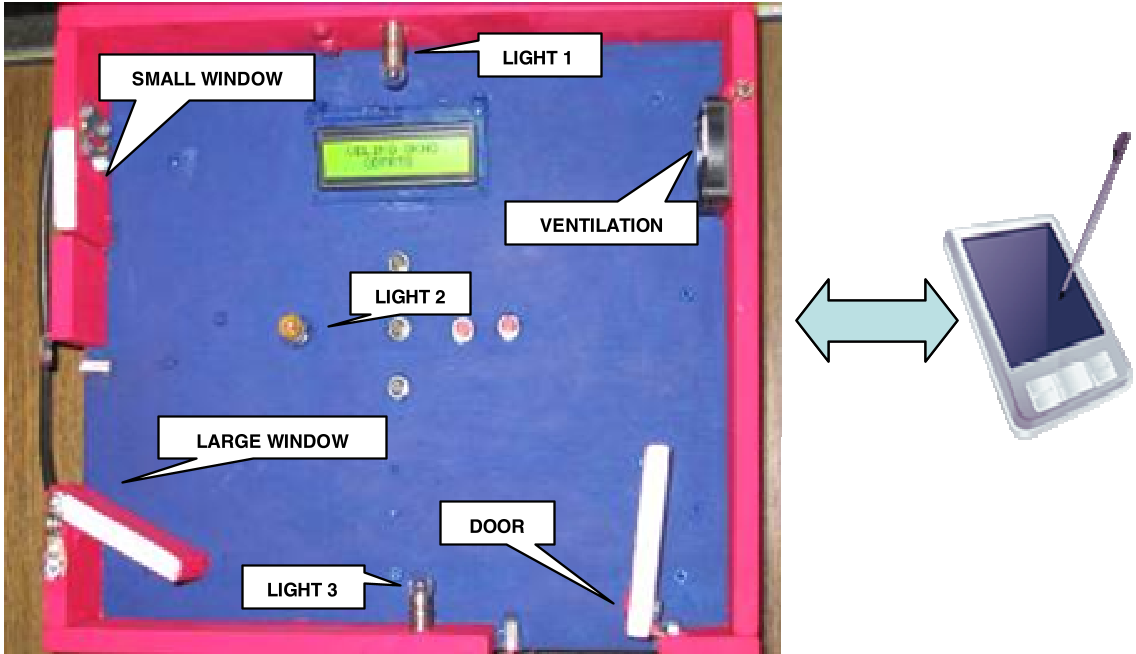 Figure 1: The physical wooden model (m-house) used as the remote engineering testbed.
Experiments & Results: Putting Theory to the Test
The researchers conducted usability testing with three participants with severe impairments (88% to 97% impairment levels). Using the Thinking-Aloud method, they uncovered several critical insights:
User Interface Insights
- Contrast is King: A user with 95% blindness found current mobile contrasts too weak, specifically requesting white backgrounds for better clarity.
- Navigation Flattening: Users were confused by multiple tabs. The feedback suggested that all vital management controls should reside on a single, primary screen to reduce cognitive friction.
- Consistency: Visual elements (buttons, sliders) must maintain uniform shapes and colors to build a reliable mental model for the user.
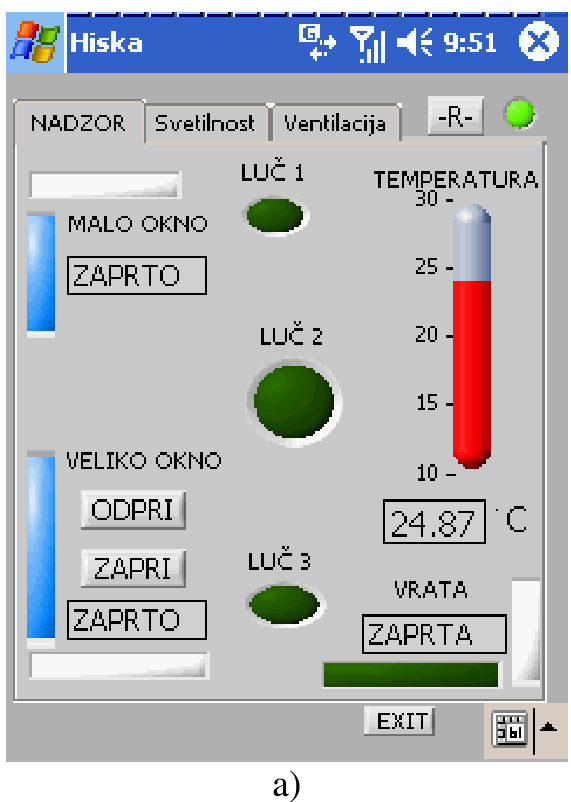 Figure 2: The LabView-based mobile interface for controlling lights and monitoring temperature.
Critical Analysis & Conclusion
This work highlights a vital truth in academic tech: Accessibility aids everyone. While the features were designed for persons with special needs, the resulting simplicity and responsiveness benefit any user in a high-distraction mobile environment.
Limitations
- Sample Size: With only three participants, the study is a qualitative pilot. Larger quantitative studies are needed to validate the statistical significance of the interface improvements.
- Legacy Hardware: The study's focus on PDA hardware limits some of the multimedia potential available on modern smartphones, though the core HCI principles remain evergreen.
The Takeaway
True m-learning accessibility is achieved through iterative design and direct user feedback. By treating accessibility as a core engineering requirement rather than an afterthought, we can create technical educational tools that empower all learners, regardless of physical ability.