
Empowering AI Literacy: An Interactive iPad Tool for Image Classification
Development of an Interactive Educational Tool to Experience Machine Learning with Image Classification
This paper presents a specialized iPad-based interactive educational tool designed to teach machine learning fundamentals through image classification. The system features a Swift-based client for dataset creation and a Django/TensorFlow-powered server for model training, allowing beginners to experience the full AI development lifecycle without coding.
TL;DR
Researchers from Keio University and other Japanese institutions have developed a code-free educational application for iPadOS. By allowing students to manually curate datasets and train TensorFlow models via a Django backend, the tool demystifies the "black box" of AI, fostering essential problem-solving skills through direct experience with image classification.
Problem & Motivation: Beyond the "Black Box"
As AI becomes ubiquitous, the educational gap widens. Current resources typically fall into two categories:
- High-Level Theory: Textbooks that describe AI but offer no hands-on engagement.
- Professional Tools: Frameworks like PyTorch or TensorFlow that possess a steep learning curve for non-programmers.
The authors argue that true AI literacy requires developmental experience. Educators need tools that allow students to fail—to see a model break because the training data was insufficient or biased—thereby understanding the critical role of human involvement in the AI lifecycle.
Methodology: The Interactive Sandbox
The system is split into a Client Application (Swift on iPad) and a Server System (Python/Django/TensorFlow).
The Workflow:
- Dataset Creation: Users use a stylus or camera to add images to specific labels (e.g., numbers 0-9).
- Model Generation: The data is sent to the server where a CNN (Convolutional Neural Network) or similar structure is trained.
- Inference & Comparison: Users test the model with new drawings and can save multiple versions to compare how different training inputs affect the "likelihood" output.
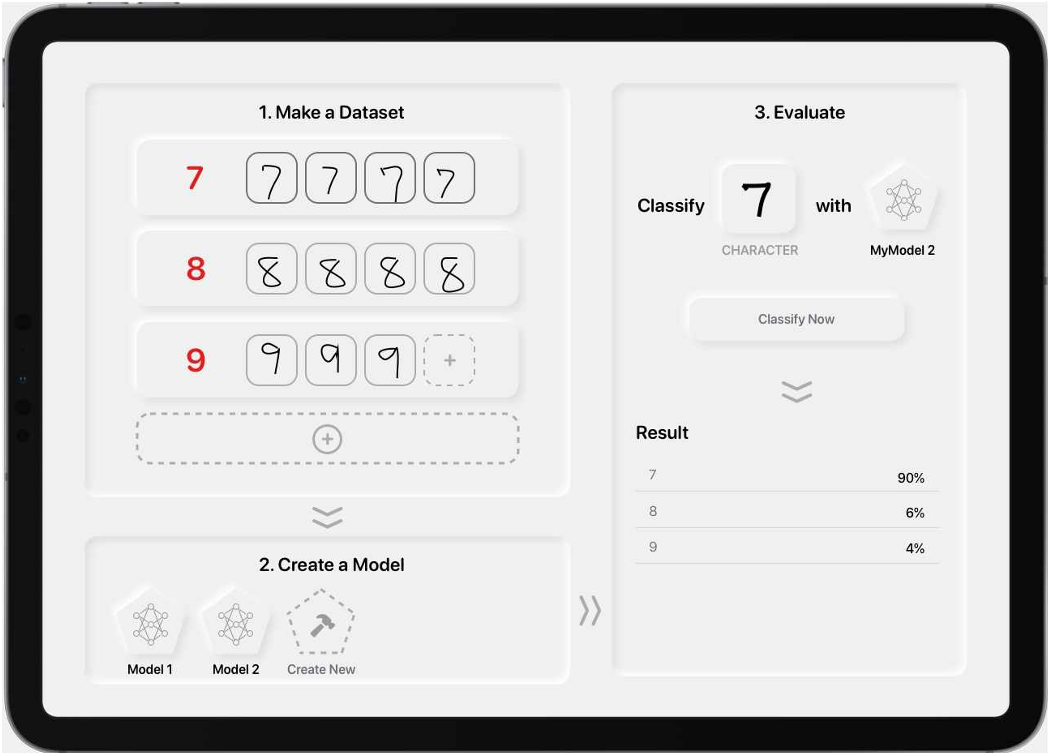 Fig 1. The structural overview of the client-server interaction.
Experiential Learning Insights
The core of the methodology isn't just "making it work," but exploring why it might fail. The tool enables several key pedagogical activities:
- Data Sufficiency: How many samples are needed for 99% accuracy?
- Noise Impact: What happens if we train on "messy" handwriting vs. "clean" print?
- Adversarial Labeling: Intentionally mislabeling data to observe the resulting logical failures in the AI.
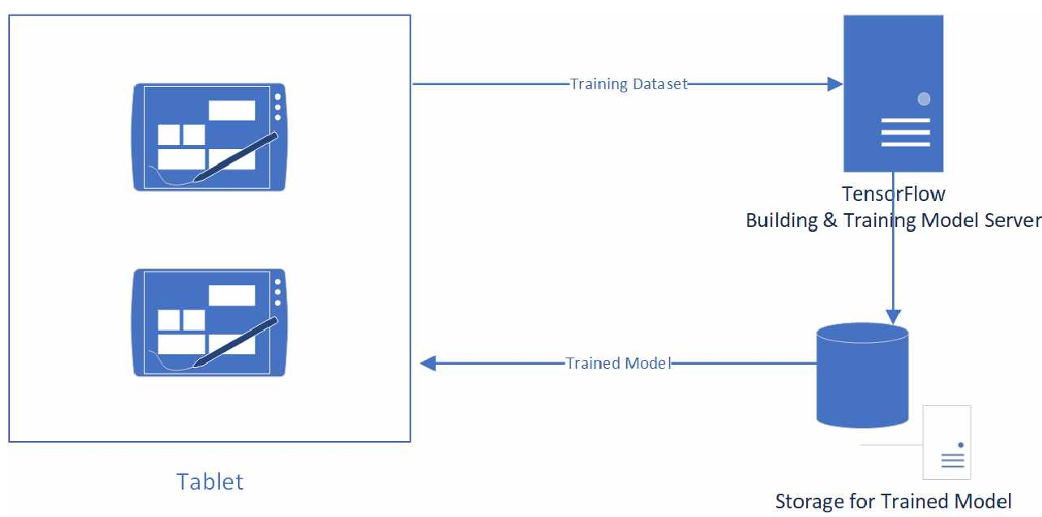 Fig 2. The iPad interface features distinct panes for dataset creation (top-left), model management (bottom-left), and live evaluation (right).
Deep Insight & Conclusion
This work represents a vital shift in AI pedagogy from Passive Consumption to Active Construction. By abstracting the syntax of Python while retaining the logic of data science, the authors provide a scalable path for fostering "AI use skills."
Summary of Contribution:
- Accessibility: Brings TensorFlow training to a mobile, touch-first interface.
- Collaboration: Includes features for group-based model development, mirroring real-world engineering teams.
- Future Work: The team plans to expand beyond image classification into other modalities, aimed at providing a comprehensive AI literacy curriculum.
Limitations: Currently, the system relies on a central server, which might limit deployment in low-connectivity environments. Additionally, the specific neural network architectures are abstracted away, which might prevent more advanced students from understanding hyperparameter tuning.