
Kaleidoscope: Bringing the Lab to the Browser for Scalable Web QoE Testing
Kaleidoscope: A Crowdsourcing Testing Tool for Web Quality of Experience
Kaleidoscope is a crowdsourcing-based testing tool implemented as a browser extension that enables large-scale evaluation of Web Quality of Experience (QoE). It uniquely supports side-by-side visual comparisons of webpage styles and a novel "visual replay" mechanism to test user-perceived page load time (uPLT), matching in-lab accuracy at 12x the speed of traditional A/B testing.
TL;DR
Web developers often face a dilemma: choose expensive, slow in-lab user studies or rely on high-traffic A/B testing that might alienate users. Kaleidoscope breaks this trade-off. It is an automated tool that uses a browser extension to turn remote crowdsourced workers into "lab participants," allowing for side-by-side visual comparisons and precise "loading replays" to measure what users actually feel when a page loads.
The Problem: The High Bar of Data-Driven Design
For giants like Google or Amazon, A/B testing is a superpower. But for the "smaller players"—researchers or niche developers—it is a nightmare.
- Lack of Traffic: Only 1 in 8 A/B tests produce significant results; without millions of users, you might wait weeks for a "maybe."
- Revenue Risk: Testing a "bad" UI variant on live users can permanently damage retention.
- The "onLoad" Fallacy: Traditional metrics like Page Load Time don't care if a user can actually read the content. They just care if the TCP connection is finished.
Kaleidoscope’s Methodology: The Browser as a Controlled Lab
Kaleidoscope moves the experiment from the server-side (where A/B testing lives) to the client-side extension. This allows the experimenter to control the environment like a local laboratory.
1. Side-by-Side Comparison
Instead of showing one version and hoping for a click (implicit feedback), Kaleidoscope shows two versions (e.g., Font A vs. Font B) side-by-side.
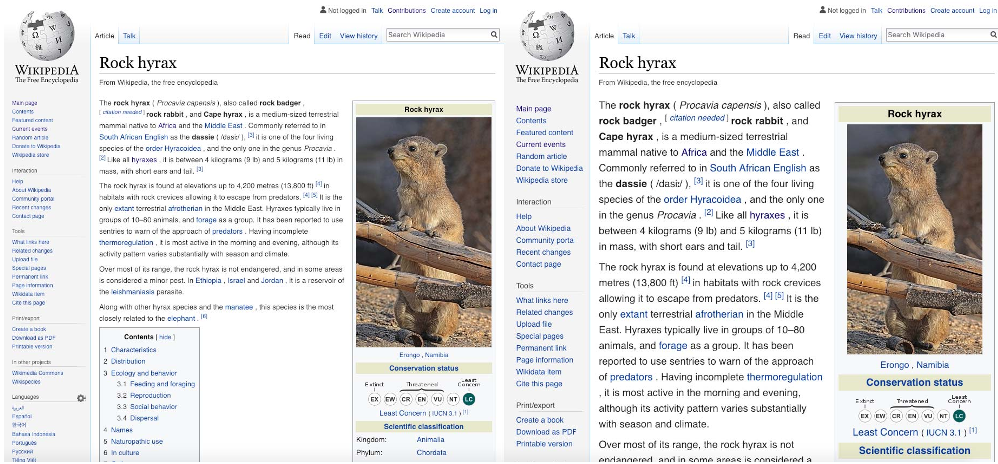 Fig 1: The side-by-side testing interface presented to participants.
2. Controlled Visual Loading (The "How")
How do you test if a website feels faster? Kaleidoscope injects a JavaScript function that hides all DOM elements and "replays" their appearance based on specific timestamps. This allows the tool to simulate different network profiles or loading strategies (e.g., "What if the text appears before the images?") regardless of the tester's actual internet speed.
3. Workflow
The system uses an Aggregator to compress webpage resources into a single file (using SingleFile) and a Core Server to manage crowdsourcing tasks via platforms like FigureEight (now Appen).
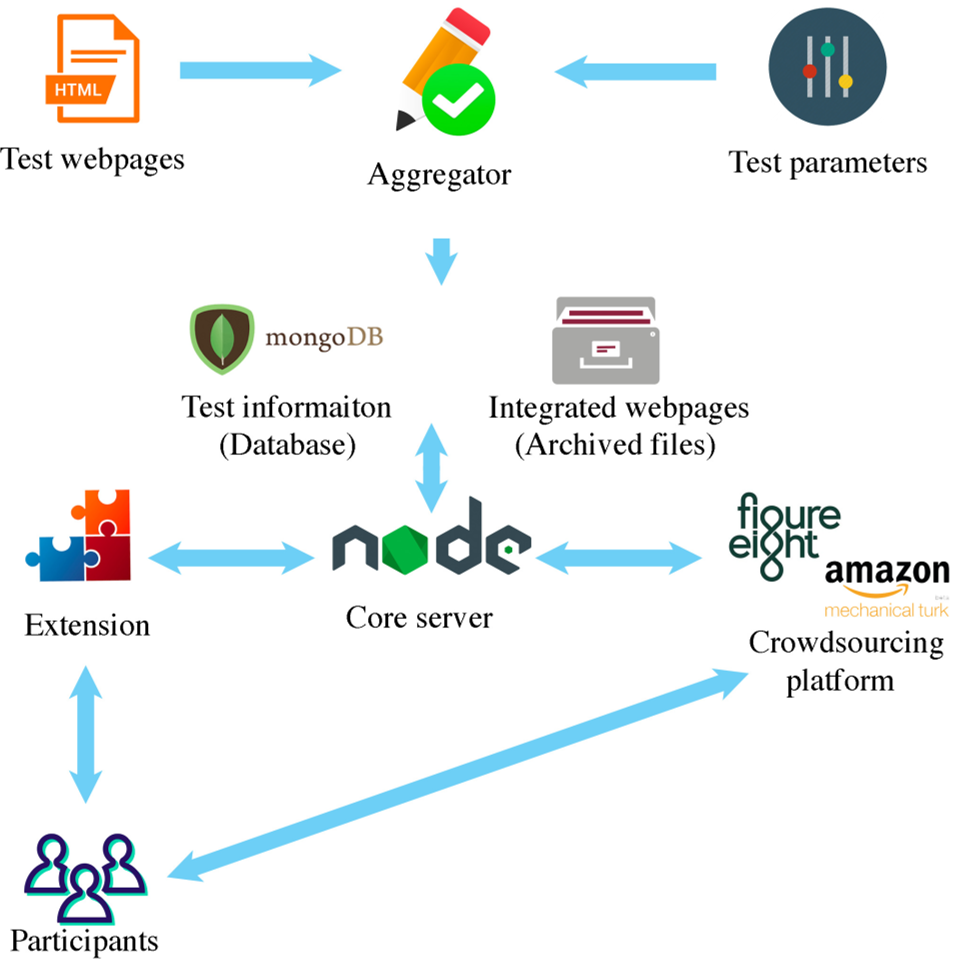 Fig 2: The architecture connecting the Aggregator, Core Server, and Browser Extension.
Experiments and Results: Faster, Cheaper, Better
Kaleidoscope vs. In-Lab
Testing font sizes for readability, Kaleidoscope matched the gold-standard results of in-lab studies (identifying 12pt and 14pt as optimal) while recruiting 100 testers for just $11.
The 12x Speedup over A/B Testing
When testing an "Expand" button's visibility:
- A/B Testing: Took 12 days to gather 100 visitors. The result was inconclusive ().
- Kaleidoscope: Took <1 day. The result was highly significant (), proving the new design was objectively more visible.
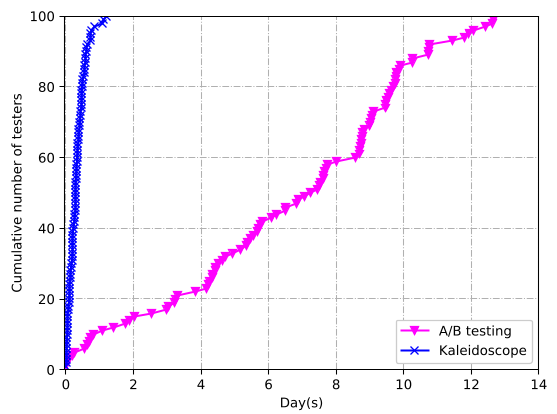 Fig 3: Comparison of statistical significance and user preference counts.
Critical Insight: Main Text is King
By replaying page loads, the authors found that even if two versions have the same "Above-the-Fold" (ATF) time, users perceive the page as "ready" much faster if the main text loads before the navigation bars.
Critical Analysis & Conclusion
Takeaway: Kaleidoscope proves that you don't need millions of users to get high-quality UX data. By leveraging crowdsourcing and client-side control, small developers can achieve "Big Tech" levels of optimization.
Limitations:
- Interactivity: Currently, the tool focuses largely on visual features. Testing deeply interactive states (like complex web apps) requires further refinement.
- Extension Friction: Requiring testers to install a browser extension remains a hurdle, though mitigated by paid crowdsourcing platforms.
Future Outlook: This approach paves the way for "Visual-Aware" performance optimization, where developers prioritize loading specific DOM elements based on human-perceived value rather than just byte size.