
Beyond Gestures: Reimagining Social Collaboration on Multi-touch Notice Boards
A multi-touch notice board fostering social interaction
This paper introduces a multi-user, multi-touch digital notice board using the OCGM (Objects, Containers, Gestures, and Manipulations) metaphor. It features a novel "continuous manipulation" folder system and workspace color-coding to facilitate social interaction and collaborative content sharing on large-scale interactive surfaces.
TL;DR
Researchers from the University of Cagliari have developed a multi-touch notice board that ditches "stop-and-start" gestures for continuous, fluid manipulations. By integrating social media, color-coded workspaces, and a unique zooming folder system, this project transforms large interactive displays into truly collaborative social environments where multiple users can work side-by-side without interference.
The Friction of Discrete Gestures
In the world of Human-Computer Interaction (HCI), we are often stuck in a world of "commands." You pinch, you wait for the system to recognize the gesture, and then the window opens. This is a discrete gesture. While functional, it lacks the fluidity of the physical world.
Furthermore, large touch tables often fail when two or three people try to share the screen. Who owns which note? Which keyboard belongs to whom? The "cluttered workplace" problem remains a significant barrier to effective Computer-Supported Cooperative Work (CSCW).
Methodology: The OCGM Metaphor in Motion
The authors leverage the OCGM (Objects, Containers, Gestures, and Manipulations) framework. Their breakthrough lies in shifting the focus from Gestures (indirect/discrete) to Manipulations (direct/continuous).
1. The Living Folder
Instead of double-tapping a folder to "open" it, the authors treated folders as elastic containers.
- The Zoom Logic: As a user zooms into a folder name (a text label), the pixels themselves expand and reorganize into a grid of documents.
- No Binary State: There is no "open" or "closed" state. A user can interact with a document even while the folder is "semi-closed." This mimics reaching into a partially opened box.
 Figure: The folder container is explored via continuous zoom-in manipulation.
2. Solving Multi-User Conflict
To allow simultaneous use, the system generates a unique Workspace for each person:
- Color-Coding: Every object created by "User A" gets a unique border color (e.g., blue), while "User B" gets another (e.g., green).
- Hierarchical Management: The system tracks a hierarchy where the "Toolbar" is the root. This allows the system to manage multiple virtual keyboards and social media sessions (Facebook APIs) independently on the same screen.
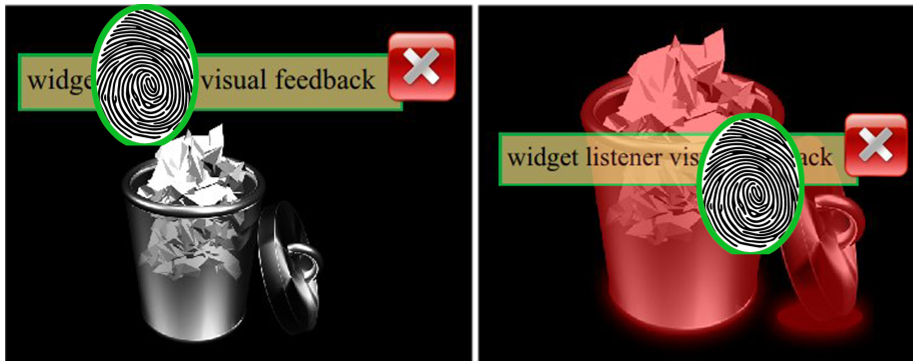 Figure: Color-coded borders allow users to visually discriminate between separate workspaces.
Experiments & Social Integration
The prototype was tested on a custom-built FTIR (Frustrated Total Internal Reflection) multi-touch table.
- Social Seamlessness: Users could log in, "push" digital drawings to their real Facebook profiles, or "pull" social media content down onto the table as interactive objects.
- Physical Intuition: The "Trash" functionality uses a shaking animation when an object is dragged over it, providing haptic-like visual feedback that creates a stronger sense of "physical" connection between digital items.
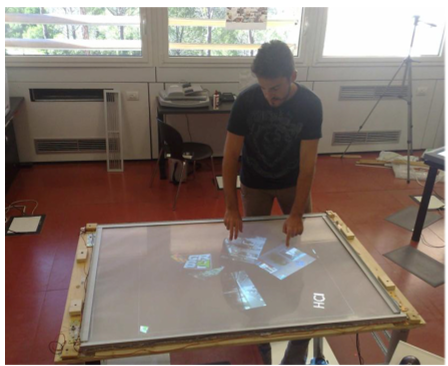 Figure: The system in use, supporting cooperative and collaborative tasks.
Critical Insights & Future Outlook
The real value of this work is the reduction of cognitive load. By relying on "skills-based behaviors" (like zooming and moving objects) that humans develop in infancy, the interface becomes "innate."
Limitations & Future Path: Currently, the system uses color to identify users, but it doesn't "know" where they are standing. The authors suggest that adding inexpensive depth cameras (like Kinect) could allow the board to "follow" the user, moving their workspace as they walk around the table.
In a world where we are increasingly isolated by personal mobile devices, this multi-touch notice board offers a return to the "communal square," updated for the digital age.