
Visualizing the Flow: A New Paradigm for Group Role-Sharing Decisions
Opinion Exchange Support System by Visualizing Input History
The paper introduces an asynchronous "Opinion Exchange Support System" that facilitates group role-sharing decisions through a visual, drag-and-drop interface. It replaces traditional text-based discussion with a system where users move candidate pictures into role-specific domains, and the evolution of the discussion is replayed via animation.
TL;DR
Reaching a consensus in a group—whether it's assigning cleaning duties or casting a play—is often a messy process of reading endless chat logs. This paper proposes a unique Opinion Exchange Support System that turns these discussions into a visual, animated experience. By moving pictures on a 2D board and replaying the history of these movements, users can intuitively "see" the debate evolve and reach a conclusion faster.
The Problem: The "Textual Log" Fatigue
In standard Bulletin Board Systems (BBS) or messaging apps, the "state" of a discussion is buried in chronological text. To understand why a decision was reached, a user must read everything from the beginning. This creates a high cognitive load, making it hard to see the "big picture" (the distribution of opinions) and the "history" (how opinions shifted over time).
The authors argue that for role-sharing problems (small groups of 4-8 people), text is often an inefficient medium. We need something more spatial, intuitive, and dynamic.
Methodology: Movement as Meaning
The proposed system replaces typing with spatial manipulation.
1. The Visual Interface
The screen is divided into domains representing different roles. To say "I think Person A should do Role B," a user simply drags Person A's picture into Role B's area.
2. The Logic of Brightness
The system uses a mathematical approach to represent convergence. The brightness of a candidate's picture in a specific domain is calculated by: Where is the count of pictures in that domain and is the total pictures of that candidate. If everyone agrees a person fits a role, their picture is brightest in that spot. If opinions are split, the images appear dim across multiple areas, signaling a lack of consensus.
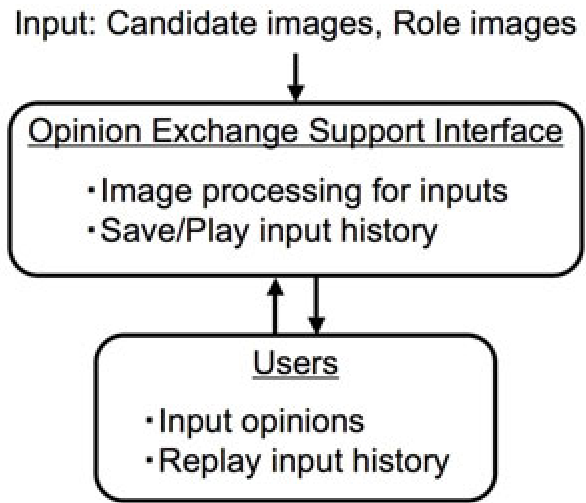 Fig 1: The conceptual architecture of the opinion exchange support system.
3. Forced Moves & Animation
To encourage interaction, a "forced move" function allows users to move pictures belonging to others (representing a counter-argument). Furthermore, the Animation Replay feature allows latecomers to watch the discussion "play back," where the speed of a dragged icon represents the user's confidence in that choice.
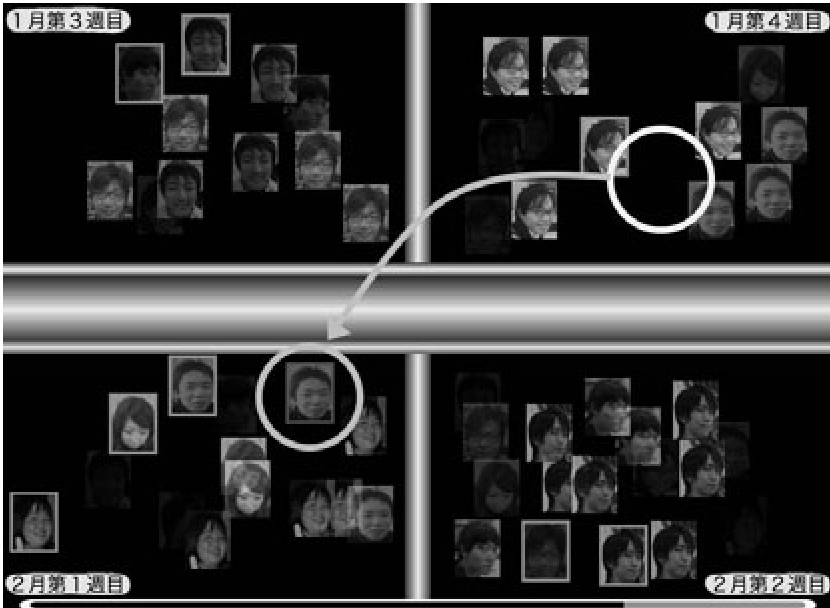 Fig 2: The actual user interface where role assignment (e.g., cleaning duties) takes place.
Experiments and Results
The researchers tested the system with 16 students across several tasks, ranging from mundane (Cleaning Duty) to creative (Casting Voice Actors for Dragon Ball).
Key Findings:
- From Divergence to Convergence: Before using the system, individual preferences were scattered (one person nominated for 5 roles, or roles with no nominees). After using the interface, the group naturally funneled toward a single candidate per role.
- High Engagement: "Forced moves" happened in ~80% of sessions, suggesting that users felt comfortable challenging other opinions through the visual interface.
- Intuitive Understanding: Users could distinguish the "winners" of the discussion simply by looking at which pictures remained bright and stable in specific domains.
 Table 2: Comparison of candidate selection before and after the opinion exchange process.
Critical Insight: Why This Works
The brilliance of this system lies in its Inductive Bias. By forcing users to interact with a 2D space, it leverages our natural spatial reasoning. Unlike text, which is linear, the 2D grid allows for a simultaneous view of all possibilities. The use of animation adds a temporal dimension that reveals the "struggle" of the decision-making process—something usually lost in static polls or chat logs.
Limitations & Future Work
- Scalability: The current system is optimized for 4-8 people. Scale this to 100 people, and the screen would likely become a chaotic mess of overlapping icons.
- Nuance: While moving pictures is fast, it loses the "nuance" of why a person thinks someone is suitable (e.g., "Alice is busy on Tuesdays"). Combining this visual tool with a secondary text-comment feature might be the next step.
Conclusion
This paper shifts the focus of collaborative tools from "storing data" to "visualizing intent." By treating a discussion as a dynamic animation of shifting opinions, the authors have provided a blueprint for more efficient, less stressful group coordination.