
Beyond the Glass House: Merging GUI Recognition with Scripting Power for the IT Pro
A Retrospective and Prospective View of Information Technology Professionals’ Use of Tools: Maturing the User Experience
This paper examines the evolution of the Information Technology (IT) professional's user experience, transitioning from specialized command-line interfaces to modern graphical user interfaces (GUIs). It introduces the "continuum of user experience" theory and demonstrates how products like Microsoft Exchange Server 2007 integrated GUI-driven workflows with PowerShell scripting to bridge the gap between novice-friendly and expert-level tools.
TL;DR
For decades, the industry assumed IT professionals (IT pros) required fundamentally different interfaces than general office workers. Candace Soderston’s research challenges this dichotomy. By analyzing twenty years of ethnographic data at Microsoft and IBM, she argues that IT pros are on a "continuum" of user experience. The ultimate solution lies in a synergistic design: interfaces that offer the discoverability of a GUI while seamlessly exposing the power of scripting languages like PowerShell.
The "Expert" Fallacy: Why Modern IT Pros Are Struggling
Historically, IT tools were built by scientists for scientists. This created a legacy where command-line interfaces (CLIs) and "recall-based" systems were the norm. However, the modern IT pro is no longer a dedicated technocrat focused on a single machine; they are multitaskers juggling email, browsers, and complex server management across layers of the stack.
Soderston points out a critical friction point: while IT pros have high technical aptitude, they suffer from the same cognitive bottlenecks as everyone else. Memory is a finite resource. When a tool relies on "recall" (knowing the exact syntax of a command) rather than "recognition" (finding an icon in a landscape), productivity drops during high-stress troubleshooting.
Methodology: Coding Human Error
The research isn't just theoretical. It stems from rigorous benchmarking at IBM where 95 information workers were tracked across different OS environments (MAC System 6, Windows 3.0, OS/2). This longitudinal study identified 10 persistent error types that transcend specific software.
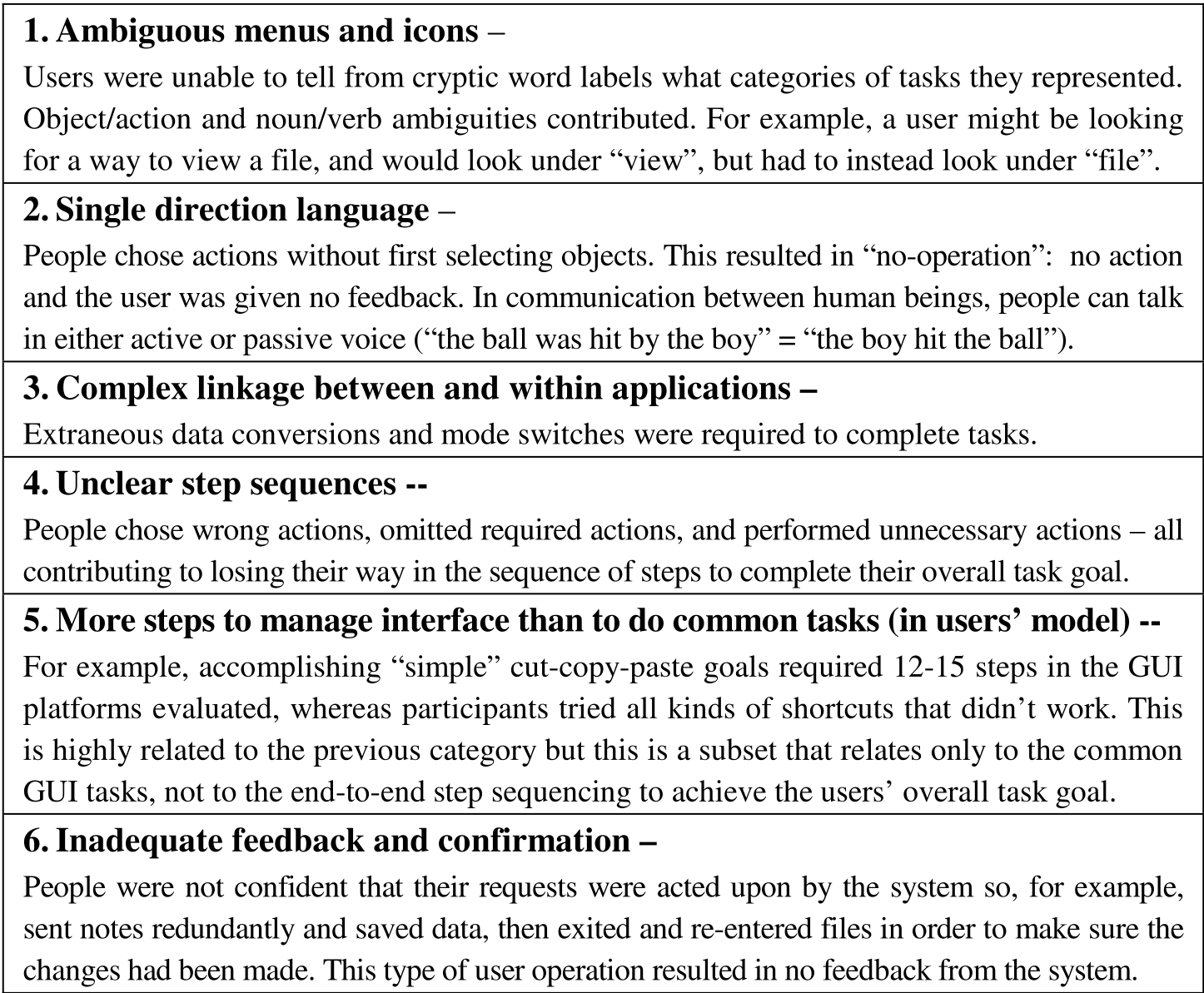
Key findings included:
- Ambiguous Action/Object direction: Users often try to perform an action before selecting an object, leading to "no-operation" states.
- Lack of System Anticipation: Systems often provide dead-end error messages instead of suggesting paths forward (e.g., offering to format a disk rather than just saying it's unreadable).
- Management Overload: The GUI itself often requires more steps to manage (moving windows, finding menus) than the actual task requires.
The Solution: Task-Oriented Overlays and Learning by Doing
One of the paper’s most significant contributions is illustrating how Microsoft transformed these insights into product features.
1. The Task-Oriented Hierarchy
In traditional admin consoles, everything is organized by "Objects" (Servers, Databases, Users). To do a task, you have to know where the object lives first. The author highlights BizTalk Server 2006 and Exchange Server 2007, which introduced "Task Overlays." These allow users to find their starting point through a hierarchy of verbs (actions) rather than just nouns (objects).

2. The PowerShell Integration (The "Training Wheels" Approach)
A breakthrough in Exchange Server 2007 was exposing the "under the covers" PowerShell scripts directly in the GUI. When a user performs an action via the mouse, the console shows the corresponding script. This allows the IT pro to:
- Verify what the system is doing.
- Copy and modify the script for bulk operations.
- Learn the syntax through recognition without the pressure of a blank screen.
Experimental Proof: Persistence of Errors
The paper emphasizes that even as GUI paradigms evolved, the "primitive" errors remained consistent. Whether on a legacy mainframe terminal or a modern Windows environment, users struggle with "cryptic word labels" and "unclear step sequences."
The data shown in the longitudinal charts (referring to Fig. 4 in the paper) reveals that while some errors drop off as a user gains experience, others—particularly those related to complex linkages—persist over time, suggesting they are flaws in the Interface Design rather than the User's Intelligence.
Critical Insight & Future Outlook
The core takeaway is that "Training wheels don't have to be removed if they're not in the way." The future of IT software isn't choosing between a CLI and a GUI; it is creating a "root hub" where both coexist.
Limitations: The paper reflects a specific era of enterprise software transition (early 2000s). In today's era of Cloud-Native and AI-driven operations, the new challenge isn't just GUI vs. CLI, but how "Intent-Based Networking" and "Natural Language" interfaces fit into this continuum. However, the fundamental human need for recognition over recall remains an evergreen principle for any developer building tools for professionals.
Summary of Impact
- Shifted Perspective: Moved IT pros from a "special class" to a "high-skill segment of the human continuum."
- Product Evolution: Directly influenced the design of Microsoft’s flagship enterprise consoles.
- Standardization: Promoted the idea that "expert fast paths" (scripts) should be discoverable through "novice landscapes" (GUIs).