
BrightPass: Leveraging Screen Brightness to Thwart Mobile Spyware
Using Screen Brightness to Improve Security in Mobile Social Network Access
The paper introduces BrightPass, a novel two-factor authentication mechanism for mobile social networks that utilizes screen brightness levels as a secure, out-of-band communication channel. By using brightness to signal whether to input real or fake PIN digits, it achieves high resilience against sophisticated spyware while maintaining superior usability compared to traditional CAPTCHAs.
TL;DR
In the battle against mobile identity theft, standard PIN codes are no longer enough—malware can simply "record" your screen. BrightPass introduces a clever hack: use screen brightness to tell the user when to input real PIN digits and when to tap fake ones. Since screen recorders don't capture brightness levels, the malware sees the taps but has no idea which ones are real.
Background: The Invisible Threat in Your Pocket
As smartphones become central hubs for social and financial identity, they have become prime targets for "Spyware Recording Attacks." Even if you use a Secure Element (SE), malware with root access can record touch coordinates and screen images. If you type "1234," the malware knows it.
Current solutions like CAPTCHAs are hated by users, and "graphical passwords" are often slow and prone to errors. The authors of "BrightPass" sought a way to keep the simplicity of a PIN while making it invisible to software-based observers.
The Core Insight: The Brightness Blindspot
The researchers discovered a fundamental limitation in mobile OS architecture: Standard screen capture and recording tools are brightness-blind. A white pixel is recorded as "white" (RGB: 255,255,255) whether your screen is at 10% or 100% brightness.
 Fig 1: Screen captures look identical regardless of physical brightness settings.
By using the Mean Squared Error (MSE) algorithm, the authors proved that the screen content remains identical to the software, even though the human eye sees a clear difference.
Methodology: How BrightPass Works
BrightPass employs a "Lie Overhead" strategy coordinated by the device's Secure Element (SE).
- The Challenge: The SE generates a random bit-sequence (e.g.,
1101001).1means "Real PIN digit," and0means "Fake digit." - The Signal: The screen displays a circle that alternates between high and low brightness.
- The User Action:
- Circle is Bright: Type a real digit of your PIN.
- Circle is Dim: Type any random "lie" digit.
- Verification: The SE receives the full string (e.g., a 7-digit string for a 4-digit PIN) and extracts only the digits at the "bright" timestamps.
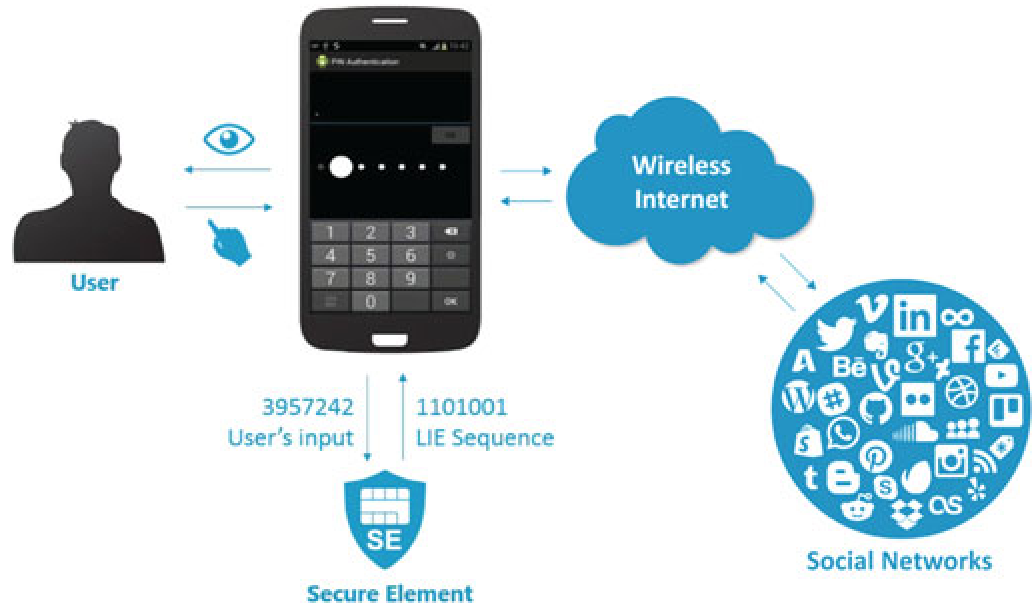 Fig 2: The BrightPass authentication flow from Social Network to Secure Element.
Security & Usability: The Best of Both Worlds
The beauty of BrightPass is that it doesn't require the user to memorize anything new—just their 4-digit PIN.
Security Analysis
- Recording Attacks: Even if malware records the entire session, it cannot distinguish between the real "3" and the fake "7" because it can't see the brightness changes.
- Side-Channel Attacks: The authors tested light sensors. Interestingly, the light sensor on most phones captures ambient light, not the light emitted by the screen itself, further protecting the secret.
Performance Results
In a head-to-head comparison with other secure schemes (PassWindow, FakePIN, KHS), BrightPass dominates:
| Metric | BrightPass | Competitors (Avg) |
|---|---|---|
| Auth Time | 6.73s | 11s - 18s |
| Error Rate | 1.81% | 4% - 18% |
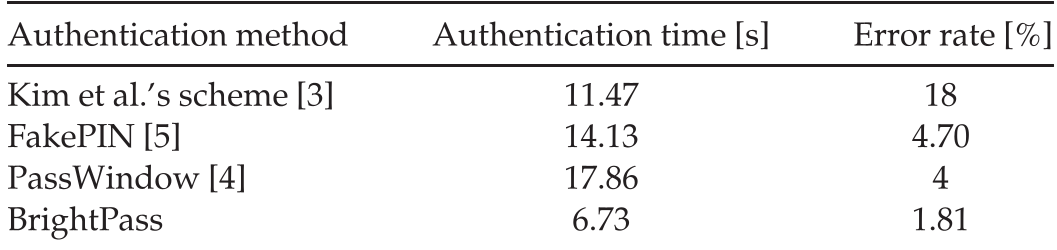 Table 1: Performance comparison showing BrightPass as the most efficient secure method.
Critical Analysis & Conclusion
Takeaway: BrightPass is a brilliant example of "Usable Security." It utilizes a hardware-level "out-of-band" channel that exists on every smartphone without requiring new sensors.
Limitations:
- Environmental Factors: Using brightness might be difficult in direct sunlight or for users with visual impairments.
- OS Evolution: If future versions of Android or iOS allow background services to monitor the
Window.attributes.screenBrightnessproperty, the security of this method would rely entirely on the Trusted Execution Environment (TEE) or Secure Element to hide those calls.
Overall, BrightPass demonstrates that sometimes the best way to secure a digital interaction is to step outside the digital data stream and use the physical properties of the device itself.