
TapTag: Re-designing Social Media Interaction for "Safe Exploration" by Older Adults
TapTag: Assistive Gestural Interactions in Social Media on Touchscreens for Older Adults
This paper introduces TapTag, a novel assistive interaction model designed for older adults to improve the learnability and accessibility of social media on touchscreens. The core method utilizes a multi-step single-tap mechanism and an interaction walkthrough, which helped participants achieve a 35% higher task success rate compared to the native Facebook application.
TL;DR
Social media is a lifeline for older adults seeking to avoid isolation, yet the "one-tap" nature of touchscreens often creates a barrier of fear rather than a bridge to connection. TapTag is an assistive gestural model that transforms risky one-step interactions into a safe, two-step "inform-then-activate" process. By adding cognitive scaffolding to the Facebook app, researchers achieved a 35% increase in task success and a dramatic reduction in user anxiety.
Problem: The "Fear of the Fatal Tap"
While touchscreens are often cited as more intuitive than a mouse, for older adults, they lack a crucial feature of the desktop: The Hover.
On a desktop, a user can move a cursor over an icon to see a tooltip without committing to a click. On a mobile phone, to touch is to act. The study found that:
- Lack of Forgiveness: Seniors fear making public mistakes (like sharing a private photo).
- Invisible Affordances: Abstract icons (like the Instagram "Direct" arrow) are often unintuitive.
- Cognitive Overload: The transition from desktop-centric web workflows to streamlined mobile apps leaves users feeling lost.
Methodology: The TapTag Philosophy
The researchers proposed a three-pronged intervention to make interfaces "forgiving" and "learnable":
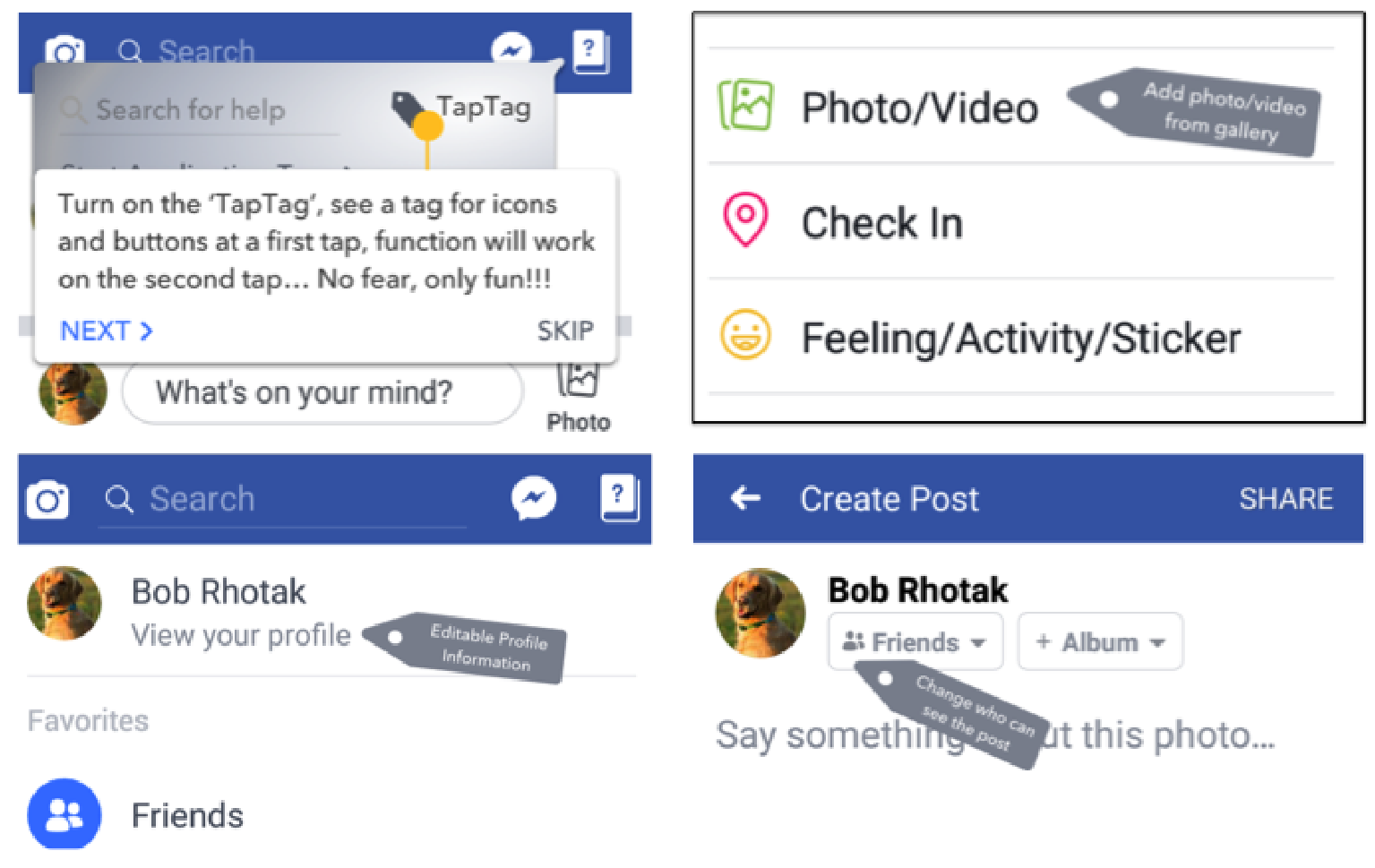
1. Multi-step Interaction (The "Mobile Hover")
When TapTag is active, the touchscreen mimics the safety of a mouse.
- Step 1: Tap an icon to trigger a Tag (a tooltip explaining what the button does).
- Step 2: Tap again to execute the function. This allows users to explore the UI without the consequence of accidental activation.
2. Interaction Walkthrough
Instead of a static manual, TapTag provides a series of pop-ups that highlight and explain the purpose of every standard button on the screen, acting as a live tour guide for new or updated features.
3. Content Accessibility (Keyword Filtering)
Older adults often feel overwhelmed by "irrelevant" content (e.g., political rants or ads). TapTag introduces keyword-based filtering to give users a sense of agency over their News Feed, a feature currently hidden or non-existent in many native social apps.
Experiments: Proving the "Safe Interaction" Concept
The researchers conducted a within-subject study comparing native Facebook with the TapTag-enhanced version.
Key Results:
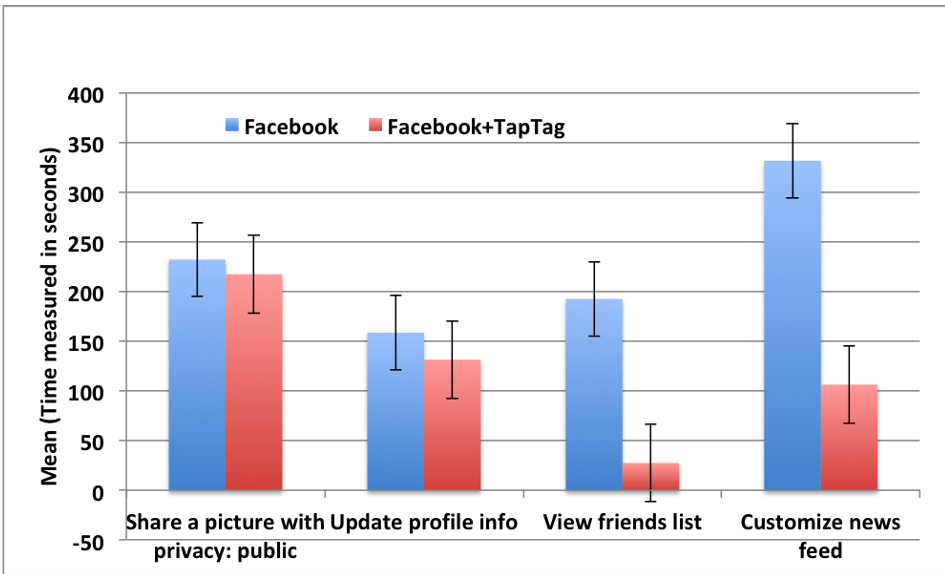
- Success Rates: For complex tasks like "Customizing news feed," the success rate jumped from 0% to 80%.
- Efficiency: In Task 3 (locating friends list), the average time dropped from 192.5 seconds to 27.5 seconds.
- Subjective Satisfaction: Users reported that the "Tags were readable and helpful," leading to a significantly higher ease-of-use score.
Critical Analysis & Conclusion
The genius of TapTag lies in its simplicity. It doesn't attempt to redesign the entire OS; instead, it provides an assistive "layer" that respects the user's existing mental models from the desktop era.
Limitations
- Platform Scope: The study was primarily focused on Facebook.
- Intermediate Users: The participants had at least two years of experience; results might differ for absolute tech novices.
Future Outlook
As we move toward AR/VR and Mixed Reality, the "one-step" interaction problem will only intensify. TapTag’s concept of cognitive affordance before activation provides a vital blueprint for making any complex interface accessible to aging populations. The next step is applying this to high-stakes domains like mobile banking and digital health, where a "mis-tap" has real-world consequences.
Takeaway: In inclusive design, "efficiency" (fewer taps) should never come at the cost of "efficacy" (user confidence).