
TaskTracer: Bridging the Cognitive Gap in Multitasking Environments
Tasktracer: a desktop environment to support multi-tasking knowledge workers
TaskTracer is a software framework designed to assist multitasking knowledge workers by monitoring cross-application desktop activities and associating interaction events with specific tasks. It utilizes a novel Publisher-Subscriber architecture and integrates with Microsoft Office and Windows OS to enable seamless interruption recovery and knowledge reuse.
TL;DR
TaskTracer is an intelligent desktop environment designed to alleviate the "multitasking tax" paid by knowledge workers. By monitoring every click, file open, and window switch across the Windows ecosystem, it builds a comprehensive Task Profile. This allows workers to instantly recover from interruptions and reuse successful past workflows, effectively transforming a chaotic desktop into a structured repository of task-specific knowledge.
Background: The Fragmented Desktop
In the modern workflow, a "task" isn't just a single document; it’s a web of emails, Excel sheets, browser tabs, and IDE windows. The core problem is that our Operating Systems are resource-centric, not task-centric. When you switch from "Writing a Grant" to "Answering Student Emails," you manually hunt for files and lose your mental "thread." TaskTracer argues that the computer should "understand" these working spheres and manage the context for you.
Methodology: The Publisher-Subscriber Engine
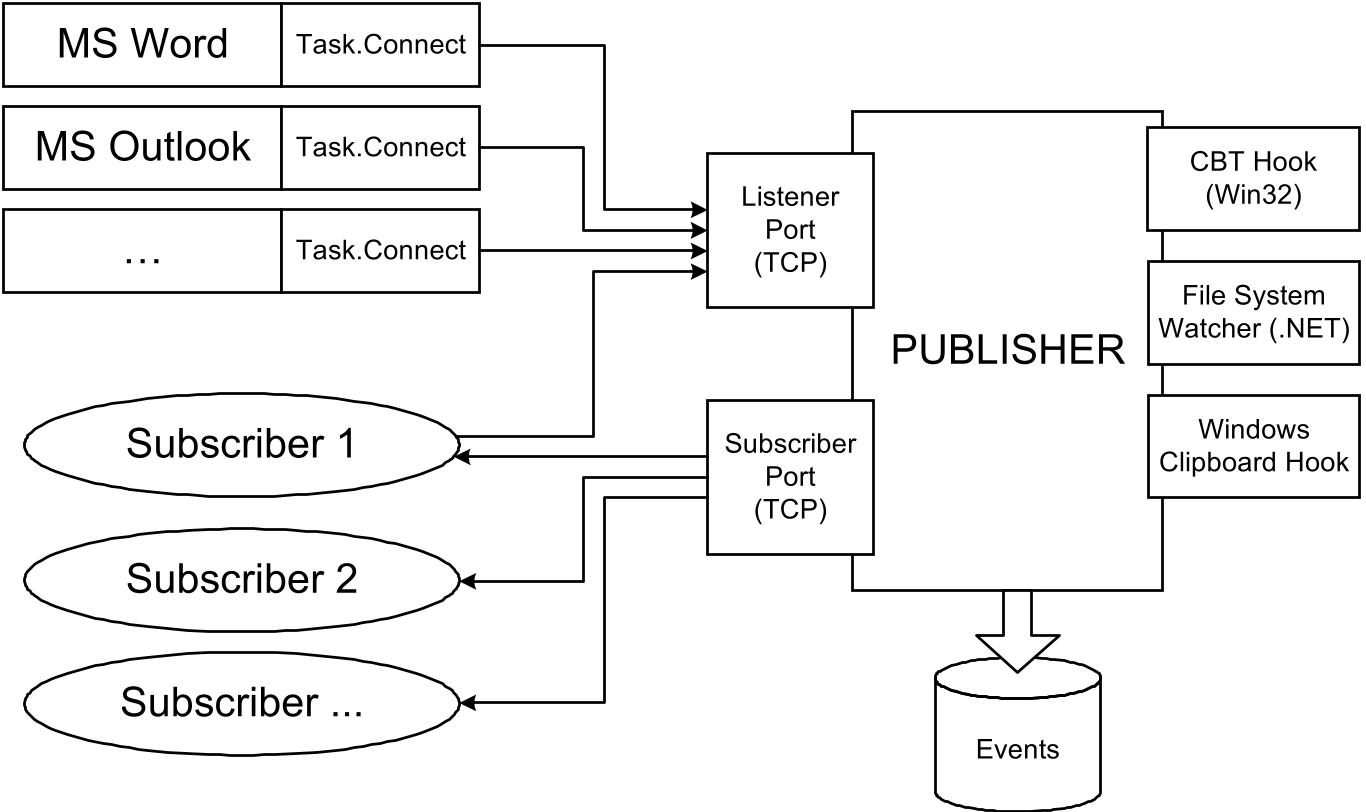
At the heart of TaskTracer is a robust Publisher-Subscriber Architecture. This design decouples the "messy" work of capturing low-level OS hooks from the "clean" work of analyzing what the user is actually doing.
1. Robust Data Capture
Unlike previous attempts that relied on simple file-system monitoring, TaskTracer goes deep:
- .NET COM Add-ins: Deeply integrated into MS Office (Word, Outlook, Excel).
- OS Hooks: Monitoring window focus, clipboard events, and even phone call metadata via Caller ID.
- VBA Integration: Bypassing standard COM limitations to capture granular internal application events.
2. The Architecture
The Publisher acts as a "tape recorder," storing raw event messages in a database. This allows researchers to "replay" a user's workday to test different Machine Learning models for task prediction.
Evolution of the Interface
The authors explored multiple UI metaphors to find the "Goldilocks zone" of visibility without irritation:
- The Pop-up Menu: A floating semi-transparent label. Verdict: Too intrusive, blocked buttons.
- The Start Menu Integration: Hacking the Windows Start button to be task-aware. Verdict: Familiar, but struggled with large task lists.
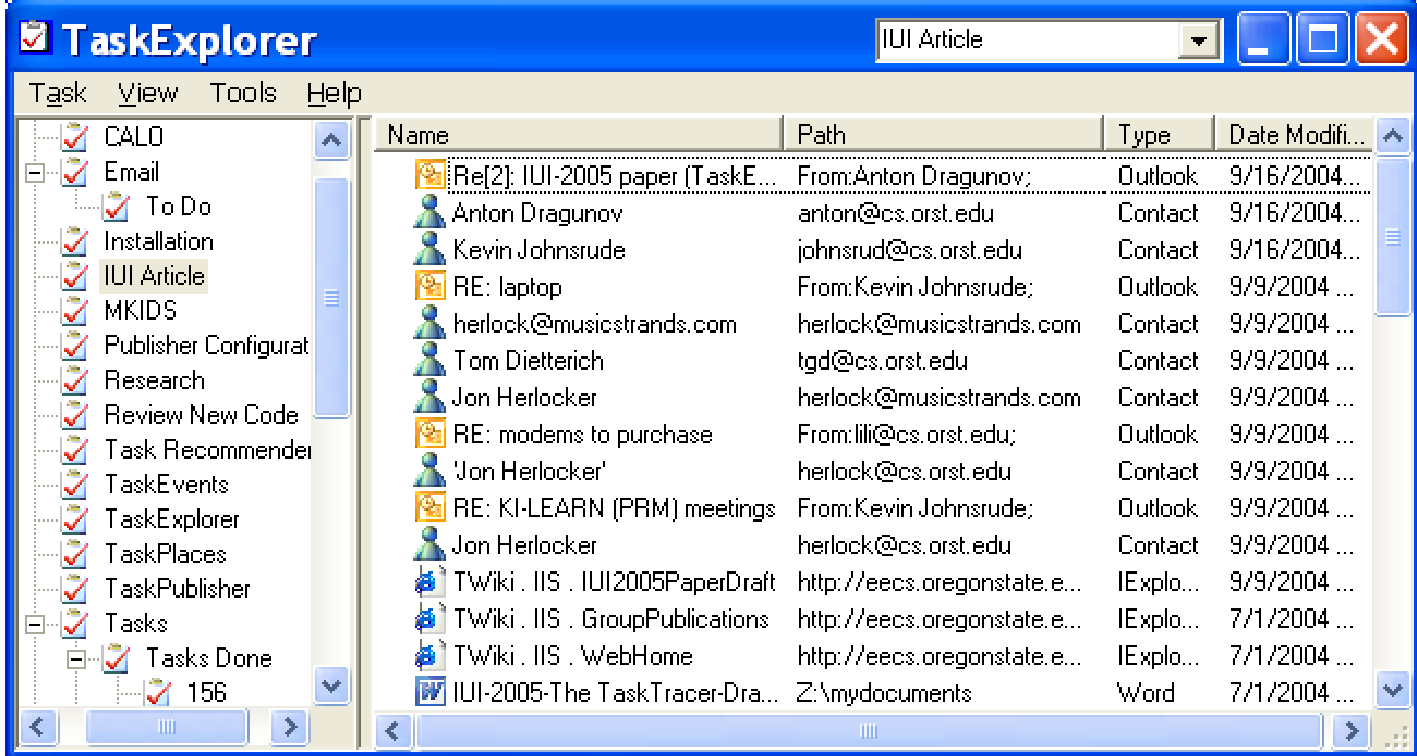
- TaskExplorer: The winner. Using a "File Explorer" metaphor (Windows Explorer), it provides a dedicated tree view of tasks on the left and associated resources on the right.
Insight: The "Noise" Problem
A critical challenge identified is the Human-in-the-loop struggle. If a user has a "Grant Writing" task active but quickly uses a browser window to search for a personal flight, that event "pollutes" the task profile. The authors highlight a fundamental tension: users will often take the path of least resistance (introducing noise) rather than perform the cognitive work of switching the system's state. This is where the paper points toward its future: Machine Learning. By analyzing the content of documents and the sequence of events, the system aims to eventually "guess" when a switch has occurred.
Critical Analysis & Conclusion
TaskTracer is a foundational piece in Personal Information Management (PIM). Its contribution isn't just the software, but the realization that "context" is the most valuable asset a knowledge worker has.
Key Takeaways:
- Interruption Recovery: Restoring applications and even "scrolling" documents to their last-seen state is a massive productivity booster.
- Knowledge Templating: Being able to see the specific sequence of documents used for a successful project 12 months ago allows for "process reuse," not just "file reuse."
Limitations: The 2005-era technology struggled with non-Microsoft applications (though hooks for Mozilla were in progress) and the accuracy of phone call transcription. More importantly, the system still relied heavily on manual task selection—a hurdle that Modern AI (LLMs and Activity Transformers) might finally overcome.
Future Outlook
While TaskTracer was ahead of its time, its DNA lives on in modern "Focus Modes" and "Smart Folders." The next frontier lies in Autonomous Task Tracing, where the system identifies tasks through semantic understanding of the screen content, rather than manual user input.