
Suggestions: Redefining Enterprise Coordination through Tentative Events
The design and usage of tentative events for time-based social coordination in the enterprise
The paper introduces "Suggestions," a novel social coordination mechanism integrated into an enterprise micro-calendar system called "Timely." It leverages tentative events—incomplete entries missing a "what" or "when"—to facilitate open negotiation, voting, and discussion within an enterprise social network.
TL;DR
Scheduling a meeting shouldn't feel like a bureaucratic chore. While traditional calendars require you to know the exact "what" and "when" before you click "save," real life is messier. This paper introduces Suggestions, a tool built into the Timely social calendar that allows users to create "tentative events." It transforms the calendar from a static record into a dynamic social space where groups can vote, comment, and negotiate event details before they are finalized.
Problem: The "Closed Island" of Enterprise Calendaring
The authors identify a fundamental mismatch between how we work and how our calendars function. Today’s Groupware Calendaring Systems (GCS) suffer from three fatal flaws:
- Rigidity: You must define an event's properties upfront.
- Opacity: Only the organizer sees the "declines" or "proposals," creating a communication bottleneck.
- Fragmentation: Because calendars are too formal, coordination leaks into IM, email, and phone calls, leaving the calendar disconnected from the actual decision-making process.
The research intuition here is simple: Why not treat an event as a conversation rather than a finished product?
Methodology: The Anatomy of a Suggestion
The "Suggestions" system operates as a feature of Timely (a Twitter-like micro-calendar for the enterprise). It relies on three core pillars:
1. The Tentative Event
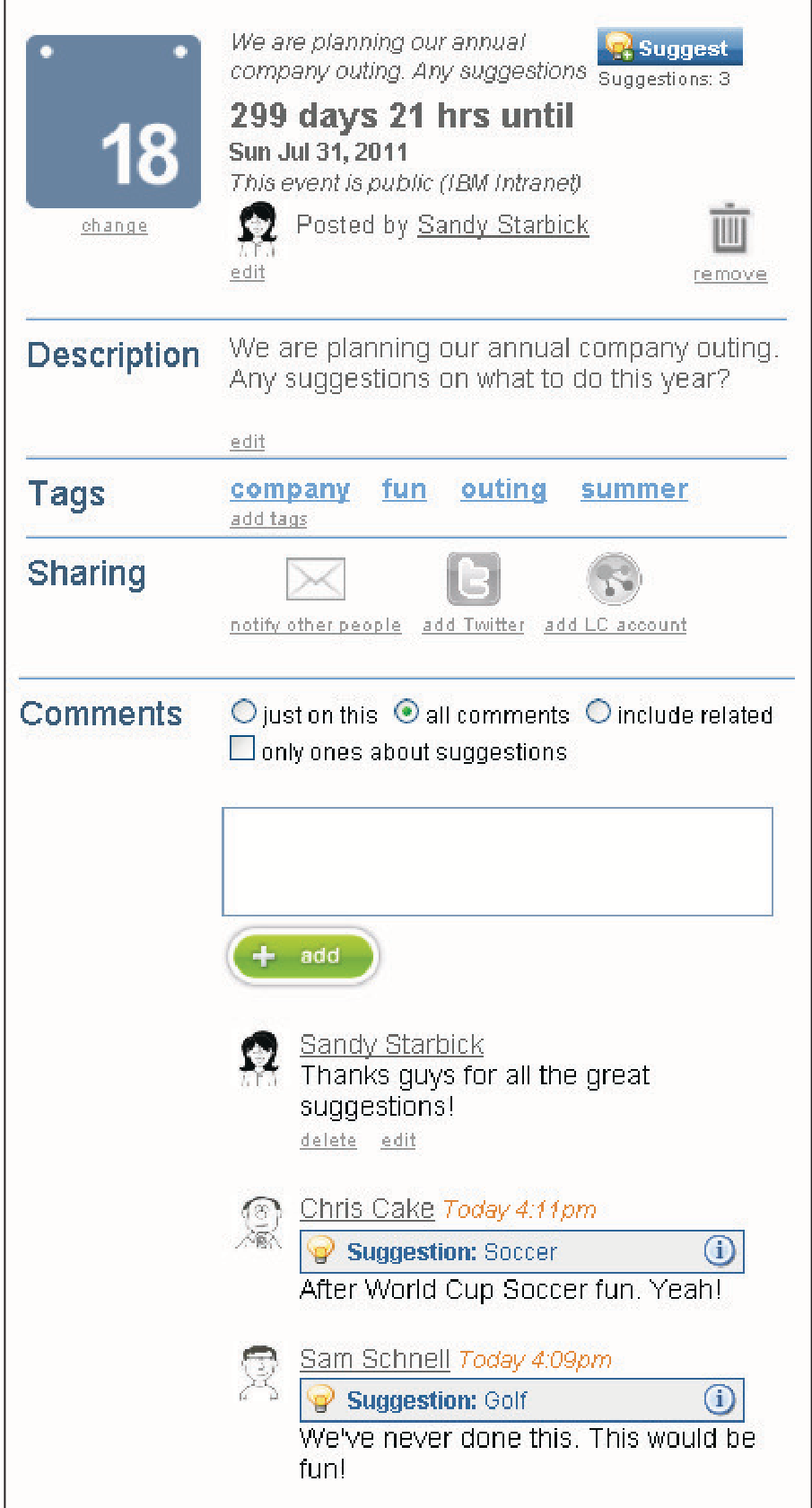
Instead of a solid block on the grid, a tentative event is an invitation for input. Users can create an event with a missing "What" (e.g., "Company Outing - suggestions needed") or a missing "When" ("Architecture Review - which afternoon works?").
2. Lightweight Polling & Negotiation
Drawing inspiration from systems like Doodle, the authors integrated a voting and suggestion interface directly into the event stream.
- Add Suggestions: Anyone in the network can propose a time or an activity.
- Social Voting: Users check boxes for options they like, with vote counts visible to all.
- Inline Discussion: Comments are attached to specific suggestions, allowing users to argue for or against a specific time/location in context.
3. Acceptance and History
Once a consensus is reached, the creator "Accepts" a suggestion. The event converts into a standard entry, but—critically—the Coordination History remains. This transparency ensures everyone understands why a specific decision was made.
Experiments: How Do Employees Actually Coordinate?
The system was deployed within IBM for nearly three months. The researchers analyzed 40 tentative events and conducted deep-dive interviews.
Quantitative Insights:
- Primary Use Case: 61% of tentative events were used to find the "When" (scheduling), while 39% focused on the "What" (brainstorming).
- Context: 82.5% were work-related, proving that "social" tools have a serious place in productivity.
Qualitative Gains:
- The "Shotgun" Effect: One user described using the system to "shoot into the company" to find experts he didn't even know existed. By making a request public, he received "bonus responses" from outside his immediate circle.
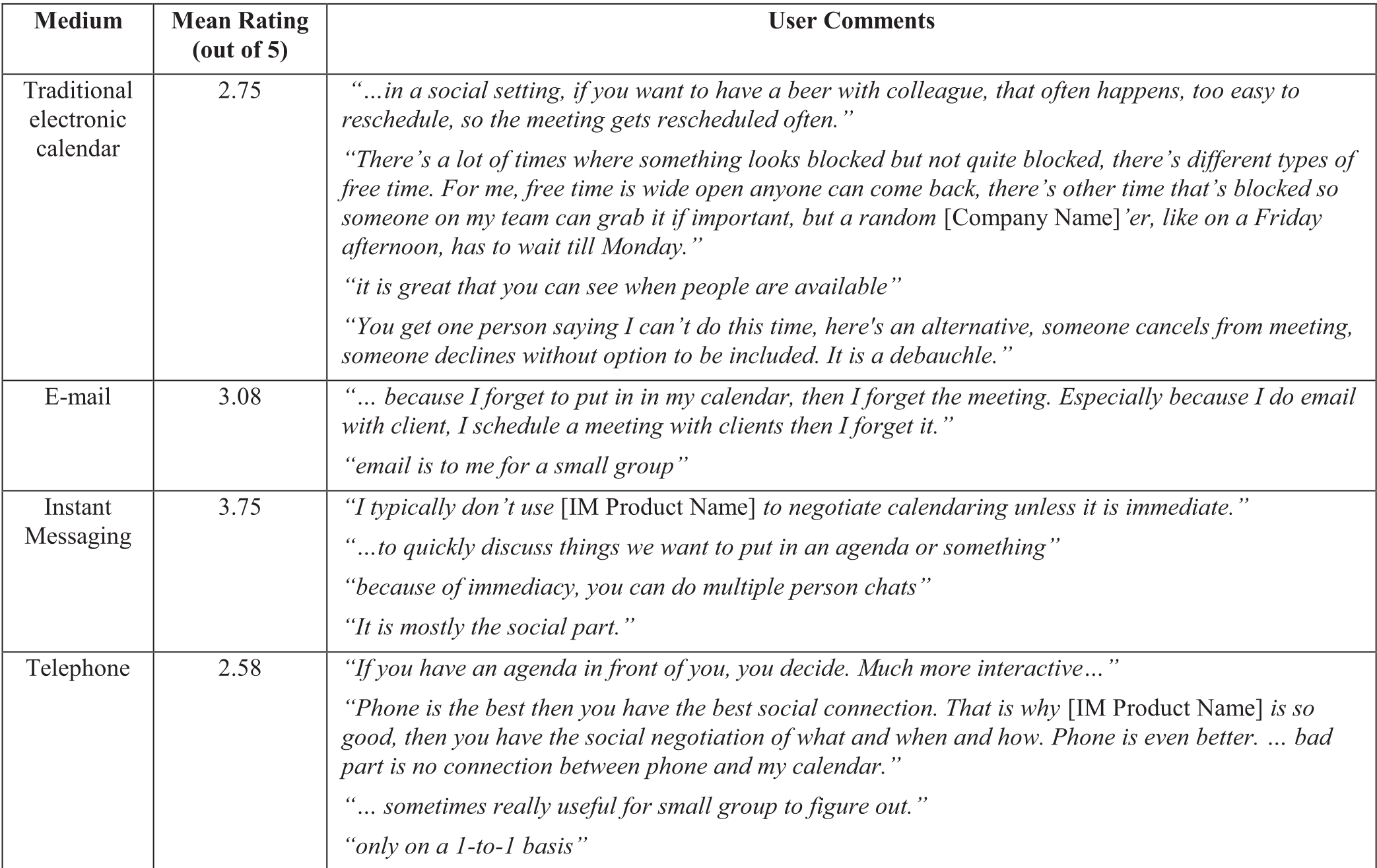
- Media Comparison: High-fidelity channels like Telephone or Face-to-Face are great for small groups but don't scale. Suggestions provided a middle ground: the "social feeling" of IM with the structured data of a calendar.
Critical Analysis: Why Aren't We All Using This?
The paper honestly addresses the elephant in the room: Legacy Inertia. Despite the benefits, users were reluctant to manage two calendars.
The Takeaway? You cannot defeat a "System of Record" (like Outlook or Lotus Notes) by being better; you must be integrated. The authors conclude that the future isn't a new calendar app, but a social "sidebar" or "plugin" that adds these negotiation layers to the tools people already use.
Furthermore, the "Open by Default" nature of this tool is its greatest strength and its greatest liability. In a large enterprise, privacy tiers (Social Circles) are essential to prevent "notification fatigue" and to protect sensitive meeting agendas.
Future Outlook
As we move toward more decentralized and remote work environments, the "open-access" model of coordination looks increasingly prophetic. The design of "Suggestions" anticipates the flexible, transparent collaboration models seen in modern tools like Slack's Huddles or Notion's shared workspaces. The next step? Integrating Large Language Models (LLMs) to synthesize these "suggestions" and automatically resolve the most logical "what" and "when" for a team.