
AMCOSOP: Reimagining Social Networks as Non-Intrusive "Digital Photo Frames" for the Elderly
User interface for social networking application for the elderly
This paper introduces the AMCOSOP (Ambient COmmunication for Sense Of Presence) system, a specialized social networking interface designed for elderly users with little to no computer experience. It employs a touch-screen "Home Terminal" featuring intuitive, high-visibility UI elements and presence-sharing functionality to reduce social isolation.
TL;DR
The AMCOSOP project bridges the digital divide for seniors by replacing complex social media feeds with a dedicated "Home Terminal." Through a user-centered design process, the researchers created an interface where presence information is communicated through visual metaphors—such as varying photo sizes—making social connectivity as natural as looking at a picture on a mantelpiece.
Perspective: Moving Beyond the "PC-for-Seniors" Paradigm
Most attempts to bring the elderly online involve "dumbing down" existing operating systems (e.g., SeniorPC). The authors of this paper argue that this approach fails because it doesn't remove the "stigma" or "fear" of the computer. AMCOSOP is positioned not as a computer, but as a decoration—a source of peripheral awareness that fosters a "Sense of Presence" without the cognitive load of a modern OS.
The "Why": Solving for Social Isolation and Surveillance Fear
Independent living often leads to loneliness, which significantly increases dementia risk. However, seniors often reject assistive technology if it feels like they are being "watched."
- The Insight: Availability information is the cornerstone of connection. Seniors often hesitate to call relatives for fear of "interrupting" them. By providing a "glanceable" availability status, the system lowers the barrier to spontaneous communication.
Methodology: Designing with, Not Just For
The transition from abstract mocks to a functional terminal followed a rigorous iterative path:
- Cultural Probes: Users were given "mock-ups" (cardboard in photo frames) to place in their homes to identify the best physical location (usually the living room).
- Visual Metaphors: Instead of "Online/Offline" text, the system uses image scaling. A large photo indicates "Available," while a small photo denotes "Busy."
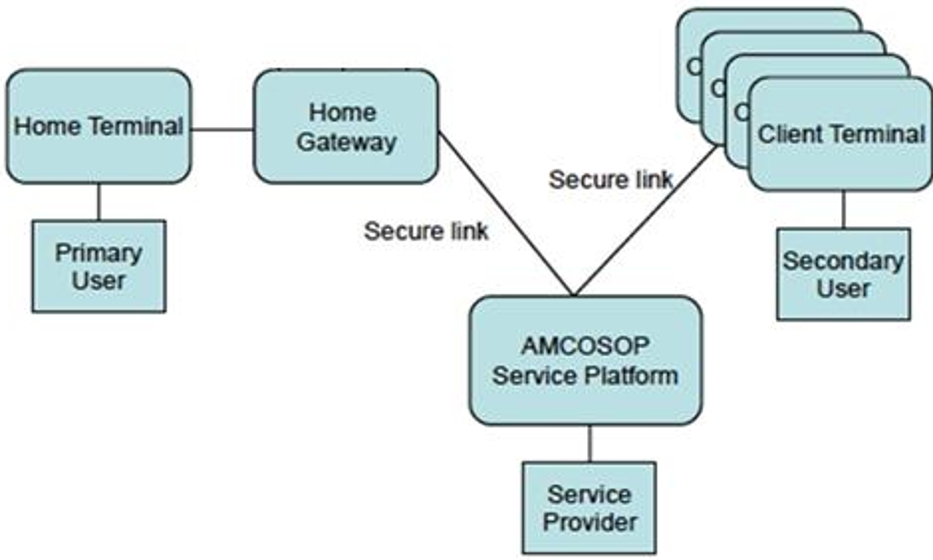 The AMCOSOP ecosystem: Connecting the Home Terminal to a cloud-based service platform and a safety net of relatives.
The Core Mechanism: The Home View
The interface is built on JavaFX to ensure a "rich" and fluid user experience. The primary interaction occurs in the Home View, where the "Safety Net" is visualized.
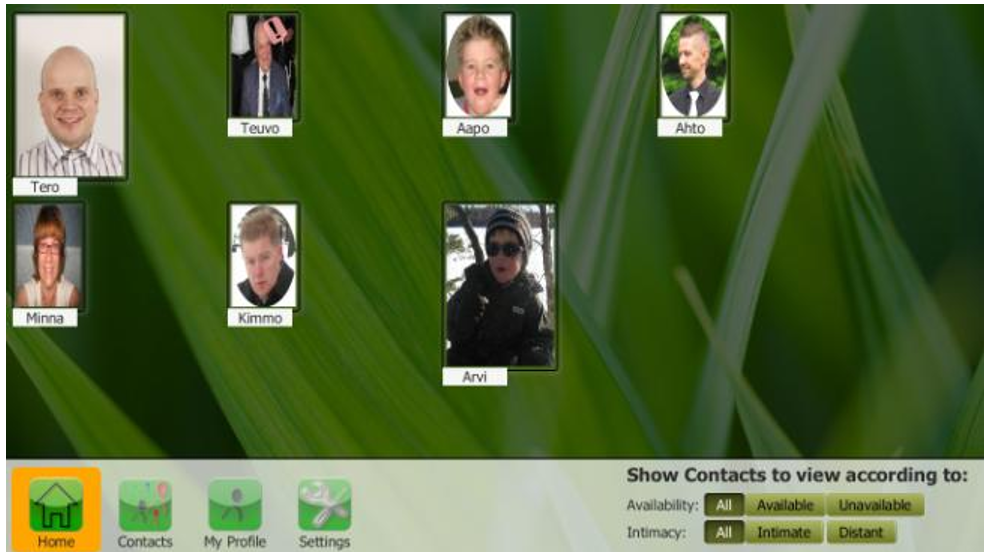 Figure: The Home View. Note the variation in photo sizes, allowing users to gauge their entire social circle's status at a single glance.
Experimental Validation: Does it Work?
The 10-week field trial in Finland and Austria evaluated the system using the TAM3 (Technology Acceptance Model).
- Ease of Use: Scored exceptionally high, demonstrating that the "photo-frame" metaphor succeeded in reducing computer anxiety.
- Usage Patterns: Initial usage was low but grew steadily as users gained confidence, averaging 30-40 minutes per day.
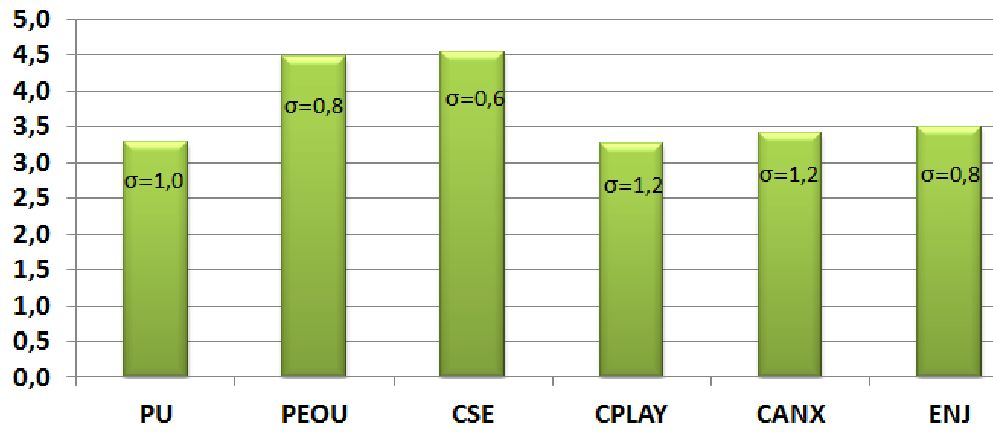 Experimental Result: High scores in Perceived Ease of Use (PEOU) and Computer Self-Efficacy (CSE) show that the interface overcame the initial barrier of technology fear.
Critical Insight: The "Boring" Paradox
Interestingly, some participants found the UI "too simple" or "boring" after several weeks. This reveals a secondary challenge in geriatric UX: Progressive Disclosure. Once a user masters the basics, they desire more agency—such as the ability to write custom messages rather than just selecting predefined moods.
Conclusion & Future Outlook
AMCOSOP successfully proves that social networking for the elderly is a hardware/UI problem, not a capability problem. By masking a sophisticated XMPP/REST communication stack behind a simple touch interface, the researchers allowed non-users to join the digital age. Future iterations will focus on adding "input flexibility" (writing messages) without sacrificing the core simplicity that made the system approachable in the first place.