
Social Media Exclusion: Why the World's Biggest Platforms Fail the Visually Impaired
Web Accessibility in Social Networking Services
This study evaluates the web accessibility of four major social networking sites (Facebook, LinkedIn, ResearchGate, and Twitter) specifically for visually impaired users. Using a dual-stage assessment combining WCAG 2.0 automated tools and expert manual reviews, the research identifies significant systemic failures in meeting international accessibility standards.
TL;DR
A rigorous audit of Facebook, LinkedIn, Twitter, and ResearchGate reveals a startling reality: none of these global giants meet the minimum international standards for web accessibility. By combining automated code analysis with expert manual testing, researchers found that visually impaired users are systematically blocked by poor HTML structure, missing descriptors, and navigation traps.
The Hidden Barrier in Our Digital Town Square
We often hear that technology is the great equalizer. For people without disabilities, technology makes things easier; for people with disabilities, technology makes things possible. However, as social networking services (SNS) have become the primary utility for communication, a massive demographic is being left behind. With 15% of the population living with some form of disability, the failure of these platforms to adhere to WCAG 2.0 (Web Content Accessibility Guidelines) is not just a technical oversight—it is a barrier to social inclusion.
Methodology: The GQM Paradigm
The researchers didn't just run a single "scanner" and call it a day. They utilized the Goal Question Metric (GQM) approach to ensure their findings were logically grounded.
- Stage 1: Automated Syntax Analysis: Using tools like AccessMonitor and Total Validator, they checked the "grammar" of the sites—identifying broken tags and missing
alttext. - Stage 2: Expert Semantic Review: Experts navigated the sites using screen readers. This is crucial because a tool might see that an image has "text," but it takes a human to realize the text says "Image123" instead of "Logo of the Company."
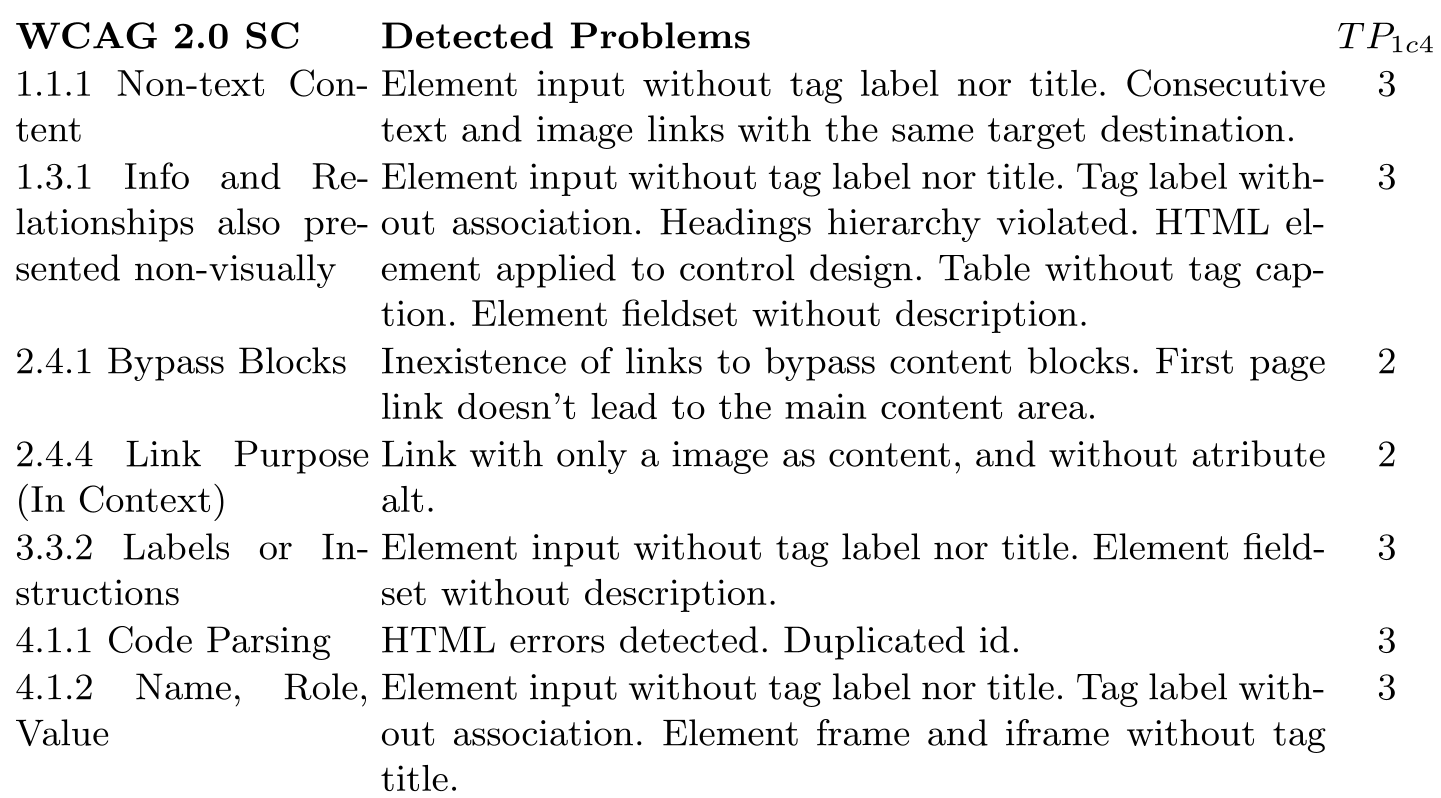 Table: Success criteria and the specific technical failures identified in automated trials.
Why They Failed: A Look at the "Big Four"
1. Facebook: The Perception Problem
Facebook struggled significantly with the Perceivable Principle. Experts noted that while the site is rich with media, videos shared by users rarely had transcripts, and images often lacked meaningful alternative text. For a blind user, a news feed becomes a series of "unidentified links."
2. LinkedIn & ResearchGate: The Navigation Trap
Both platforms suffered from Keyboard Inaccessibility. In many cases, information blocks on the right side of the screen were completely unreachable via keyboard because the main feed would "auto-recharge," trapping the user's focus in a loop.
3. Twitter: The Global Underperformer
Twitter (at the time of the study) showed the highest number of criteria failures. It failed across all four WCAG principles: Perceivable, Operable, Understandable, and Robust.
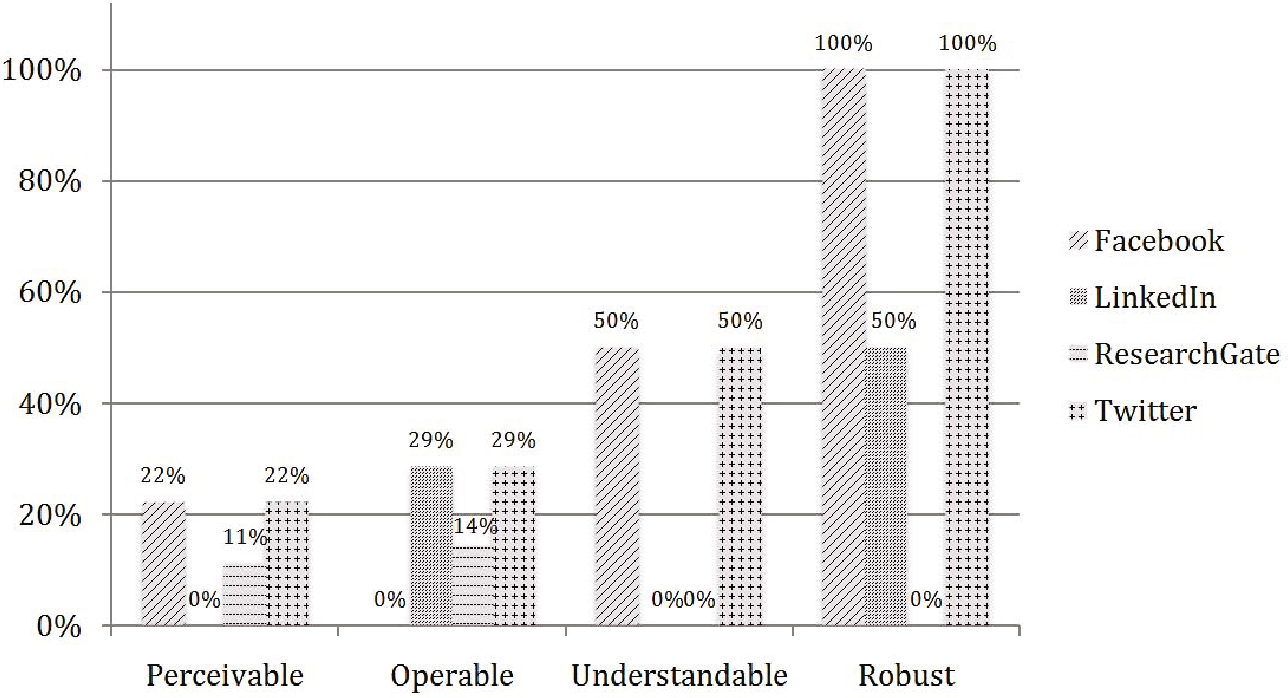 Graph: Percentage of failures by platform, highlighting Twitter's widespread issues across principles.
Critical Insight: Syntax vs. Semantics
One of the paper's most salient points is that automated tools are insufficient.
- An automated tool can confirm if a
<label>exists. - Only a human expert can confirm that the label actually helps the user understand what to type in a box.
The study found that the Understandable Principle was the most problematic in practice. Sites frequently used color alone (e.g., a red border) to indicate a login error. To a screen reader user, the page seemingly does nothing, providing no verbal feedback that an error occurred.
Conclusion: A Call for Robust Code
The failure of these platforms to reach Level A (the lowest conformance level) is an indictment of modern web development priorities. For social networks to be truly "social," they must be "universal."
Key Recommendations for Developers:
- Prioritize Robustness: Ensure HTML is well-formed so assistive technologies don't crash or skip content.
- Meaningful Feedback: Don't rely on visual cues (like color) for error messages.
- Skip Navigation: Provide "bypass blocks" so screen reader users don't have to listen to 50 menu items before getting to the main post.
The researchers leave us with a powerful reminder: Accessibility is not a "feature"—it is a fundamental requirement of software quality.