

Google Scholar is useful, but keyword search has a built-in weakness: it only finds what your words can reach. If another field uses different terminology for the same idea, you may miss important papers. If your query is too broad, you may drown in results that look related but do not answer the question.
AI academic search helps by searching concepts, research questions, citation neighborhoods, and paper meaning rather than only exact terms. That does not make keyword search obsolete. It gives researchers another route into the literature.
The best search workflow uses both. Use AI search to discover language, papers, and adjacent concepts. Then use structured keyword searches, citation chasing, and database-specific queries to make the search defensible. If you are still comparing tools, start with the broader guide to AI tools for literature review.
Why Keyword Search Misses Papers
Keyword search is precise when you know the vocabulary. It is fragile when you do not.
Keyword search struggles when:
- The same concept has multiple names.
- Different disciplines use different terminology.
- New papers use emerging language.
- Authors describe methods without using your preferred phrase.
- Your query is too broad and returns noise.
- Your query is too narrow and misses adjacent work.
For example, a researcher looking for "AI literature review screening" may also need terms like study selection, title and abstract screening, evidence synthesis, active learning, semi-automation, and systematic review prioritization. A keyword search can find these terms once you know them. The problem is getting to that vocabulary in the first place.
AI search is useful at this discovery stage because it can respond to a research question rather than only a keyword string.
What AI Academic Search Does Differently
AI academic search can support several search modes:
| Search mode | What it helps with |
|---|---|
| Natural-language search | You ask a research question instead of building a perfect keyword query. |
| Semantic search | The system looks for conceptual similarity, not only exact words. |
| Citation mapping | You start from seed papers and explore connected literature. |
| Paper summarization | You inspect likely relevance before opening every PDF. |
| Extraction tables | You compare fields across a selected set of papers. |
| Research feeds | You scan new or trending papers without restarting the search. |
Each mode solves a different problem. Natural-language search helps when the question is clearer than the keywords. Citation mapping helps when you already have seed papers. Extraction tables help when you are comparing studies after screening.
The mistake is expecting one search box to replace the whole review process. AI search can expand discovery. It does not remove the need for screening, source verification, and deep reading.
Tools That Go Beyond Keywords
The current academic search landscape is bigger than one tool. The right choice depends on the task.
| Tool | Best use | Key caution |
|---|---|---|
| Semantic Scholar | Broad scholarly discovery and alerts. | Search results still need manual screening. |
| Elicit | Research-question search, source-backed answers, and extraction-style workflows. | AI outputs need source checks. |
| SciSpace | Literature review search and PDF-reading support. | Summaries should be checked against the paper. |
| ResearchRabbit | Citation mapping from seed papers. | Citation proximity is not the same as relevance. |
| OpenAlex | Open scholarly metadata and API-based discovery. | API use requires more technical comfort. |
| WisPaper | Natural-language paper search and first-pass screening. | AI triage should not replace human judgment. |
Semantic Scholar says users can search 233,536,167 papers across scientific fields. Elicit says users can search over 138 million academic papers and 545,000 clinical trials. SciSpace says it supports literature reviews on 280M+ papers. ResearchRabbit's pricing page lists searches across 310+ million articles. OpenAlex says it indexes 316 million scholarly works, including journal articles, dissertations, datasets, and preprints.
These coverage numbers are not directly comparable. Each platform uses different sources, indexing rules, update schedules, and product goals. Use them as coverage signals, not as a universal quality ranking.
Start With A Research Question
AI search works best when you start with a question, not a keyword pile.
Instead of searching only:
AI literature review screening
Ask:
Which papers evaluate active learning methods for title and abstract screening in systematic reviews?
This forces the search to carry the concept, task, and context. Once you see results, extract the vocabulary:
- active learning
- study selection
- title and abstract screening
- evidence synthesis
- systematic review automation
- screening prioritization
Then run a second search with those terms in traditional databases, Google Scholar, or your library platform. AI search helps discover vocabulary; keyword search helps make the search more controlled.
This is especially useful when a topic crosses fields. A computer science paper and a health sciences review may describe related automation methods with different language. AI search can help you see both neighborhoods.
Use Seed Papers To Escape Keyword Traps
When you already have a strong paper, stop typing more keywords for a moment. Use the paper as a seed.
Citation mapping tools can show:
- Earlier papers the seed paper builds on.
- Later papers that cite the seed paper.
- Similar papers in the same citation neighborhood.
- Authors who repeatedly publish near the topic.
- Clusters that represent methods, subtopics, or schools of thought.
ResearchRabbit is designed for this kind of exploration. Its pricing page says users can use up to 50 seed articles on the free plan, and its learning materials describe retrieving papers from a database of over 310 million papers when users search with a keyword, DOI, or paper title.
Citation maps are powerful, but they can pull you toward well-connected papers rather than the most relevant ones. Use them to find candidates, then screen the candidates against your criteria.
The workflow pairs well with organizing papers into themes. Citation clusters can suggest possible themes, but your final structure should come from reading the papers.
Use AI Search To Improve Keywords
One of the best uses of AI academic search is not accepting its results. It is using those results to improve your next search.
After running a natural-language query, look for:
- Terms that appear repeatedly in relevant titles.
- Methods you did not know to search.
- Population terms used by another discipline.
- Review keywords such as scoping review, systematic review, meta-analysis, evidence synthesis, or mapping review.
- Author names that recur across strong papers.
- Venues that repeatedly publish relevant work.
Then build a controlled query from those observations. This is how AI search and traditional search reinforce each other.
If your review is formal, document this process. Record how the initial terms were generated, which terms were kept, and where the final searches were run. AI-assisted search can be useful, but the final method still needs to be explainable.
For formal methods, connect this search phase to AI-assisted systematic review methods, where reporting and screening records matter more.
Do Not Treat AI Results As A Final Reading List
AI search results are candidates. They are not a finished bibliography.
Before a paper enters your review, check:
- Does the title and abstract match the question?
- Is the source type appropriate for the review?
- Does the paper provide evidence, theory, method, or background?
- Is the paper a duplicate, preprint, commentary, or secondary source?
- Does the paper support the claim you plan to cite?
This is where many researchers get into trouble. AI search feels like it has already done the hard part. It has not. It has only changed the order in which candidates appear.
For a large result set, use a screening workflow before deep reading. The guide on AI-assisted systematic review methods can help you keep include, exclude, and maybe decisions separate.
Check Citations Before Writing
AI search can surface real papers, but citation quality still needs checking. A paper can exist and still be the wrong source for a claim. A DOI can resolve and still point to a paper that does not support your sentence.
Before citing a paper from AI search:
- Open the source record.
- Confirm title, authors, year, and DOI.
- Read the relevant abstract or section.
- Check whether the claim is actually supported.
- Save the source in a reference manager.
Citation checking is especially important if a general AI tool generated references during drafting. Research on AI citation hallucination rates shows why generated bibliographies need verification.
The practical rule is simple: AI can help find candidates, but the final citation should come from a source you can inspect.
A Combined Search Workflow
Use this workflow when a keyword search feels too narrow or too noisy:
| Stage | Action | Output |
|---|---|---|
| Question | Write the research question in plain language. | A natural-language query. |
| AI discovery | Search with an AI academic tool. | Candidate papers and vocabulary. |
| Vocabulary extraction | Pull recurring terms, authors, methods, and venues from relevant results. | A better keyword set. |
| Citation mapping | Use seed papers to find connected literature. | Adjacent candidates and clusters. |
| Controlled search | Run refined queries in databases or library tools. | A more defensible result set. |
| Screening | Apply inclusion and exclusion criteria. | Included, excluded, and uncertain papers. |
| Verification | Check source metadata and claim support. | Citations that can be trusted. |
This workflow keeps AI where it is strongest: discovery, exploration, and triage. It keeps human judgment where it is essential: scope, eligibility, interpretation, and citation.
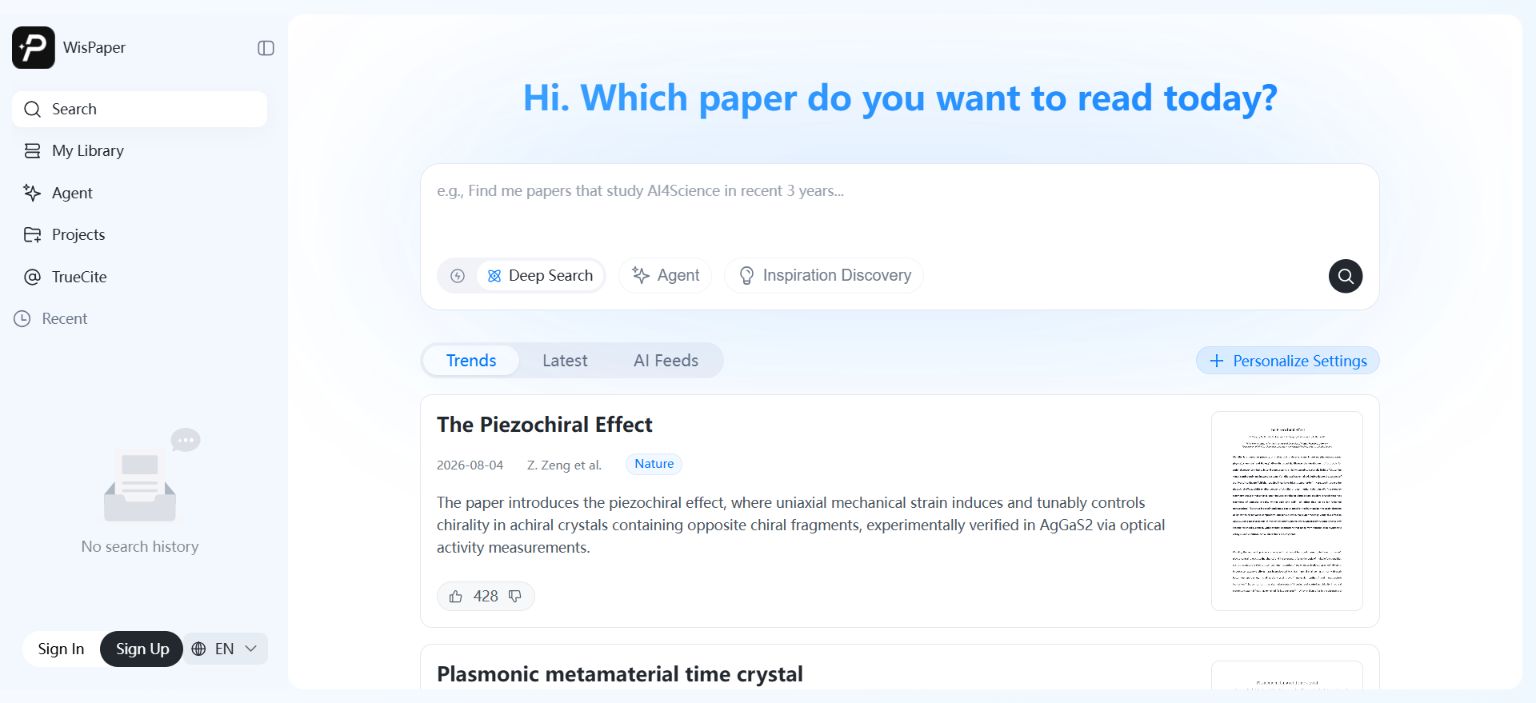
Where WisPaper Fits
WisPaper helps researchers search and screen academic papers with AI. Its search workspace supports Deep Search, Scholar Agent, and Inspiration Discovery, while paper cards show source labels, summaries, and preview images so users can triage results before deciding what to read.
WisPaper also lets users build a paper library and ask questions against that library. Papers can be uploaded or added from search results, then used as the basis for library-specific QA.
FAQs
Keep Reading

Scholarly Sources for Assignments: Where to Find Them and How to Use Them
You have an assignment due, and the instructions say "use scholarly sources." That usually means peer-reviewed journal articles, academic books, or conference papers. But if you have ever typed your research question int

How to Find Peer-Reviewed Articles for a Research Paper
Your instructor wrote "peer-reviewed sources only" in the rubric. You need to find them, but you are not entirely sure what counts as peer reviewed or where to look. A quick Google Scholar search returns a mix of PDFs, p

Good Sources for a College Research Paper: What Counts and What Does Not
You have a thesis, a deadline, and a blank page. The next step is finding sources, but the search results are overwhelming, and it is hard to tell what your professor will actually accept. A "good" source has to be accur