

The hard part of a literature review is often not finding papers. It is deciding which papers deserve deep reading. A broad search can return a large pile of records, and reading them one by one in the order they appear is the slowest possible strategy.
The better approach is screening. Screening turns a pile of search results into a smaller, defensible reading set. You define criteria, scan titles and abstracts, hold uncertain records for manual review, and document why each paper was included or excluded.
WisPaper says users can "screen 1000 papers in just 5 minutes" and get "20 papers you must read". The broader workflow below explains how to keep large-scale screening defensible whether you use AI, a spreadsheet, a dedicated screening tool, or a mix of methods.
Screening Is Not Deep Reading
Screening and deep reading solve different problems. Screening asks whether a paper should stay in the candidate set. Deep reading asks what the paper contributes to your argument.
If you mix those stages, the review slows down fast. You open PDFs too early, spend time on irrelevant papers, and forget why a paper was included. A cleaner process separates the work:
- Search broadly enough to find candidate papers.
- Screen titles and abstracts against criteria.
- Review uncertain papers by hand.
- Read only the included or high-priority papers deeply.
- Keep a decision trail that can be explained later.
This matters even for a non-systematic literature review. A professor, supervisor, reviewer, or coauthor may still ask why the final sources were chosen. "They looked relevant" is not a method. A written screening process gives you a stronger answer.
Define Criteria Before You Open The Results
The most common screening mistake is starting with the search results. That invites mood-based decisions. The abstract that sounds elegant gets kept. The paper with unfamiliar terminology gets ignored. The review becomes biased before you notice.
Write inclusion and exclusion criteria first. They do not need to be fancy, but they should be specific enough to guide decisions.
Useful criteria answer:
- What topic, population, method, material, intervention, system, or outcome must be present?
- Which adjacent topics should be excluded?
- Which publication types are allowed?
- Which languages or databases are in scope?
- Which study designs count for the review question?
- Which time period is relevant, if a time limit is justified?
For a formal review, these criteria belong in a protocol or methods section. For a thesis chapter or narrative review, they can live in a project note. The important part is writing them before screening, not after.
If AI will help with screening, criteria become even more important. A model cannot apply your intent reliably if the intent is still vague. Good criteria also make it easier to review AI suggestions because you can ask: did this decision follow the written rule?
Build A Three-Pile System
Large screening jobs work best with simple labels. Do not create a dozen categories during the first pass. Use three:
| Label | Meaning | What happens next |
|---|---|---|
| Include | The record clearly matches the criteria. | Save for full-text review or priority reading. |
| Exclude | The record clearly falls outside the criteria. | Record the exclusion reason. |
| Maybe | The title and abstract are not enough to decide. | Hold for manual review. |
The maybe pile is not a failure. It is quality control. It prevents both humans and AI tools from forcing uncertain records into a premature decision.
Use exclusion reasons that are short and reusable. Examples include wrong population, wrong method, wrong setting, not empirical, not peer-reviewed, duplicate, unavailable full text, or outside scope. Reusable reasons make the final screening log easier to report.
The goal of the first pass is not perfect understanding. It is reducing the pile without losing papers that need judgment.
Screen Titles And Abstracts First
Start with title and abstract screening. Do not open PDFs unless the title and abstract are too vague to classify the record.
Title and abstract screening works because many irrelevant records can be excluded quickly. The title may show the wrong field. The abstract may show the wrong population. The methods may show that the paper is commentary rather than empirical evidence.
During the first pass, ask only a few questions:
- Does the record match the review topic?
- Does it match the required method, population, or context?
- Is it clearly outside scope?
- Is the abstract too vague for a confident decision?
Avoid deep-note taking at this stage. Deep notes belong later. Screening notes should explain decisions, not summarize the whole paper.
This is where tools can help. Rayyan's pricing page lists duplicate detection, AI relevance predictions, and workbench facets on its free plan for screening workflows. ASReview describes ASReview LAB as open-source software for title and abstract screening in systematic reviews and meta-analyses using active learning. These tools are useful because screening is a distinct workflow, not just casual reading.
Use AI For Triage, Not Silent Final Decisions
AI can help rank papers, surface likely matches, summarize abstracts, detect duplicates, suggest exclusion reasons, or identify borderline records. It should not silently decide the final evidence base unless your protocol explicitly allows that and you document the method.
The safest rule is human control over final inclusion. AI can help you move faster through obvious cases, but the researcher should make or confirm final decisions, especially for high-stakes reviews.
Use AI in these ways:
- Ask it to explain why a record may match your criteria.
- Ask it to flag missing information that prevents a decision.
- Ask it to sort candidates by likely relevance.
- Ask it to generate a short rationale for human review.
- Ask it to compare an abstract against your written criteria.
Do not use AI in these ways:
- Accept a final include or exclude decision without checking.
- Let the tool change criteria midstream without noting it.
- Hide AI involvement in a formal review method.
- Treat relevance ranking as the same thing as eligibility.
- Cite papers based only on AI summaries.
This is the same logic behind responsible AI tools for literature review. The tool can reduce friction. It cannot carry the accountability.
Hand-Check Borderline Papers
Borderline papers are where review quality lives. They are also where shortcuts are most dangerous.
Common borderline cases include:
- The title uses unfamiliar terminology but the abstract seems relevant.
- The method is relevant but the population is not.
- The population is relevant but the study type is outside scope.
- The abstract is vague but the venue is highly relevant.
- The paper is from an adjacent discipline with different vocabulary.
- The paper appears to be a duplicate or secondary report.
For these records, open the abstract again, check keywords, inspect methods if available, and look for enough information to make a decision. If the review is formal, record the reason for the final decision.
Borderline review is also where a second human reviewer can help. If a project has multiple reviewers, disagreements should be resolved by discussion or a predefined rule rather than by whichever person screened faster.
Keep A Screening Log
A screening log is the difference between a fast review and a defensible review. It does not need to be elaborate, but it must capture decisions.
At minimum, keep:
| Field | Why it matters |
|---|---|
| Paper title | Identifies the record being screened. |
| Source or database | Shows where the record came from. |
| Decision | Records include, exclude, or maybe. |
| Reason | Explains the decision. |
| Reviewer or tool | Shows who or what assisted the decision. |
| Notes | Captures uncertainty or follow-up. |
For a formal systematic review, PRISMA matters. The PRISMA site says the PRISMA flow diagram maps the number of records identified, included, excluded, and reasons for exclusions through the review process. The PRISMA checklist page says PRISMA 2020 includes checklist items and an expanded checklist for reporting recommendations, while the BMJ explanation paper describes the checklist as having 27 items.
Do not claim PRISMA compliance just because you kept a spreadsheet. PRISMA is a reporting guideline. It helps you report what you did; it does not magically make weak screening decisions strong. If your review needs a formal reporting plan, use a dedicated guide to AI-assisted systematic review methods before deciding how much automation belongs in the protocol.
A Practical Workflow For Large Screening Sets
Use this workflow when the search returns more records than you can read deeply:
| Stage | Action | Output |
|---|---|---|
| Prepare | Write the review question and criteria. | A short screening rule set. |
| Import | Put records into a spreadsheet or screening tool. | One searchable record set. |
| Clean | Remove obvious duplicates where possible. | A cleaner candidate pool. |
| First pass | Screen titles and abstracts. | Include, exclude, and maybe labels. |
| AI triage | Use AI to rank, summarize, or flag uncertain records. | A prioritized review queue. |
| Manual review | Check maybe records and high-impact exclusions. | Defensible final decisions. |
| Deep reading | Read included papers closely. | Notes, extraction fields, and themes. |
| Documentation | Save decisions and reasons. | A screening log or flow diagram input. |
This workflow keeps speed and judgment separate. AI can help move candidate papers into a better order. Humans still decide what belongs in the review.
If the next stage is synthesis, connect the included papers to a theme table. The process in organizing papers into themes works better when the source set has already been screened.
Common Screening Mistakes
Large screening projects fail in predictable ways.
Avoid these mistakes:
- Changing criteria halfway through without recording the change.
- Reading full PDFs before title and abstract screening.
- Using "interesting" as an inclusion rule.
- Deleting borderline papers without a reason.
- Mixing duplicates, excluded records, and included records in the same folder.
- Accepting AI recommendations without checking sample records.
- Treating summaries as evidence without opening the paper.
The fix is not complicated. Keep criteria visible. Keep labels simple. Review uncertain cases. Save reasons.
If AI produced references or summaries during the process, verify the citations before they enter your manuscript. The guide on how to verify AI-generated citations is a useful safeguard before drafting.
Where WisPaper Fits
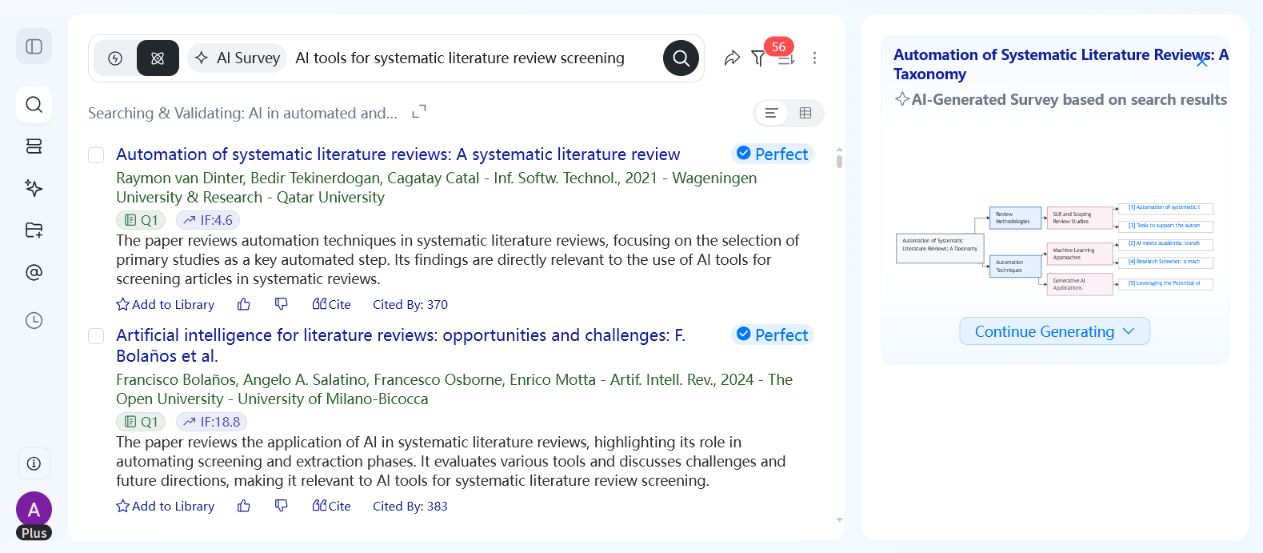
WisPaper helps researchers search and screen academic papers with AI. Its search workspace supports Deep Search, Scholar Agent, and Inspiration Discovery, while paper cards show source labels, summaries, and preview images so users can triage results before deciding what to read.
WisPaper says users can "screen 1000 papers in just 5 minutes" with AI to get "20 papers you must read". Researchers should still apply their own inclusion criteria and verify the relevance of the final reading set.
FAQs
Keep Reading

Scholarly Sources for Assignments: Where to Find Them and How to Use Them
You have an assignment due, and the instructions say "use scholarly sources." That usually means peer-reviewed journal articles, academic books, or conference papers. But if you have ever typed your research question int
How to Find Peer-Reviewed Articles for a Research Paper
Your instructor wrote "peer-reviewed sources only" in the rubric. You need to find them, but you are not entirely sure what counts as peer reviewed or where to look. A quick Google Scholar search returns a mix of PDFs, p

Good Sources for a College Research Paper: What Counts and What Does Not
You have a thesis, a deadline, and a blank page. The next step is finding sources, but the search results are overwhelming, and it is hard to tell what your professor will actually accept. A "good" source has to be accur