

SciSpace is popular because it helps with a real research pain: reading and understanding papers. Its pricing page describes SciSpace as an end-to-end platform for discovering, analyzing, and writing scientific literature, with tools such as Literature Review, Chat with PDF, Paraphraser, AI Detector, and Citation Generator. For students and researchers who get stuck inside dense PDFs, that kind of help is practical.
But SciSpace is not the right tool for every literature review workflow. If your main bottleneck is screening hundreds of search results, running a formal systematic review, checking citation context, or mapping a field from seed papers, a more focused alternative may fit better.
This guide compares 7 SciSpace alternatives by research task. The point is not to replace SciSpace everywhere. The point is to choose the tool that matches the stage of your review.
What SciSpace Does Well
SciSpace is strongest when the paper is already in front of you. Its homepage lists tools for Chat with PDF, Literature Review, Find Topics, Paraphraser, Citation Generator, Extract Data, and AI Detector. Its pricing page says SciSpace is used by 1 million+ researchers from institutions shown on the page.
For a graduate student, that means SciSpace can reduce friction while reading. You can ask questions about a paper, clarify technical sections, and move from confusion to a usable understanding faster than reading alone.
In practice, SciSpace is useful when the reading stage is the main source of friction. It is less suitable when the problem occurs earlier, such as narrowing a large search result before opening PDFs.
Where SciSpace Can Fall Short
SciSpace covers many tasks, but broad coverage does not always mean deeper workflow control. A literature review has separate stages: search, screening, reading, extraction, synthesis, and citation checking. A tool can be strong in one stage and weaker in another.
Researchers often look for alternatives when they need:
- Faster first-pass screening from a broad query.
- A more structured extraction workflow.
- Team screening and decision records.
- Citation maps from seed papers.
- Citation context and claim checking.
- A free scholarly search layer.
- A workflow that keeps AI-generated citations under tighter control.
If you are comparing SciSpace with other AI tools for literature review, start by naming your bottleneck. "I need help reading PDFs" and "I need to screen 1,000 abstracts" are different problems.
Quick Comparison Table
| Tool | Best for | Why choose it instead of SciSpace | Main caution |
|---|---|---|---|
| WisPaper | Search and screening | Better fit when you need to narrow a broad paper set before deep reading. | AI screening should still be checked by the researcher. |
| Elicit | Evidence tables and extraction | Better for structured reports and systematic review-style workflows. | May feel heavier if you only need PDF explanation. |
| Rayyan | Review screening | Better for title/abstract decisions, duplicates, and reviewer workflows. | Not designed as a general PDF reading assistant. |
| Covidence | Formal review management | Better for institutional systematic reviews and team process. | More formal and costly than many student projects need. |
| ResearchRabbit | Citation mapping | Better for visual discovery from seed papers. | Does not replace screening criteria. |
| scite | Citation context | Better for checking whether later work supports or disputes a claim. | Works best after you already have claims or papers to inspect. |
| Semantic Scholar | Free scholarly search | Better as a no-cost discovery layer across a large paper graph. | Not a guided review workspace. |
1. WisPaper
WisPaper is the SciSpace alternative to consider when your main problem is not understanding one paper, but deciding which papers to read first. SciSpace is strongest inside the PDF. WisPaper is built around search and screening before deep reading.
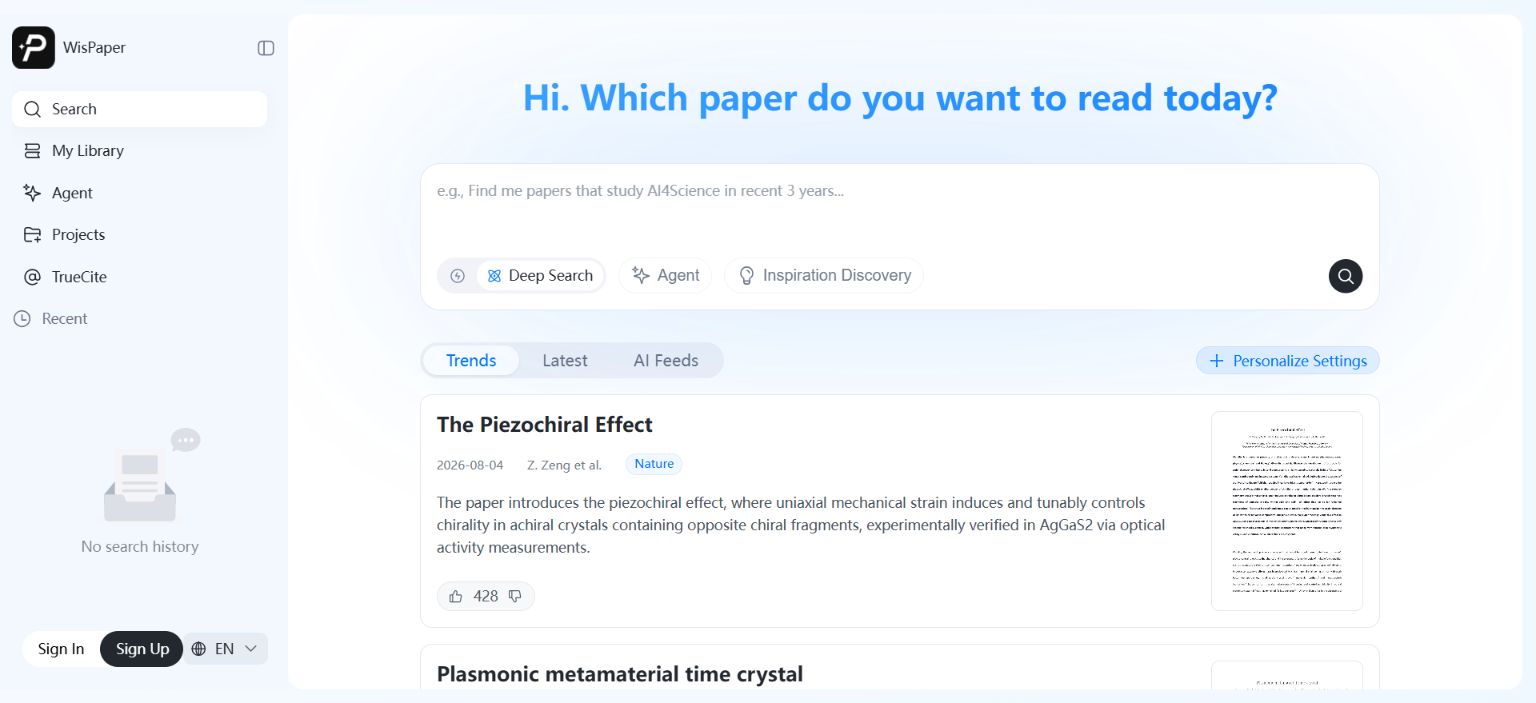
WisPaper's search workspace supports Deep Search, Scholar Agent, and Inspiration Discovery. Paper cards show source labels, summaries, feedback controls, and preview images. The workflow helps researchers move from a broad research question to a smaller set of papers worth inspecting.
WisPaper says users can screen 1000 papers in 5 minutes to identify 20 must-read papers. The core use case is reducing the first-pass reading pile before researchers begin detailed evaluation.
Where WisPaper is better than SciSpace:
- First-pass screening from a broad research question.
- Natural-language search when exact keywords are unclear.
- Building a working library from search results.
- Asking questions based on papers saved or uploaded into the library.
Where SciSpace may be better:
- Reading and explaining a dense PDF.
- Using one workspace for PDF chat, writing help, and citation tools.
- Students who need paper-level comprehension more than screening.
Best fit:
- Researchers with too many search results.
- Graduate students writing surveys or literature reviews.
- Teams that need a lighter discovery-to-library workflow.
2. Elicit
Elicit is a strong SciSpace alternative when your literature review needs structured evidence work. Elicit says it searches over 138 million academic papers and 545,000 clinical trials and supports search, research reports, systematic literature review workflows, library organization, and alerts.
The difference is the output. SciSpace helps you understand papers. Elicit is more focused on turning papers into reports, tables, and source-backed claims. That matters when your review has to become an evidence table rather than a set of notes.
Elicit's homepage says it can find up to 1,000 relevant papers and analyze up to 20,000 data points at once. For a researcher comparing many papers, that kind of structured workflow can be more useful than PDF chat.
Where Elicit is better than SciSpace:
- Structured extraction tables.
- Source-backed research reports.
- Systematic review-style workflows.
- Evidence organization across many papers.
Where SciSpace may be better:
- Reading individual PDFs.
- Explaining technical sections.
- Combining reading, writing, and citation utilities in one interface.
Best fit:
- Semi-systematic reviews.
- Evidence synthesis projects.
- Researchers who need tables, not just explanations.
For a deeper tool-specific decision, compare this with the dedicated Elicit alternatives guide.
3. Rayyan
Rayyan is the stronger choice when your project is about screening records, not reading papers. Its pricing page lists a free plan with 3 active reviews, 2 free reviewers, duplicate detection, AI relevance predictions, and 15+ workbench facets.
That makes Rayyan useful for systematic review workflows. It helps teams label, sort, and resolve screening decisions. SciSpace can help you understand a paper; Rayyan helps you manage the decision process around many papers.
The practical difference is accountability. If a supervisor asks why a paper was excluded, a screening workbench is easier to defend than scattered notes or chat history.
Where Rayyan is better than SciSpace:
- Title-and-abstract screening.
- Duplicate detection.
- Reviewer workflows.
- Screening decisions that need a record.
Where SciSpace may be better:
- Understanding full-text papers.
- Asking questions about a PDF.
- Reading outside your field.
Best fit:
- Systematic review teams.
- Students doing formal screening.
- Projects that need a clear include/exclude workflow.
If this is your main decision, read the full Rayyan vs Covidence vs ASReview comparison.
4. Covidence
Covidence is a SciSpace alternative only if your workflow is formal review management. It is not trying to compete on PDF chat. It is built for systematic review teams that need structure, collaboration, and process control.
Covidence's pricing page lists a Single plan at $339 USD/year and a Package plan at $907 USD/year for up to 3 reviews. The same page also lists a trial with 500 records.
That pricing makes sense when the review is important enough to justify a formal platform. For an individual student, it may be more process than necessary.
Where Covidence is better than SciSpace:
- Formal systematic review administration.
- Team screening and conflict workflows.
- Institutional evidence synthesis.
- Projects where process matters as much as reading.
Where SciSpace may be better:
- Learning a new field.
- Reading dense PDFs.
- Using AI writing and citation utilities.
Best fit:
- Medical or policy review teams.
- Institutional research groups.
- Projects with supervisors or methods teams expecting review software.
5. ResearchRabbit
ResearchRabbit is best when you need to discover the shape of a field. Its pricing page lists a free plan with unlimited searches across 310+ million articles, unlimited libraries and collections, collection sharing, and up to 50 seed articles.
This is useful before you know the field's vocabulary. You can start with seed papers and explore nearby authors, clusters, and citation paths. That helps you find papers keyword search might miss.
ResearchRabbit is not a replacement for SciSpace when you need to understand a difficult paper. It is more useful before that stage, when you are deciding what the reading map should include.
Where ResearchRabbit is better than SciSpace:
- Citation network discovery.
- Finding related papers from seed articles.
- Visual mapping before a literature review.
- Exploring adjacent research clusters.
Where SciSpace may be better:
- Explaining paper content.
- Asking questions about a specific PDF.
- Supporting writing-adjacent tasks.
Best fit:
- Researchers entering a new topic.
- Students building a reading map.
- Literature reviews that start from a handful of known papers.
6. scite
scite is the SciSpace alternative for citation context. Its homepage says it reads across 280M+ full-text scholarly articles and uses Smart Citations to show whether a finding has been supported or contradicted by later research.
This is different from asking a PDF question. scite helps you understand how the literature treats a claim after publication. A paper can look important because it is highly cited, but later papers may support it, challenge it, narrow it, or cite it only as background.
Use scite when your review depends on a few key claims. Before repeating those claims, check how later work discusses them and whether the evidence still holds.
Where scite is better than SciSpace:
- Citation context.
- Claim checking.
- Seeing support or contrast in later literature.
- Auditing important references before writing.
Where SciSpace may be better:
- Reading a paper line by line.
- Explaining methods and concepts.
- General PDF interaction.
Best fit:
- Researchers writing argument-heavy reviews.
- Students worried about misusing a highly cited paper.
- Anyone who needs to verify AI-generated citations before submission.
7. Semantic Scholar
Semantic Scholar is the best free SciSpace alternative for scholarly discovery. Its homepage describes it as a free, AI-powered research tool and says it searches 233,536,167 papers from all fields of science.
Semantic Scholar is not trying to be a full AI research suite. It is a strong discovery layer: paper search, author discovery, citation graph, API access, and related work. For many students, that is enough to start a review.
Use Semantic Scholar when your budget is zero or when you need a neutral discovery layer before moving into screening, reading, or extraction tools.
Where Semantic Scholar is better than SciSpace:
- Free broad search.
- Known-paper lookup.
- Author and citation graph discovery.
- Starting a topic scan without a paid plan.
Where SciSpace may be better:
- PDF chat.
- Paper explanation.
- Writing-adjacent academic tools.
Best fit:
- Students with no budget.
- Early literature review scoping.
- Researchers building an initial paper set.
If cost is the main issue, compare it with other free AI tools for literature review.
How To Choose The Right SciSpace Alternative
The fastest way to choose is to identify the workflow stage:
| Your problem | Best starting point |
|---|---|
| Too many search results | WisPaper |
| Need evidence tables | Elicit |
| Need systematic screening decisions | Rayyan |
| Need formal review management | Covidence |
| Need citation maps | ResearchRabbit |
| Need citation context | scite |
| Need free scholarly search | Semantic Scholar |
If you are still at the search stage, do not start with a PDF reader. Use discovery and screening tools first. If you are already reading final papers, SciSpace may still be the right tool.
For general AI workflows, keep a separate line between brainstorming and evidence work. A guide to ChatGPT Deep Research for literature review can help clarify where general AI belongs and where source-grounded tools are safer.
Switching From SciSpace: A Practical Checklist
Before changing tools, answer these questions:
- Am I trying to read papers, screen papers, map papers, or extract data?
- Do I need a citation trail for every claim?
- Do I need reviewer decisions and exports?
- Do I need to work from my own library of uploaded papers?
- Do I need a free option, or can I pay for a workflow tool?
- Will the output become a thesis, manuscript, review table, or internal research memo?
If the answer is mostly "I need to understand PDFs," SciSpace may still be a good fit. If the answer is "I need to reduce, organize, or verify a paper set," one of the alternatives above may be stronger.
Where WisPaper Fits
WisPaper helps researchers search and screen academic papers with AI. Its search workspace supports Deep Search, Scholar Agent, and Inspiration Discovery, while paper cards show source labels, summaries, and preview images so users can triage results before deciding what to read.
WisPaper also lets users build a paper library and ask questions against that library. Papers can be uploaded or added from search results, then used as the basis for library-specific QA.
FAQs
Keep Reading

Scholarly Sources for Assignments: Where to Find Them and How to Use Them
You have an assignment due, and the instructions say "use scholarly sources." That usually means peer-reviewed journal articles, academic books, or conference papers. But if you have ever typed your research question int
How to Find Peer-Reviewed Articles for a Research Paper
Your instructor wrote "peer-reviewed sources only" in the rubric. You need to find them, but you are not entirely sure what counts as peer reviewed or where to look. A quick Google Scholar search returns a mix of PDFs, p

Good Sources for a College Research Paper: What Counts and What Does Not
You have a thesis, a deadline, and a blank page. The next step is finding sources, but the search results are overwhelming, and it is hard to tell what your professor will actually accept. A "good" source has to be accur