

Elicit is one of the better-known AI tools for literature review because it does more than answer questions. It searches academic papers, creates research reports, supports extraction tables, and offers a systematic review workflow. Elicit says it searches over 138 million academic papers and 545,000 clinical trials, which makes it a serious tool rather than a generic chatbot with citations.
That strength is also why choosing an alternative requires care. A good Elicit alternative is not simply "another AI research tool." It should solve the specific part of your literature review that Elicit does not solve well for your situation: large-batch screening, PDF reading, visual discovery, team review, citation checking, or budget control.
This guide compares 7 Elicit alternatives by workflow fit, not hype. If you are writing a thesis, preparing a survey paper, or screening references for a review, the right choice depends on the job you need the tool to do.
Why Look For An Elicit Alternative?
Elicit is useful when your literature review needs structured evidence work. Its product page says Elicit can generate research briefs, support systematic literature review workflows, and back AI-generated claims with sentence-level citations from underlying sources. Its homepage also says Elicit can find up to 1,000 relevant papers and analyze up to 20,000 data points at once.
Researchers usually look beyond Elicit for practical reasons:
- They need faster first-pass screening from a broad search result, especially when they need to screen 1000 papers before deep reading.
- They want a simpler tool for reading and asking questions about PDFs.
- They need a team screening workflow with reviewer decisions.
- They want visual citation mapping before writing a review.
- They need to check whether citations are real or whether later work supports a claim.
- They are trying to stay inside a free or student budget.
That means the best alternative depends on the bottleneck. A tool that is excellent for citation mapping may be weak for extraction. A tool that is strong for formal systematic reviews may be too heavy for a graduate student writing a narrative review.
Quick Comparison Table
| Tool | Best for | Strongest reason to choose it | Main caution |
|---|---|---|---|
| WisPaper | Search and large-set screening | Turns a broad research question into a smaller paper set for first-pass reading. | Treat AI screening as triage, then verify important papers manually. |
| SciSpace | Reading and explaining PDFs | Better when the pain is understanding papers after finding them. | Broad feature set can be more than you need for screening. |
| Rayyan | Systematic review screening | Strong for title/abstract screening, duplicate handling, and reviewer workflows. | Less useful for open-ended discovery or PDF explanation. |
| Covidence | Formal review management | Better for institutional systematic reviews with a clear process. | Cost and structure may be too much for solo projects. |
| ResearchRabbit | Visual citation discovery | Useful for mapping related papers, authors, and research clusters. | Does not replace inclusion criteria or screening decisions. |
| scite | Citation context and claim checking | Shows whether later papers support, mention, or contrast a claim. | Works best after you already have papers or claims to check. |
| Semantic Scholar | Free scholarly discovery | Strong no-cost search layer across a large paper graph. | Not a guided literature review workspace. |
1. WisPaper
WisPaper is the best Elicit alternative when your first problem is not extraction, but paper overload. Elicit is strong once you want reports and evidence tables. WisPaper is stronger as a search-and-screen workspace: start with a research question, inspect paper cards, and move useful papers into a working library.
WisPaper says users can screen 1000 papers in 5 minutes to identify 20 must-read papers. The practical distinction is the workflow: WisPaper is built to reduce the first-pass reading pile, while researchers remain responsible for defining and applying the review protocol.
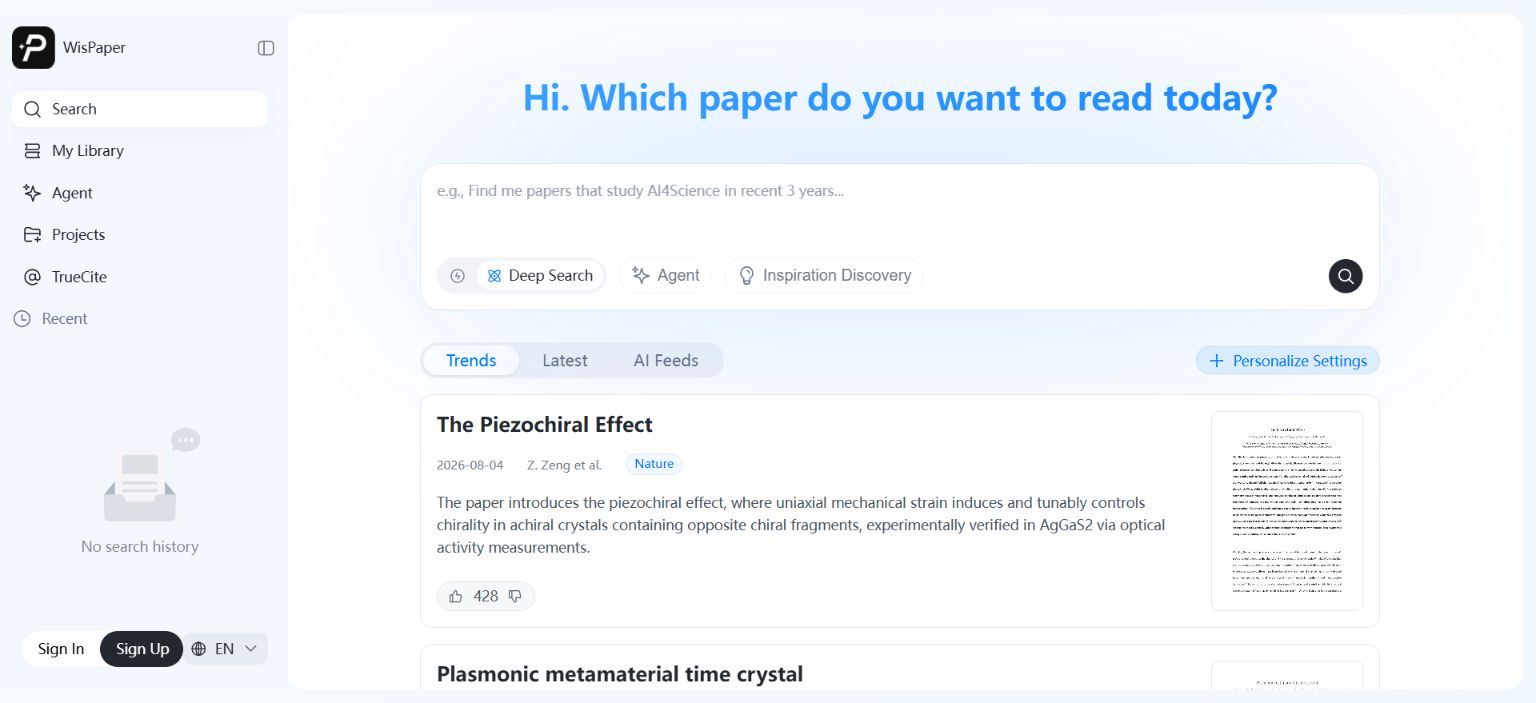
WisPaper's search workspace includes Deep Search, Scholar Agent, and Inspiration Discovery. Paper cards show source labels, summaries, feedback controls, and preview images. For a researcher, that means the tool is designed around deciding what deserves attention before spending time inside PDFs.
Where WisPaper is better than Elicit:
- First-pass screening when a broad query produces too many papers.
- Natural-language search when you are not sure which keywords the field uses.
- Moving from discovery into a personal paper library.
- Asking questions based on papers saved or uploaded into your own library.
Where Elicit may be better:
- Structured extraction tables.
- Evidence reports based on a defined paper set.
- Systematic review workflows where extraction is the main bottleneck.
Best fit:
- Graduate students starting a literature review.
- Researchers preparing a survey paper.
- Anyone who needs to narrow a large search result before deep reading.
- Teams that want search, screening, and library QA in one research workspace.
2. SciSpace
SciSpace is the Elicit alternative to consider when your main pain is reading papers, not screening them. SciSpace positions itself as an AI research tool and lists product areas such as Chat with PDF, Literature Review, AI Writer, Citation Generator, and Extract Data. Its site says users can run literature reviews on 280M+ papers, and a deeper competitor-specific comparison belongs in a dedicated SciSpace alternatives guide.
The difference is practical. Elicit is built around evidence workflows and tables. SciSpace is more useful when you are inside a dense paper and need help understanding methods, equations, terminology, or the argument structure.
SciSpace is especially useful for students entering a new field. Instead of opening a difficult PDF and guessing which sections matter, you can ask targeted questions about the paper, generate explanations, and connect the paper to nearby concepts.
Where SciSpace is better than Elicit:
- Reading and understanding individual PDFs.
- Explaining methods or technical sections.
- Combining literature review help with writing-adjacent tools.
- Supporting users who want many academic utilities in one interface.
Where Elicit may be better:
- Structured evidence extraction.
- Screening and organizing many papers into tables.
- Workflows that need source-backed research reports.
Best fit:
- Students reading outside their immediate specialty.
- Researchers who need help understanding PDFs.
- Early-stage literature review work where comprehension matters more than screening.
3. Rayyan
Rayyan is a strong Elicit alternative for title-and-abstract screening. It is not trying to be a general AI research assistant. It is a screening workbench for review projects, and it often appears in decisions alongside Covidence and ASReview; that tradeoff is worth a separate Rayyan vs Covidence vs ASReview comparison.
Rayyan's pricing page lists a free plan with 3 active reviews, 2 free reviewers, duplicate detection, AI relevance predictions, and 15+ workbench facets. The same page says Rayyan is used by 1 million+ researchers, 20,000+ institutions, and users across 190+ countries.
Rayyan makes sense when you already have references and need to decide what stays. It helps review teams sort records, resolve decisions, and manage the repetitive work of screening. For a systematic review, that kind of process can matter more than a polished AI summary.
Where Rayyan is better than Elicit:
- Reviewer workflows.
- Title-and-abstract screening.
- Duplicate detection.
- Team-based review decisions.
- Projects where decision records matter.
Where Elicit may be better:
- Searching and extracting evidence into structured tables.
- Generating reports from a selected paper set.
- Combining search, screening, and extraction in one AI-centered workflow.
Best fit:
- Systematic review teams.
- Students doing a formal review with supervisor oversight.
- Projects where multiple reviewers need to screen the same records.
4. Covidence
Covidence is the Elicit alternative for formal review management. If Rayyan is the accessible screening workbench, Covidence is the more institutional option. It is built for review teams that need a clear process, a central project record, and support around evidence synthesis.
Covidence's pricing page lists a Single plan for $339 USD/year and a Package plan for $907 USD/year covering up to 3 reviews. The same page says each plan allows unlimited collaborators for its review limit, and it offers a trial with 500 records.
Covidence will not be the cheapest option for a solo graduate student. It makes more sense when the review has institutional expectations: multiple collaborators, a methods team, formal screening stages, and a need for organized review administration.
Where Covidence is better than Elicit:
- Formal systematic review management.
- Team workflows where review administration matters.
- Projects that need a known evidence-synthesis platform.
- Review teams with institutional access.
Where Elicit may be better:
- Faster AI-assisted reports.
- Flexible source-backed extraction tables.
- Exploratory research before a formal review process begins.
Best fit:
- Medical and health evidence teams.
- Institutional review groups.
- Researchers who need a process that supervisors and collaborators already recognize.
5. ResearchRabbit
ResearchRabbit is an Elicit alternative for discovery, not extraction. Its pricing page lists free access to searches across 310+ million articles, unlimited libraries and collections, collaboration by shared collection, and up to 50 seed articles.
This matters when you are still mapping the field. If you have a few key papers but do not yet know the surrounding authors, clusters, or adjacent concepts, citation mapping can show paths that keyword search misses.
ResearchRabbit is not a screening tool in the systematic review sense. It will help you find related work, but it will not decide whether each paper meets your criteria. That is still your job.
Where ResearchRabbit is better than Elicit:
- Visual paper discovery.
- Citation network exploration.
- Starting from seed articles.
- Finding related authors and clusters.
Where Elicit may be better:
- Answering focused evidence questions.
- Extracting data into tables.
- Producing research reports with cited claims.
Best fit:
- Researchers entering a new topic.
- Students building a reading map.
- Literature review projects that begin with a few known papers.
6. scite
scite is not a direct Elicit substitute. It answers a different question: what does later literature do with a claim? That makes it valuable after you have candidate papers or draft claims, especially if you also need a process to verify AI-generated citations.
scite says it reads across 280M+ full-text scholarly articles and uses Smart Citations to show whether a finding has been supported or contradicted by later research. Its site also says it has direct agreements with Wiley, SAGE, and 30+ more publishers, and that over 2,000,000 researchers, students, and industry experts trust the product.
The practical value is verification. A paper can be highly cited and still be disputed, narrowed, or used only as background. scite helps you inspect that context instead of treating citation count as evidence quality.
Where scite is better than Elicit:
- Checking claim support.
- Understanding citation context.
- Finding whether later work supports or challenges a finding.
- Auditing important references before citing them.
Where Elicit may be better:
- Search and extraction workflows.
- Building evidence tables.
- Generating research reports from a question.
Best fit:
- Researchers checking claims before writing.
- Literature reviews where a few key studies carry the argument.
- Users worried about citation quality, not just paper discovery.
7. Semantic Scholar
Semantic Scholar is the best free Elicit alternative for broad scholarly discovery. Its homepage describes it as a free, AI-powered research tool and lists 233,536,167 papers from all fields of science. If budget is the main constraint, compare it with other free AI tools for literature review before choosing a paid workflow.
It is useful because it gives you a large, accessible starting point: paper records, author pages, citation information, related work, and recommendations. For many students, that is enough to begin.
Semantic Scholar is not a full literature review workspace. It will not manage your whole screening process, extract tables for you, or write a review record. Use it as a discovery layer, then move selected papers into Zotero, a spreadsheet, Rayyan, WisPaper, or another workflow.
Where Semantic Scholar is better than Elicit:
- Free broad academic search.
- Known-paper lookup.
- Citation graph exploration.
- Finding authors and related papers quickly.
Where Elicit may be better:
- Guided AI reports.
- Source-backed extraction.
- Review workflows that need structured outputs.
Best fit:
- Students with no budget.
- Early scoping searches.
- Researchers who want a free scholarly search layer before using paid tools.
Which Elicit Alternative Should You Choose?
Start with the part of the literature review that is slowing you down:
| Your bottleneck | Best fit |
|---|---|
| Too many search results | WisPaper |
| Reading dense PDFs | SciSpace |
| Screening records with reviewers | Rayyan |
| Formal systematic review management | Covidence |
| Mapping a field from seed papers | ResearchRabbit |
| Checking citation context | scite |
| Free scholarly discovery | Semantic Scholar |
If you are doing a formal systematic review, do not choose only by AI features. Ask whether the tool supports your required documentation, reviewer process, and export needs. If you are writing a thesis or survey, focus on the part that wastes the most time: finding papers, screening papers, reading papers, or organizing notes.
Switching From Elicit: A Practical Checklist
Before moving your workflow, answer these questions:
- What output do you need: reading list, extraction table, citation map, or review record?
- Do you need to import or export RIS, BibTeX, CSV, or Zotero items?
- Are you working alone or with reviewers?
- Do you need paper-level notes, decision logs, or source quotes?
- Will your supervisor or journal expect a documented screening method?
- Are pricing limits acceptable for the number of papers you need to process?
Do not move tools just because another product has more features. Move when the alternative fits the job better.
If your current workflow depends heavily on general AI chat, separate idea generation from evidence work. A dedicated guide to ChatGPT Deep Research for literature review can help clarify where general AI fits and where academic-native tools are safer.
Where WisPaper Fits
WisPaper helps researchers search and screen academic papers with AI. Its search workspace supports Deep Search, Scholar Agent, and Inspiration Discovery, while paper cards show source labels, summaries, and preview images so users can triage results before deciding what to read.
WisPaper also lets users build a paper library and ask questions against that library. Papers can be uploaded or added from search results, then used as the basis for library-specific QA.
FAQs
Keep Reading

Scholarly Sources for Assignments: Where to Find Them and How to Use Them
You have an assignment due, and the instructions say "use scholarly sources." That usually means peer-reviewed journal articles, academic books, or conference papers. But if you have ever typed your research question int
How to Find Peer-Reviewed Articles for a Research Paper
Your instructor wrote "peer-reviewed sources only" in the rubric. You need to find them, but you are not entirely sure what counts as peer reviewed or where to look. A quick Google Scholar search returns a mix of PDFs, p

Good Sources for a College Research Paper: What Counts and What Does Not
You have a thesis, a deadline, and a blank page. The next step is finding sources, but the search results are overwhelming, and it is hard to tell what your professor will actually accept. A "good" source has to be accur