

Free AI tools can carry a surprising amount of a literature review, especially when the project is a class paper, thesis proposal, scoping pass, or early dissertation chapter. The catch is that "free" rarely means unlimited. It usually means public search access, capped AI usage, a smaller number of active projects, fewer extraction fields, or a workflow that still depends on manual judgment.
That is not a bad thing. A student does not need an expensive platform for every review. The stronger move is to build a no-cost workflow that covers each stage: discovery, citation mapping, screening, PDF reading, note organization, citation checking, and writing support.
This guide compares free literature review tools by the job they do. If you are still choosing between paid and free research platforms, start with the broader guide to AI tools for literature review, then use this article to design a student-friendly stack.
What "Free" Actually Means In Literature Review Tools
Free plans are useful when you know what limits you are accepting. They are risky when you treat them as a substitute for a research method.
Most free literature review tools fall into one of these buckets:
- Discovery tools help you find papers, authors, venues, and related work.
- Mapping tools show citation neighborhoods around seed papers.
- Screening tools help you make inclusion and exclusion decisions.
- Reading tools summarize or explain PDFs after you provide the paper.
- Reference managers keep sources, notes, tags, and citations organized.
- Citation checkers help you verify whether references are real and correctly connected to claims.
The practical question is not "Which free AI tool is best?" It is "Which free tool should handle this stage of the review?"
A strong student workflow uses more than one tool. Search in a broad academic index, map the paper network from your strongest seed papers, screen with documented criteria, store final papers in a reference manager, and verify any AI-generated citation before using it in your manuscript. That last step matters because citation errors can survive a polished draft if nobody checks them. A separate guide on how to verify AI-generated citations is useful once you start drafting.
The Best Free Tools By Research Task
The best no-cost setup depends on where you are in the literature review:
| Research task | Free tool to try | Best fit | Main caution |
|---|---|---|---|
| Broad academic search | Semantic Scholar | Finding papers, authors, and related work across fields. | Search results still need manual relevance checks. |
| Citation mapping | ResearchRabbit | Expanding from seed papers into connected literature. | Maps can overemphasize citation proximity over conceptual fit. |
| Title and abstract screening | Rayyan | Making inclusion and exclusion decisions with a review record. | Free collaboration and active-review limits may matter for teams. |
| AI-assisted reading and extraction | Paperguide | Testing AI search, PDF chat, and extraction tables on a capped free plan. | Credits, searches, storage, and extraction tables have visible limits. |
| Reference management | Zotero | Saving, tagging, citing, and sharing research sources. | AI discovery is not the main job; it is the library layer. |
| AI search and first-pass triage | WisPaper | Searching and screening papers before deeper reading. | AI output should be checked against the paper itself before citation. |
This split keeps each tool honest. A discovery tool is not a screening protocol. A screening tool is not a search engine. A reference manager is not a replacement for reading. When students blur those roles, they usually lose track of why a paper was included.
Semantic Scholar: Best Free Starting Point For Broad Discovery
Semantic Scholar is the first place many students should try because it is free, academic, and built around scientific literature. Its homepage describes it as a free AI-powered research tool and says users can search 233,536,167 papers from scientific fields.
Use it at the beginning of a project when your research question is still unstable. Search for key phrases, identify recurring authors, look at highly cited papers, and open related-paper trails. At this stage, the goal is not to finalize the evidence base. The goal is to learn the language of the field.
Semantic Scholar works especially well for these student tasks:
- Finding seed papers before using a citation map.
- Checking whether a keyword is too broad or too narrow.
- Finding authors who repeatedly publish on your topic.
- Comparing older foundational papers with newer papers.
- Exporting candidates into a reference manager for later screening.
The main limit is methodological. A search result does not explain why a paper belongs in your review. You still need inclusion and exclusion criteria, even for a narrative review. If the project becomes formal, move from "interesting papers" to a documented search and screening workflow.
ResearchRabbit: Best Free Tool For Citation Mapping
ResearchRabbit is useful after you already have strong seed papers. Its pricing page lists a Free plan at $0, Forever, with unlimited searches across 310+ million articles, unlimited libraries and collections, collection sharing, and up to 50 seed articles.
That seed-paper model is the point. Instead of typing more keywords into a search box, you start from papers you trust and explore connected work. This can reveal adjacent methods, older roots, and clusters you might miss if your keyword vocabulary is still weak.
Use ResearchRabbit when you can name the center of the field. For example, after you have a few landmark papers, a citation map can show which papers are commonly connected, which authors sit near the topic, and which newer papers may be worth screening.
The risk is that a citation map can feel more authoritative than it is. Citation proximity is not the same as relevance. A paper can be heavily connected and still be outside your scope. Treat maps as discovery aids, then screen each candidate against your criteria.
Students often get the best result by pairing a map with a theme table. Once you see clusters, start labeling them as methods, populations, theories, datasets, or outcome measures. The workflow in organizing papers into themes fits naturally after citation mapping.
Rayyan: Best Free Tool For Screening Decisions
Rayyan is a good fit when you have moved beyond searching and need to decide which papers stay in the review. Its pricing page lists a Free plan at $0, with 3 active reviews, 2 free reviewers, duplicate detection, AI relevance predictions, and 15+ workbench facets.
Those free limits are often enough for a student project, especially a solo review or a small supervisor-student workflow. Rayyan gives you a place to import records, screen titles and abstracts, and keep decisions separate from casual reading notes.
Use Rayyan when your research question has become specific enough for criteria. Before importing records, write short rules for inclusion and exclusion. The rules can be plain language, but they should be consistent. Without rules, screening becomes a mood board.
Rayyan is not mainly a discovery tool. You usually search elsewhere, collect records, then import them for screening. That distinction matters if you are trying to screen large paper sets: search quality and screening quality are separate problems.
For formal systematic reviews, you may need more structure, more reviewers, a PRISMA record, or institutional requirements. In that case, free screening can still help you learn the process, but your final workflow may need a paid or institution-approved tool.
Paperguide: Best Free Workspace For Capped AI Reading And Extraction
Paperguide is useful for students who want to test AI-assisted reading, search, PDF chat, extraction tables, and reference management in one workspace. Its pricing page lists a Free plan at $0 per month, with 1,000 AI Credits/month, 20 AI Searches/month, 500MB References Storage, a data extraction table with 5 extract columns per table, and 10 papers per extract table at a time.
Those limits make it better for testing and smaller projects than for large evidence reviews. A student can use it for short paper summaries, compare extracted fields, or test whether AI helps clarify a dense methods section.
The best use is selective. Do not upload every paper and ask for a giant summary. Pick the papers you already believe matter. Ask targeted questions: What population was studied? What method was used? What outcome was measured? What limitation did the authors name?
AI reading tools can save time, but they also make it easy to accept paraphrases that drift from the source. Keep the PDF open. If a claim matters enough to appear in your literature review, check the surrounding paragraph in the paper before citing it.
Zotero: Best Free Reference Manager For The Final Library
Zotero should be part of almost every student literature review because it handles the unglamorous work that keeps a project from collapsing. Zotero describes itself as a free tool to collect, organize, annotate, cite, and share research, and its site says it supports over 9,000 citation styles.
Use Zotero as the final library, not as a dumping ground. Save papers that pass your first relevance check. Tag them by theme, method, population, or status. Add notes that explain why each source matters. When writing begins, you should be able to answer: "Why is this paper in my review?"
Zotero also protects you from a common student problem: mixing discovered papers, screened papers, read papers, and cited papers in the same folder. Create collections that reflect workflow stages. For example, use separate collections for candidates, included papers, background sources, and cited-in-draft.
This matters when your draft grows. The writing process is easier when your library already contains clean themes and verified sources. If the next step is drafting, the guide on writing a literature review faster can help turn the library into sections without flattening the argument.
A Practical Free Literature Review Stack
A no-cost stack works best when each tool has a clear handoff:
| Stage | Tool | Output |
|---|---|---|
| Initial discovery | Semantic Scholar | Seed papers, author names, key terms, and related work. |
| Network expansion | ResearchRabbit | Candidate clusters and connected papers. |
| Screening | Rayyan or a spreadsheet | Included, excluded, and undecided records. |
| Reading support | Paperguide or another capped AI reader | Paper summaries and extraction notes that still need checking. |
| Library management | Zotero | Clean source library, tags, notes, and citations. |
| Search and triage | WisPaper | Candidate papers to review before deeper reading. |
Start with a question, not a tool. Write the research question in one sentence. Then list the concepts that must appear for a paper to count as relevant. Only after that should you search.
The workflow can look like this:
- Search broadly in Semantic Scholar and save promising papers.
- Put your strongest seed papers into ResearchRabbit to find connected work.
- Move candidate records into Rayyan or a simple screening sheet.
- Read included papers closely and use AI only for targeted questions.
- Store final sources in Zotero with tags and notes.
- Check citations before moving claims into the final draft.
This sequence keeps the review defensible. You can explain where papers came from, why they were included, and how each one supports the final argument. That is what supervisors usually care about more than the tool list.
If you are comparing paid research assistants, the free stack also gives you a baseline. Try the no-cost workflow first. Then upgrade only when the limit is concrete: too many records, too many PDFs, too much extraction, or too many collaborators.
When Free Tools Are Enough
Free tools are usually enough for a class assignment, early thesis scoping, a proposal chapter, a narrative review, or a first pass through a new topic. They are also useful when you are still learning the field and do not know which expensive feature would actually help.
Free tools are most effective when the review has a bounded scope. A focused question, a manageable paper set, and a clear output make capped plans easier to live with. If your review is still vague, paid features can simply help you produce a larger mess.
Students should be cautious with any tool that writes polished prose before the reading is done. A good literature review is not a stitched set of paper summaries. It explains patterns, disagreements, gaps, and methods. AI can help inspect the material, but the argument is yours.
When To Pay For A Literature Review Tool
Paying makes sense when a free limit blocks real work. The strongest reason to upgrade is not a fancy feature. It is a bottleneck you can name.
Consider paying when:
- You have more records than a free review workspace can handle comfortably.
- Your project requires multiple reviewers and decision conflict resolution.
- You need extraction tables with more fields than a free plan allows.
- You need project history, exports, or documentation for a formal review.
- You are repeating the same workflow across several research projects.
Paying too early can hide weak methods. If your criteria are unclear, a paid tool will not fix them. It may only help you move faster in the wrong direction.
This is why comparison articles can be useful, but only after you know the job. If your issue is PDF reading, look at SciSpace alternatives. If your issue is evidence extraction and question answering, review Elicit alternatives. If your issue is citation safety, focus on verification rather than feature count.
Where WisPaper Fits
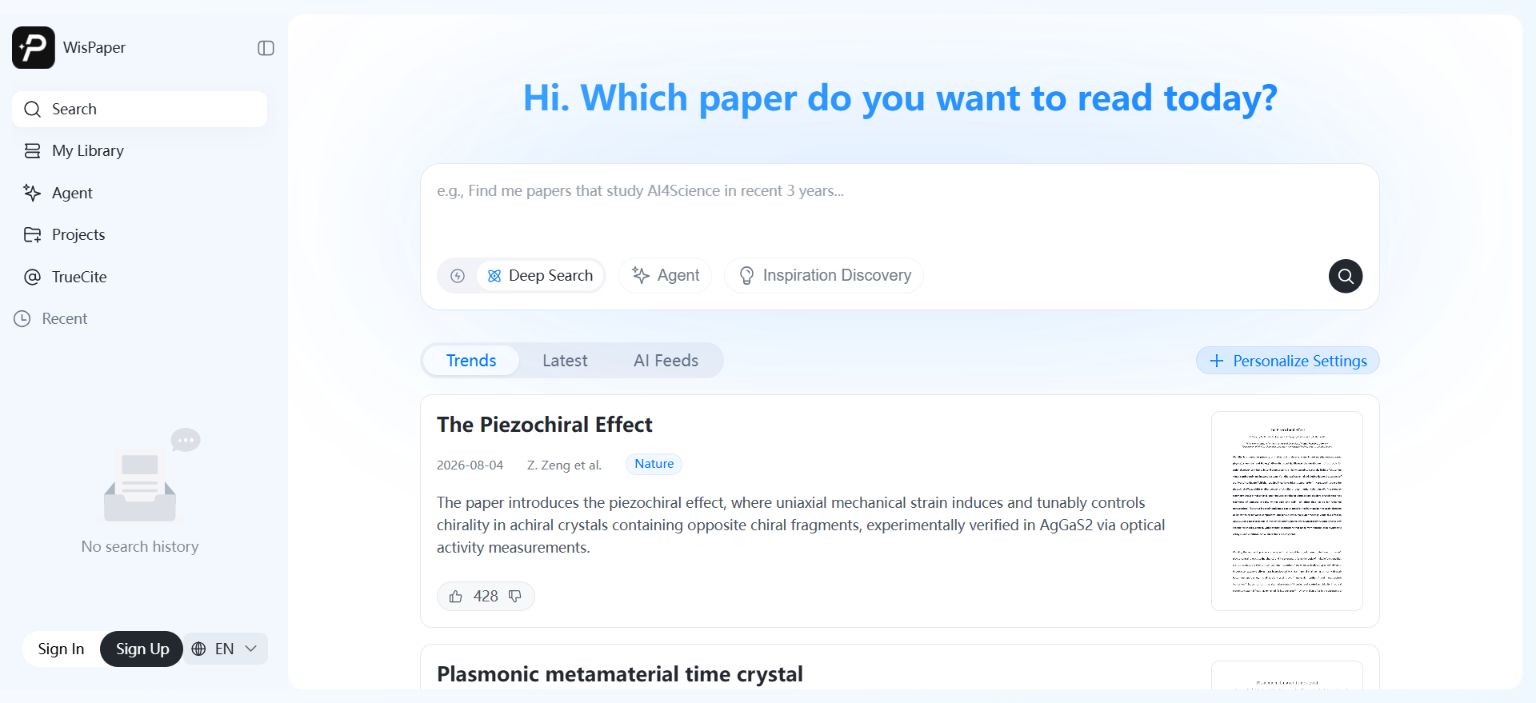
WisPaper helps researchers search and screen academic papers with AI. Its search workspace supports Deep Search, Scholar Agent, and Inspiration Discovery, while paper cards show source labels, summaries, and preview images so users can triage results before deciding what to read.
WisPaper also lets users build a paper library and ask questions against that library. Papers can be uploaded or added from search results, then used as the basis for library-specific QA.
FAQs
Keep Reading

Scholarly Sources for Assignments: Where to Find Them and How to Use Them
You have an assignment due, and the instructions say "use scholarly sources." That usually means peer-reviewed journal articles, academic books, or conference papers. But if you have ever typed your research question int
How to Find Peer-Reviewed Articles for a Research Paper
Your instructor wrote "peer-reviewed sources only" in the rubric. You need to find them, but you are not entirely sure what counts as peer reviewed or where to look. A quick Google Scholar search returns a mix of PDFs, p

Good Sources for a College Research Paper: What Counts and What Does Not
You have a thesis, a deadline, and a blank page. The next step is finding sources, but the search results are overwhelming, and it is hard to tell what your professor will actually accept. A "good" source has to be accur